$49One-time paymentUpdates & support included
01
Overview
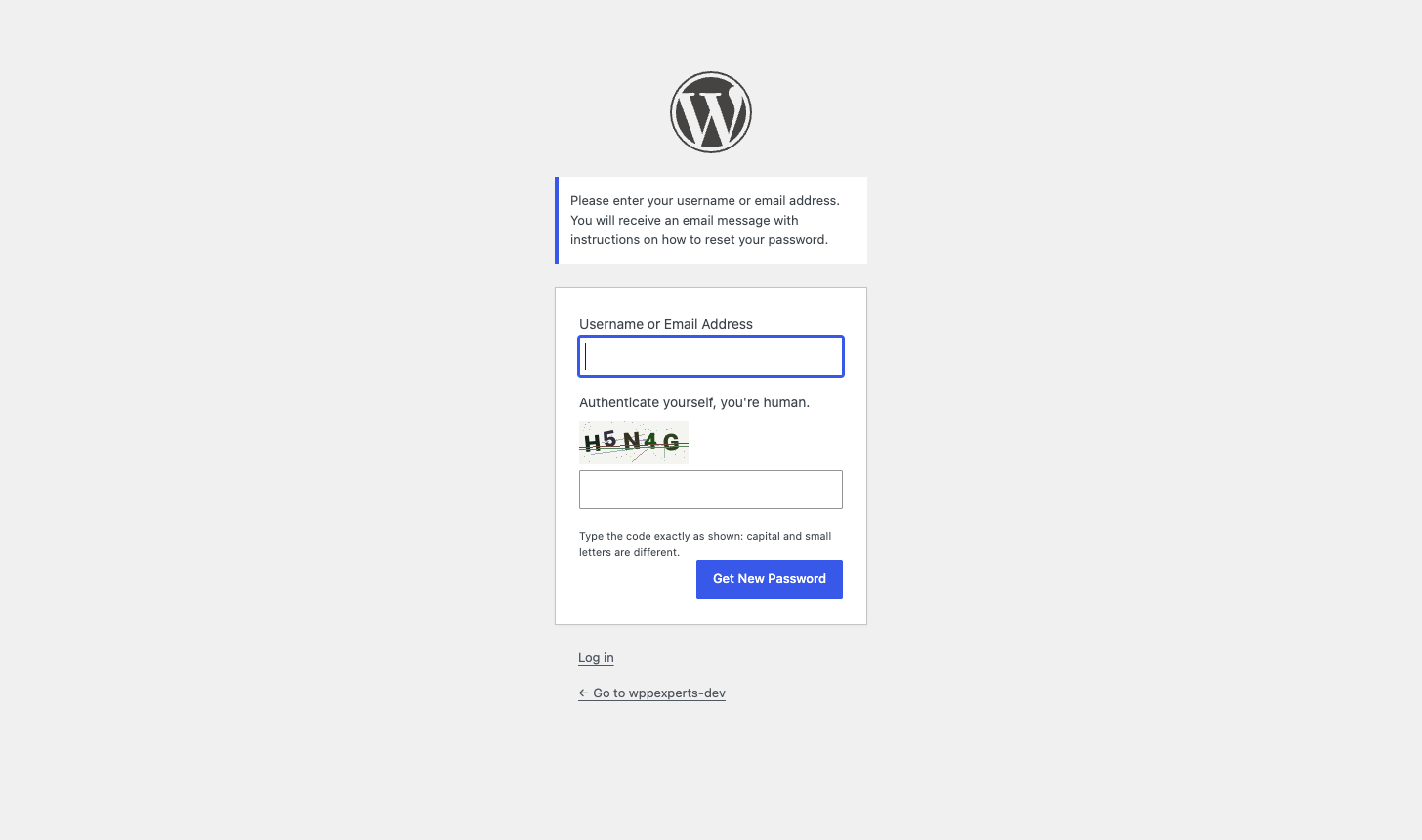
Protect Login Forms for WordPress & WooCommerce asks visitors to type the characters shown in a small image before a form is processed. Bots that cannot read the image are stopped before they create fake accounts, flood your comments or guess passwords.
The image is drawn on your own server, so there is no account, API key or third-party service. Each code is signed with your site's own secret keys, is tied to one form, expires, and works only once.
It protects the WordPress login, registration, lost-password and guest comment forms, and the WooCommerce My Account login, registration, lost-password and guest product review forms. Every form has its own switch.
02
Why store owners choose it
Bots that cannot read the image are refused before an account, comment or password attempt is processed.
Codes are signed with your site keys, tied to one form, expire, and work only once, so a solved code cannot be replayed or shared.
Nothing leaves your site: no external service, no cookies, and no IP addresses or names stored.
Every form has its own switch, so a store can protect My Account and reviews and leave the rest alone.
An image code stops automated bots, but no image captcha is unbreakable. Pair it with a login limiter for targeted attacks.
03
Features
Image code on eight forms
WordPress login, registration, lost password and guest comments, plus WooCommerce My Account and checkout login, registration, lost password and guest product reviews.
A switch for every form
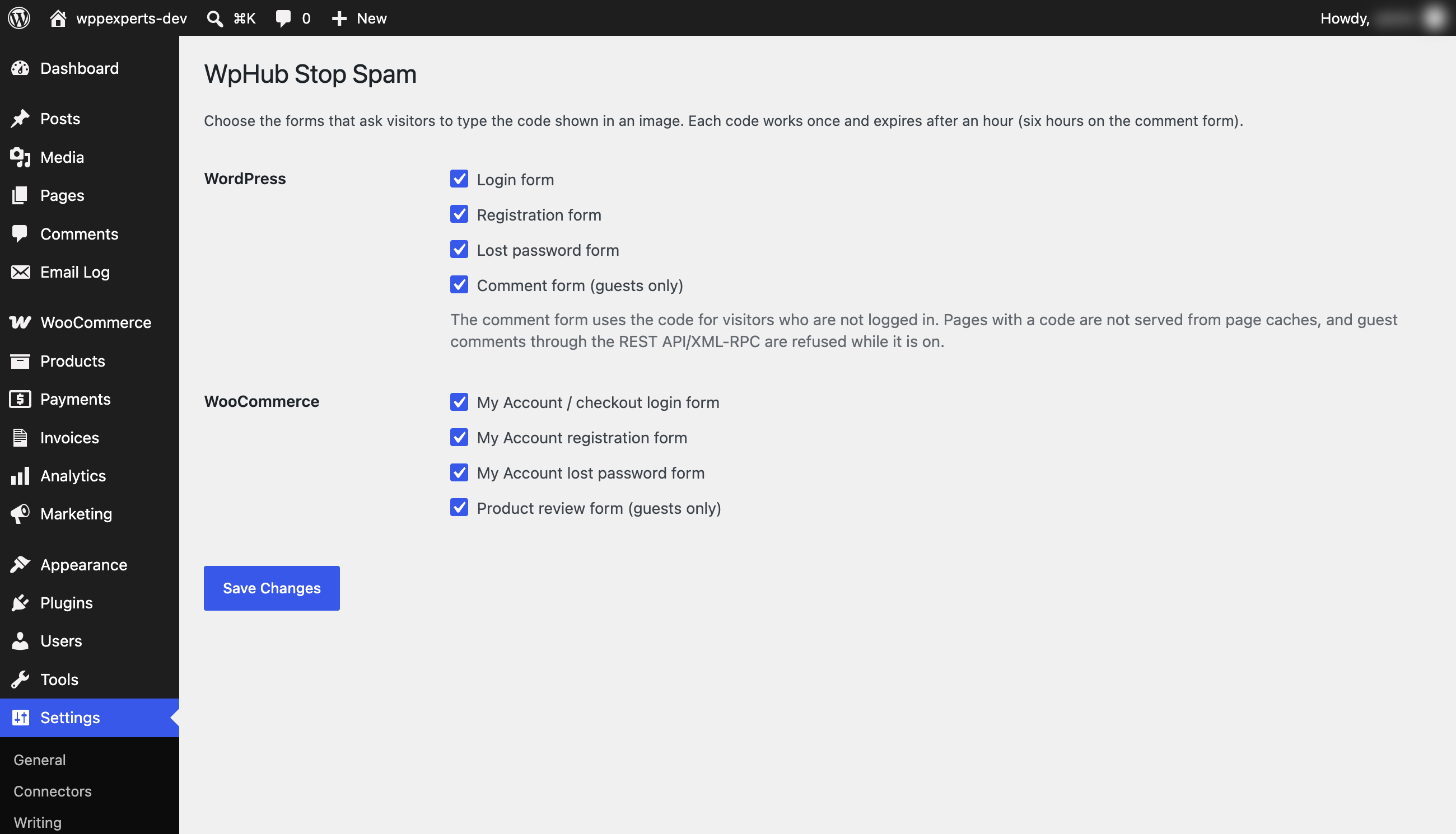
Settings → WpHub Stop Spam lists all eight forms with a checkbox each. All are on by default, and a form you switch off is never touched.
Single-use codes
A code works once, whether typed correctly or not. A solved code cannot be replayed, not even by many requests sent at the same moment, and a wrong guess cannot be retried.
Signed and never stored
The answer is derived from a token signed with your site’s own secret keys. It is never stored or sent to the browser, so a valid code cannot be forged.
Tied to one form and expiring
A login code does not work on the registration form. Codes expire after an hour, and after six hours on comment and review forms so a long comment is not lost.
Easy for people
Five characters, not case sensitive, with look-alikes such as 0/O and 1/I left out. The image has an accessible label and a slight distortion, noise and crossing lines against scripts.
WooCommerce ready
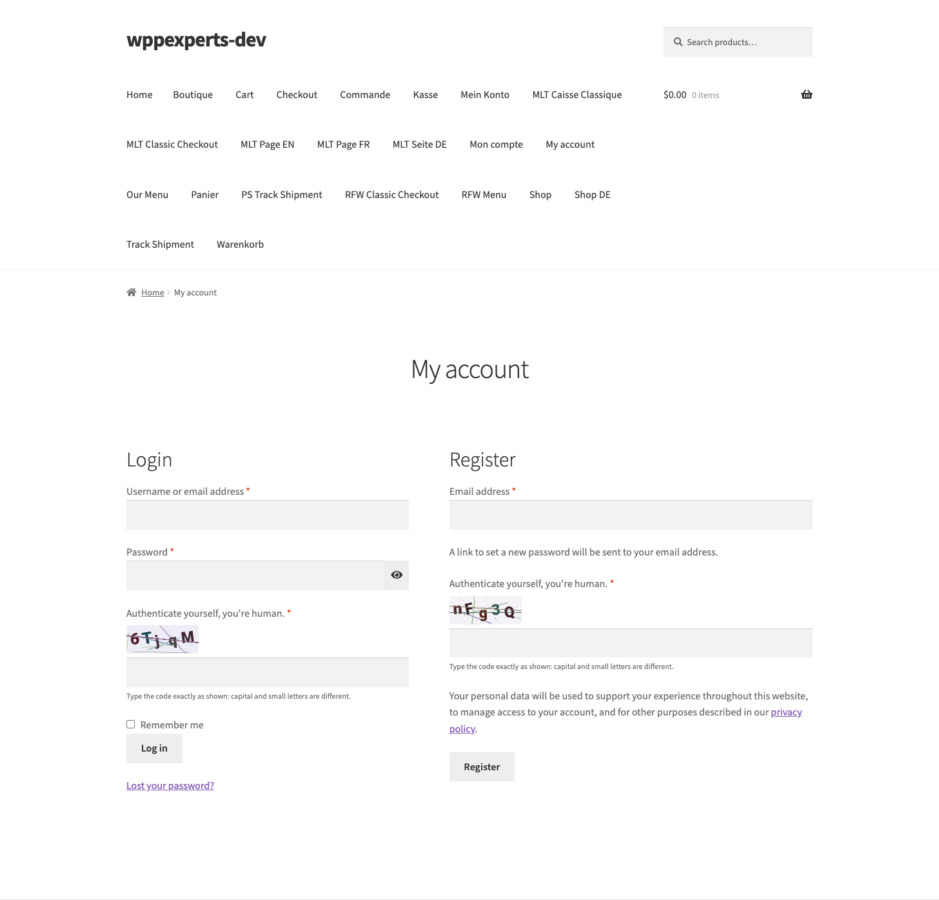
Protects the My Account and classic checkout login, registration, lost-password and product review forms. HPOS and Cart and Checkout blocks compatibility is declared.
Guest comments and reviews
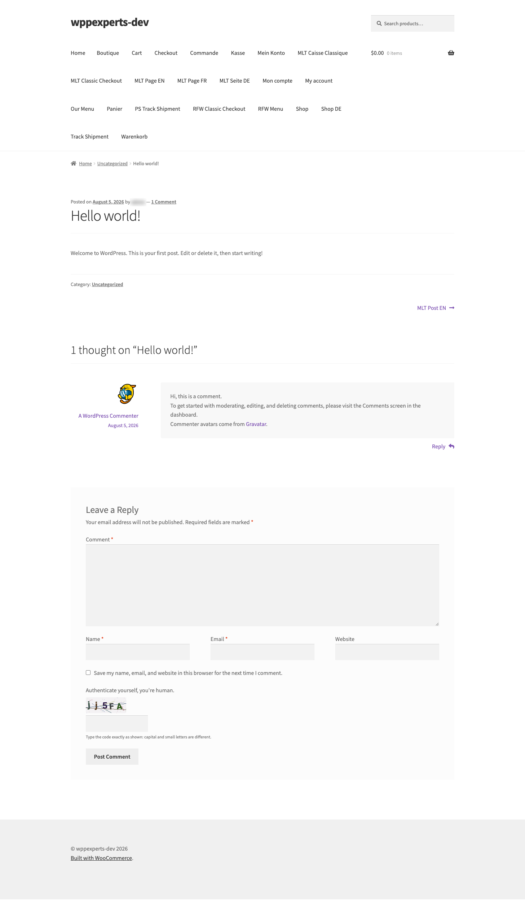
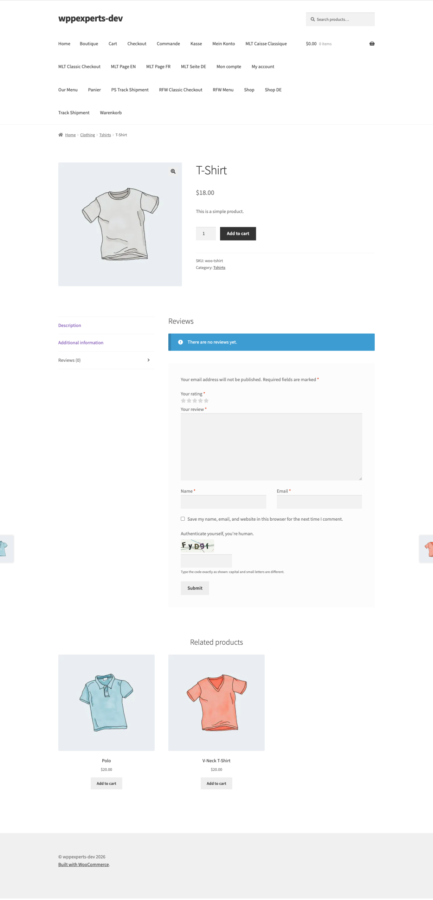
Visitors who are not signed in type the code to comment or review. Guest comments through the REST API and XML-RPC are refused while the code is on, because those cannot show one.
Self-hosted and private
The image is drawn with PHP GD and a bundled font on your own server. No account, no API key, no cookies, no external call, and no IP addresses or personal data are stored.
Fails safe
If the server has no GD with FreeType, the plugin switches itself off and shows a notice on its settings page instead of breaking your login page.
Cache aware
A page that shows a code tells page-cache plugins not to cache it, so visitors always get a fresh code.
Developer filters
Switch a form on or off in code, change how long a code lasts, set the code length from 4 to 8 characters, and override the WooCommerce fields in your theme.
04
How it works
- 1
Install and activate
Upload the plugin and activate it. The code is on for all eight forms straight away, and a Settings → WpHub Stop Spam page appears.
- 2
Choose your forms
Untick any form you do not want to protect and save. WooCommerce forms apply as soon as WooCommerce is active.
- 3
Visitors type the code
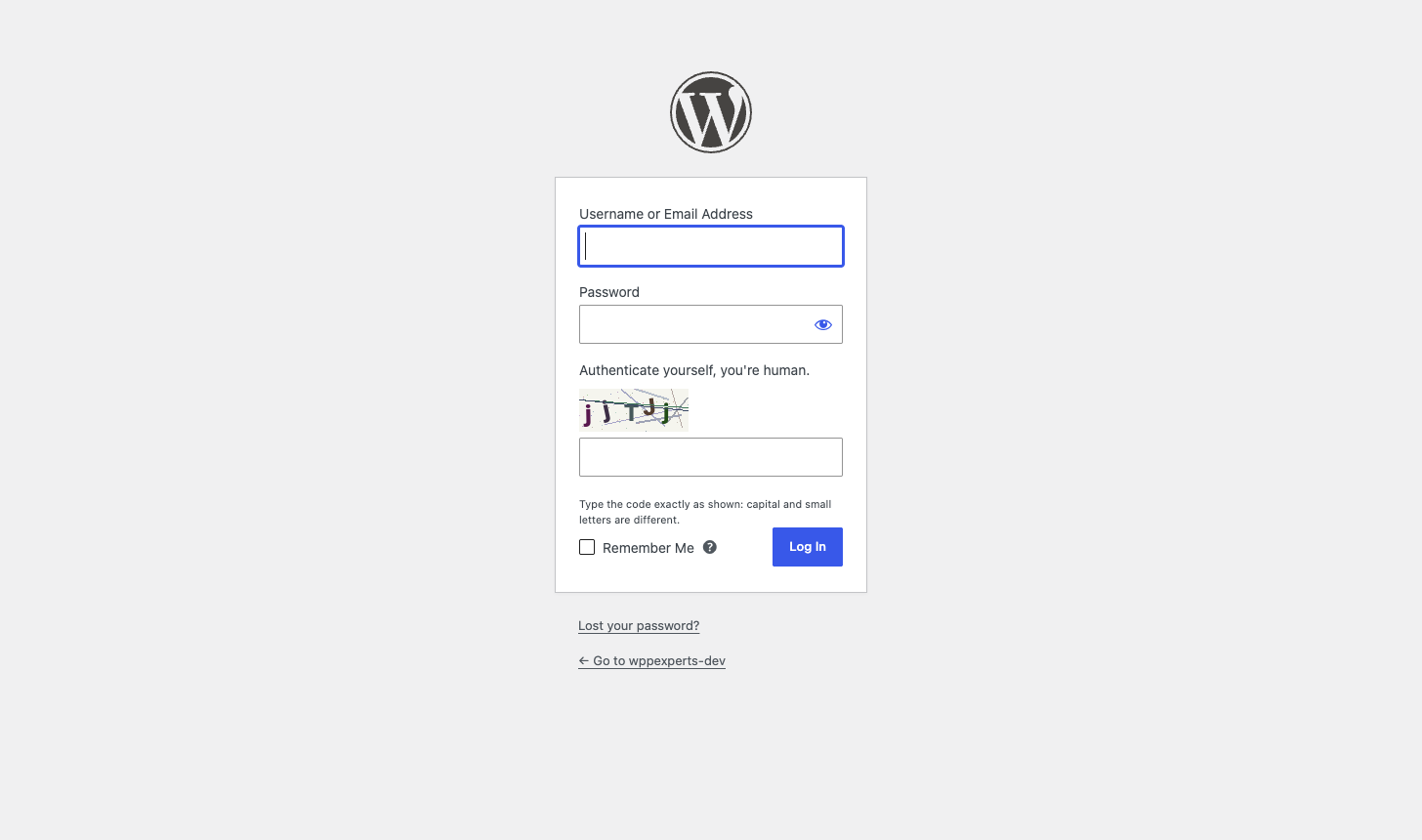
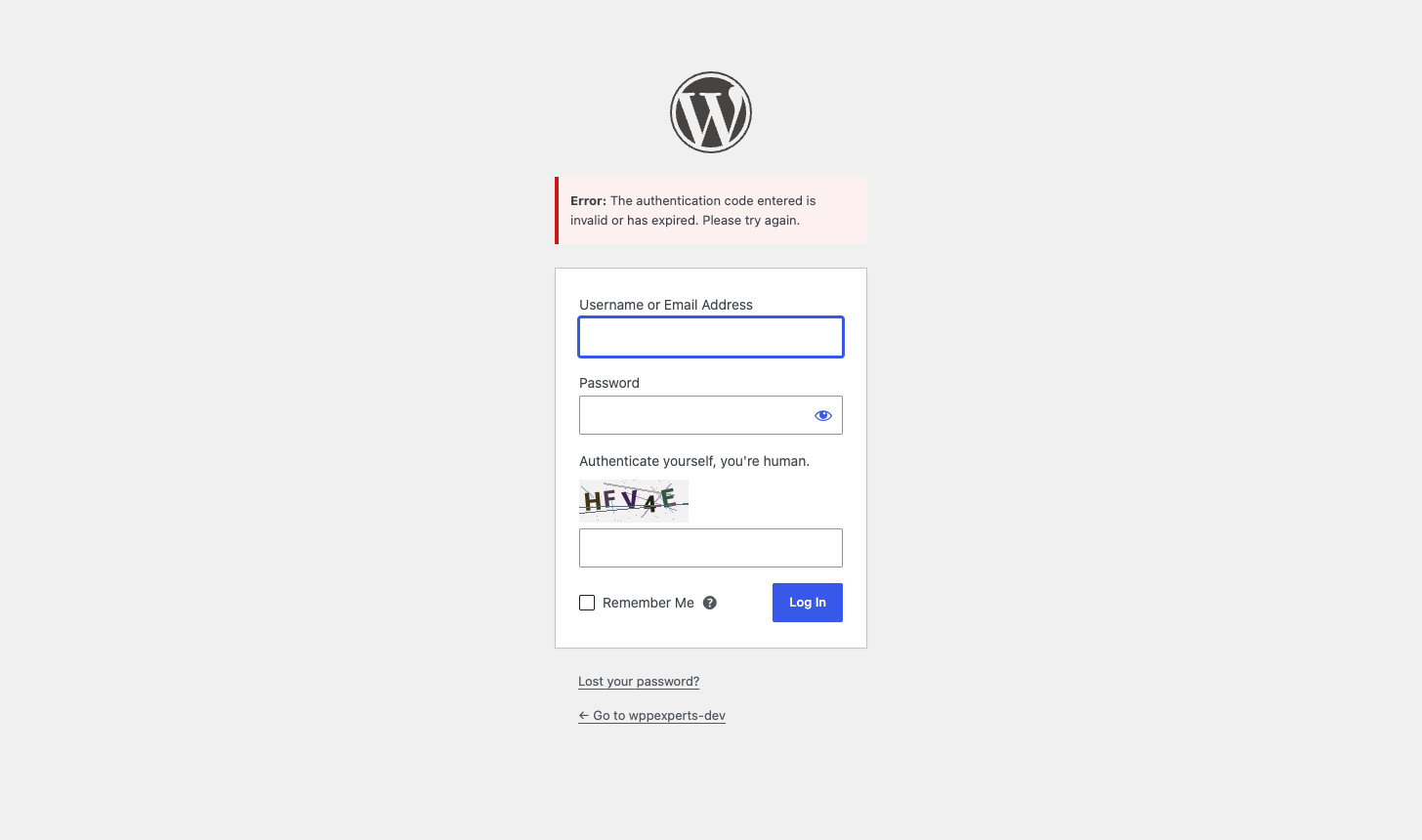
A small image appears on each protected form. A missing, wrong, expired or reused code gets a clear message, and the form is not processed.
- 4
Bots are stopped
Scripts that cannot read the image are refused before they create an account, post a comment or try a password.
05
Screenshots & demo
-
 Settings
 -
 Login form
 -
Wrong code
-
 WooCommerce My Account
 -
Lost password
-
 Comment form
 -
 Product review
06
Settings & configuration
WordPress Forms
WORDPRESSTick the login, registration, lost password and guest comment forms that should ask for the code. All four are on by default.
WooCommerce Forms
WOOCOMMERCETick the My Account and checkout login, registration, lost password and guest product review forms. All four are on by default.
Code Lifetime
LIFETIMEA code lasts an hour (six hours on comment and review forms). Change it with the wphub_stop_spam_ttl filter; the minimum is 60 seconds.
Code Length
LENGTHFive characters by default. Use the wphub_stop_spam_code_length filter to set 4 to 8.
Per-Form Filter
CODEThe wphub_stop_spam_enabled filter turns a form on or off in code, for example to skip the code on a staging site.
Template Overrides
THEMECopy woocommerce-login.php, woocommerce-register.php or woocommerce-lostpassword.php into yourtheme/woocommerce/ to change how the WooCommerce code field looks.
07
Requirements & installation
Who it is for
It suits site owners and WooCommerce stores that are tired of fake registrations, comment spam and password guessing bots, and want a captcha that does not depend on Google or another outside service. It is a good fit for sites that must keep visitor data on their own server.
Requirements
- WordPress 6.0 or later (tested up to 7.1)
- PHP 7.4 or later, with the GD extension and FreeType support (most hosts have it; the settings page tells you if it is missing)
- WooCommerce is optional (tested up to 11.1); the plugin declares HPOS and Cart and Checkout blocks compatibility
- Exclude the login, My Account and comment pages from any CDN or server cache
Installation
- Download the plugin zip from your account.
- In WordPress, go to Plugins > Add New > Upload Plugin, choose the zip file and click Install Now.
- Activate the plugin. The code is on for all eight forms straight away.
- Open Settings > WpHub Stop Spam and untick any form you do not want to protect.
- Log out and open your login, registration or comment form to see the code.
08
Documentation & support
09
Frequently asked questions
Does it use Google reCAPTCHA or another outside service?
No. The image is drawn on your own server and checked there. There is no account, API key, tracking or external request.
Which forms does it protect?
The WordPress login, registration, lost-password and guest comment forms, and the WooCommerce My Account and checkout login, registration, lost-password and guest product review forms. Each has its own switch under Settings → WpHub Stop Spam.
Can a bot replay a solved code?
No. Each code works once, right or wrong, even when many requests carrying it arrive at the same moment. It is also signed, tied to one form and expires.
Does it set cookies or store personal data?
No cookies, and no IP addresses, names or other personal data. To make a code single-use it keeps a short anonymous marker in the options table until the code expires, then removes it.
The code image does not show up. What is wrong?
Your server needs PHP GD with FreeType support. The settings page shows a notice when it is missing. Until it is available the plugin does nothing, so your forms keep working.
Visitors see "invalid or has expired". What should they do?
Reload the page and try again. A code works once and lasts an hour (six hours for comments and reviews), so an old page, a cached page or a form submitted twice needs a fresh code.
Will it work with page caching?
Pages that show a code tell caching plugins not to cache them. If a CDN or server cache stores the page anyway, the code in the cached copy expires, so exclude the login, My Account and comment pages from that cache.
Does it work with a theme or page-builder login form?
Forms created with wp_login_form() get the code automatically. A form from a page builder or login plugin that posts to wp-login.php but does not show the field may be refused. Switch the login form off, or ask its developer to call do_action( ‘login_form’ ) inside the form.
Does it work with WooCommerce checkout and the Cart and Checkout blocks?
It protects the login form on the classic checkout page and the My Account forms. Creating an account during checkout is not a separate form and is not covered. The plugin does not read or change orders, products or carts.
Are guest comments through the REST API or XML-RPC affected?
Yes. Those cannot show a code, so guest comments through them are refused while the comment or review code is on. Logged-in users are not affected.
Does it stop all spam?
No captcha does. It stops automated bots that cannot read the image, but a determined attacker can use OCR, AI or human solving services. For targeted attacks add a login-attempt limiter and comment spam filtering. There is no audio alternative, and trackbacks and pingbacks are not covered.
I am locked out of my site. What do I do?
This should not happen. If a custom login form refuses you, rename the wphub-stop-spam folder in /wp-content/plugins/ over FTP, log in, rename it back, and switch that form off in the settings.
What happens when I delete the plugin?
Its settings, the single-use markers and its housekeeping transients are removed, on a single site or on every site of a network.
How do I get updates?
New versions are published under My Account → Downloads. Upload the new zip under Plugins → Add New → Upload Plugin and choose Replace current with uploaded. Your settings are kept.
How do I get support?
Email support@wpexpertshub.com with your order details and a description of the issue, and our team will help you.
10
Customer reviews
Thanks for your review!
It’s waiting for approval and will appear here soon. We’ll email you when it’s live.
Be the first to review it
Used Protect Login Forms for WordPress & WooCommerce on your store? A short review helps other store owners decide — and tells us what to improve.
Protect Login Forms for WordPress & WooCommerce$49