$49One-time paymentUpdates & support included
01
Overview
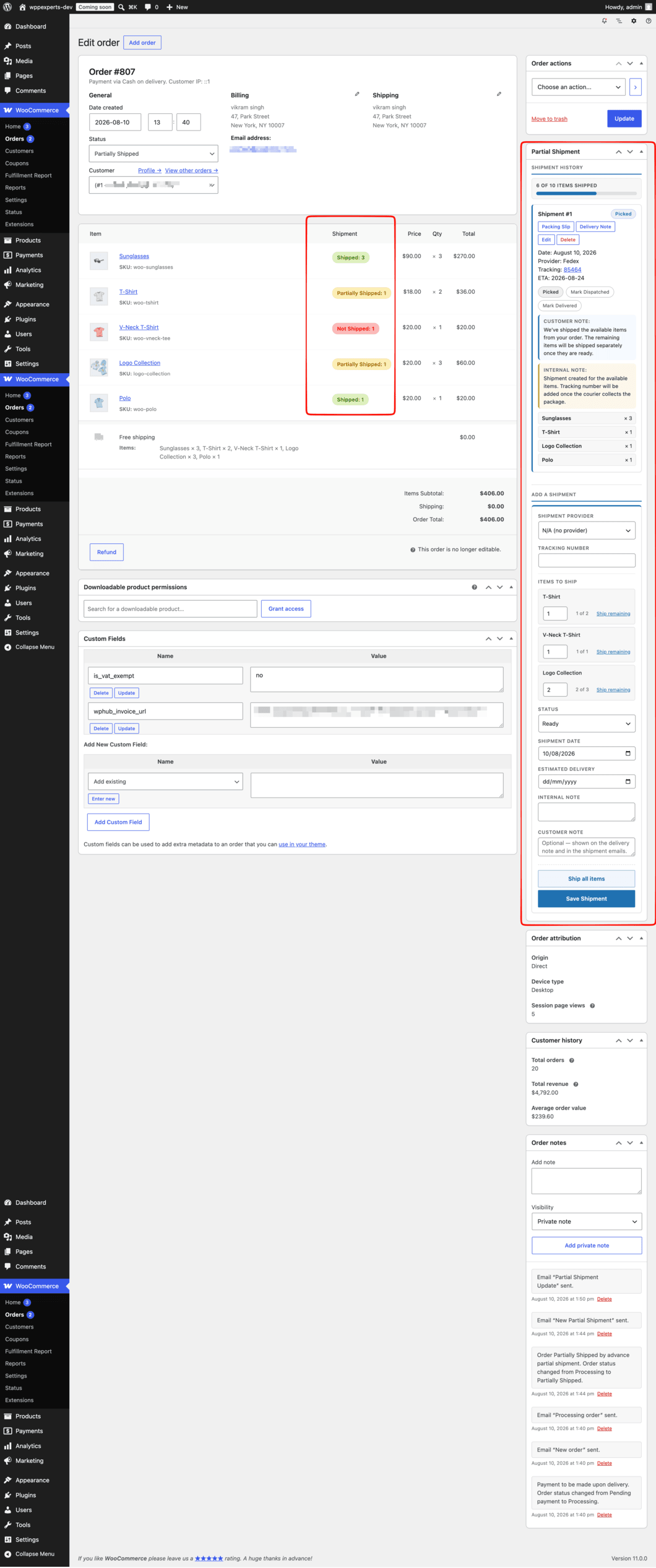
Advance Partial Shipment for WooCommerce lets you fulfil an order in stages. Ship the items you have in stock now, record the carrier and tracking number, and leave the remaining quantities for a later shipment, all from a meta box on the order edit screen.
Each shipment has its own fulfilment status (Ready, Picked, Dispatched, Delivered), shipment date, estimated delivery date and notes. Customers receive a WooCommerce email with the shipped items and a tracking link, and can follow progress on their order page or on a tracking page you publish with a shortcode.
Order statuses update automatically: orders move to Partially Shipped when some items have gone out and can switch to Completed once everything has shipped. Quantities are calculated net of refunds, and a Fulfillment Report, REST endpoint and signed outgoing webhooks help you keep an eye on the backlog and keep other systems in sync.
02
Why store owners choose it
Ship in-stock items straight away instead of holding the whole order until every line is ready.
Give customers a carrier and tracking link for every parcel, not just the first one.
Keep order statuses accurate automatically as items are shipped, partially shipped or refunded.
See your unshipped backlog and average time to first shipment in one report.
Everything is managed from the WooCommerce order screen and the Partial Shipment settings tab, with no separate dashboard to learn.
03
Features
Partial and full shipments
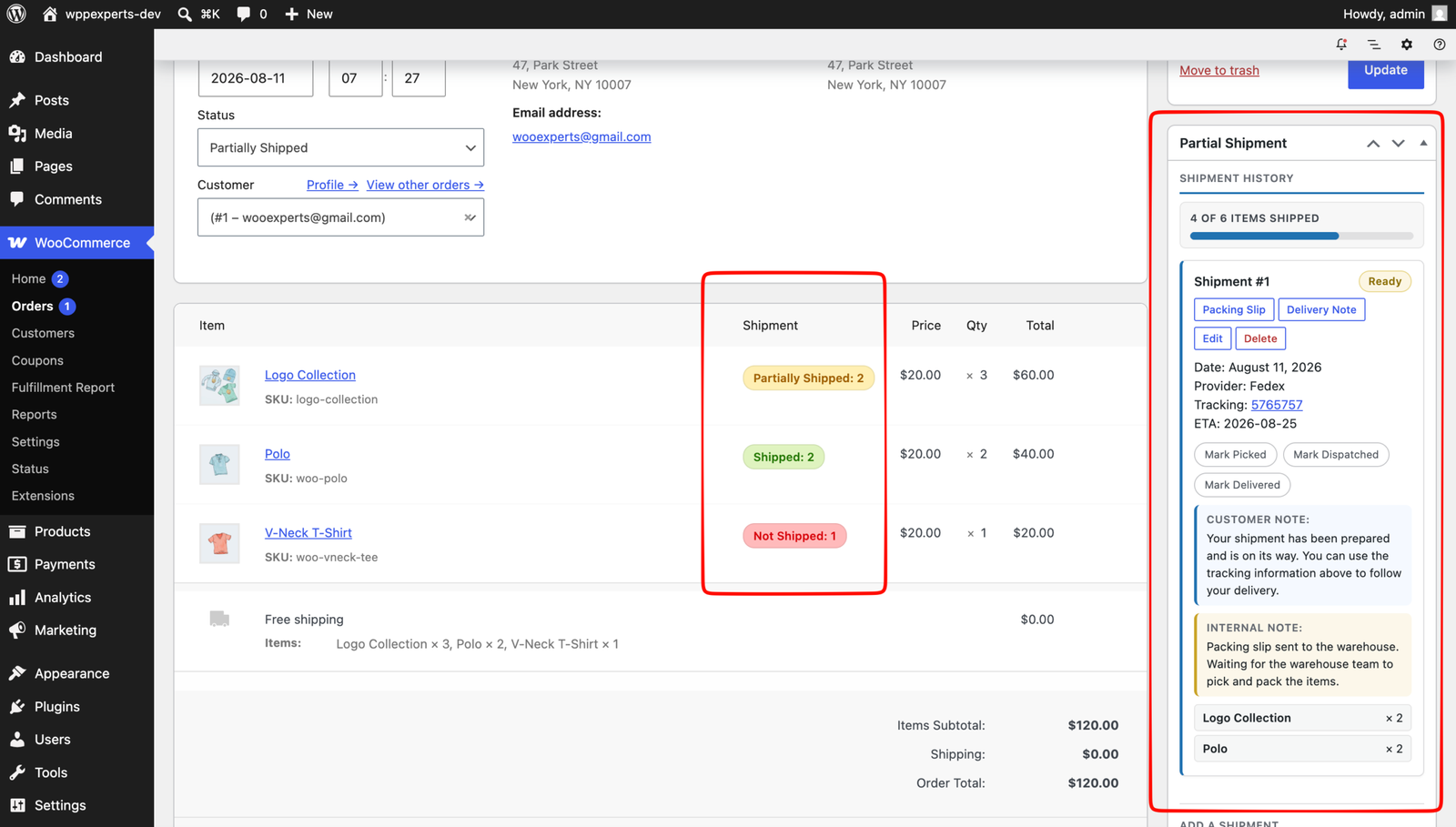
Choose the quantity to ship for each line item and create as many shipments per order as you need. Remaining quantities stay available for the next shipment.
Per-shipment tracking
Pick a carrier from the built-in, country-grouped provider list or add your own providers with a tracking URL template, available on every order. Enter a tracking number for each shipment.
Fulfilment workflow
New shipments start as Ready; mark each one Picked, Dispatched or Delivered with one click, and record the shipment date, estimated delivery date, internal notes and customer-facing notes.
Customer shipment emails
New Partial Shipment and Partial Shipment Update emails list the shipped items, provider and tracking link with a QR code. Send them on creation or only when a shipment is first marked Picked.
Automatic order statuses
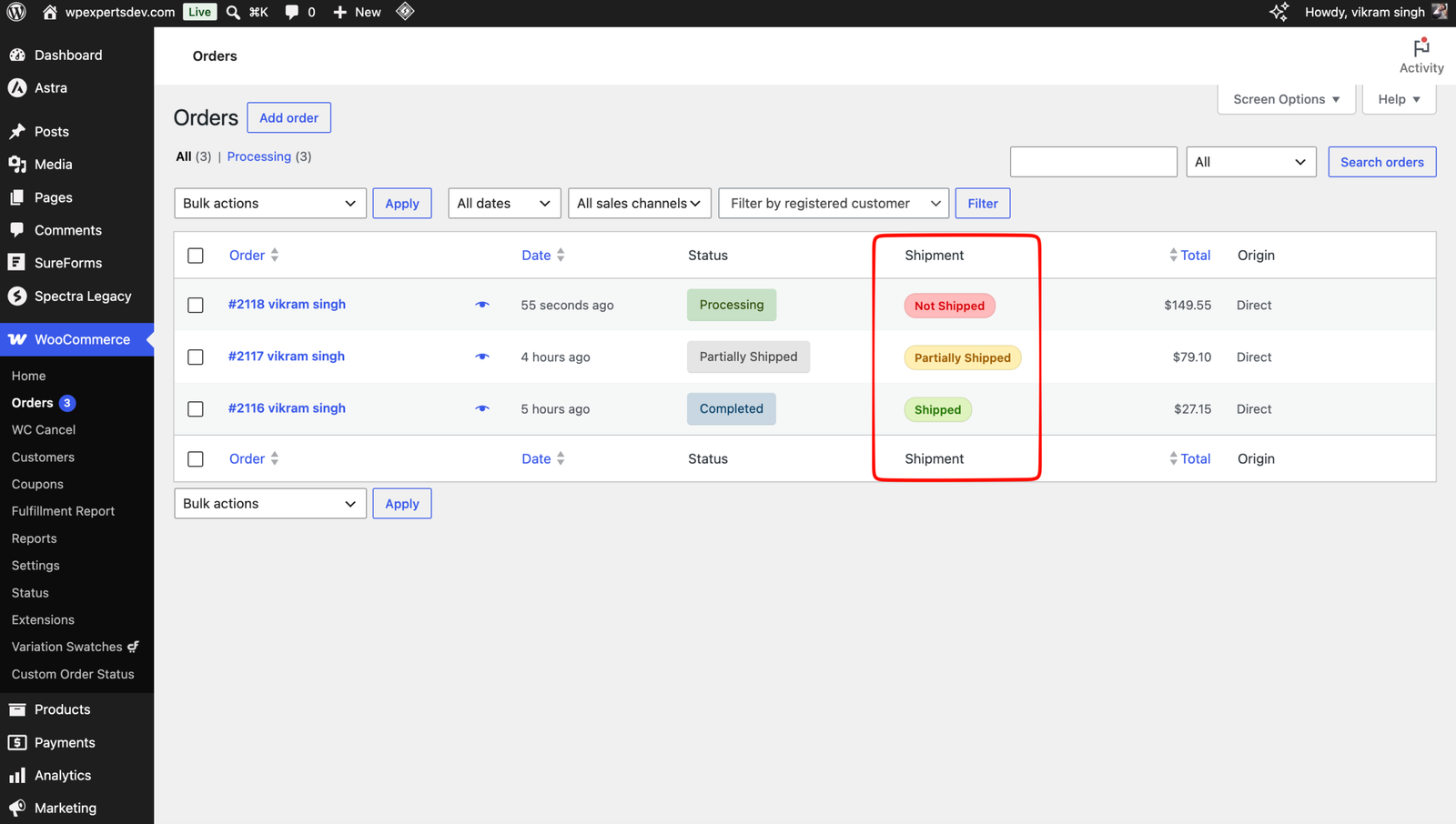
Adds a Partially Shipped order status and can switch orders to Completed once all items have shipped. Quantities are net of refunds, so refunding what is still unshipped completes the order.
Customer tracking timeline
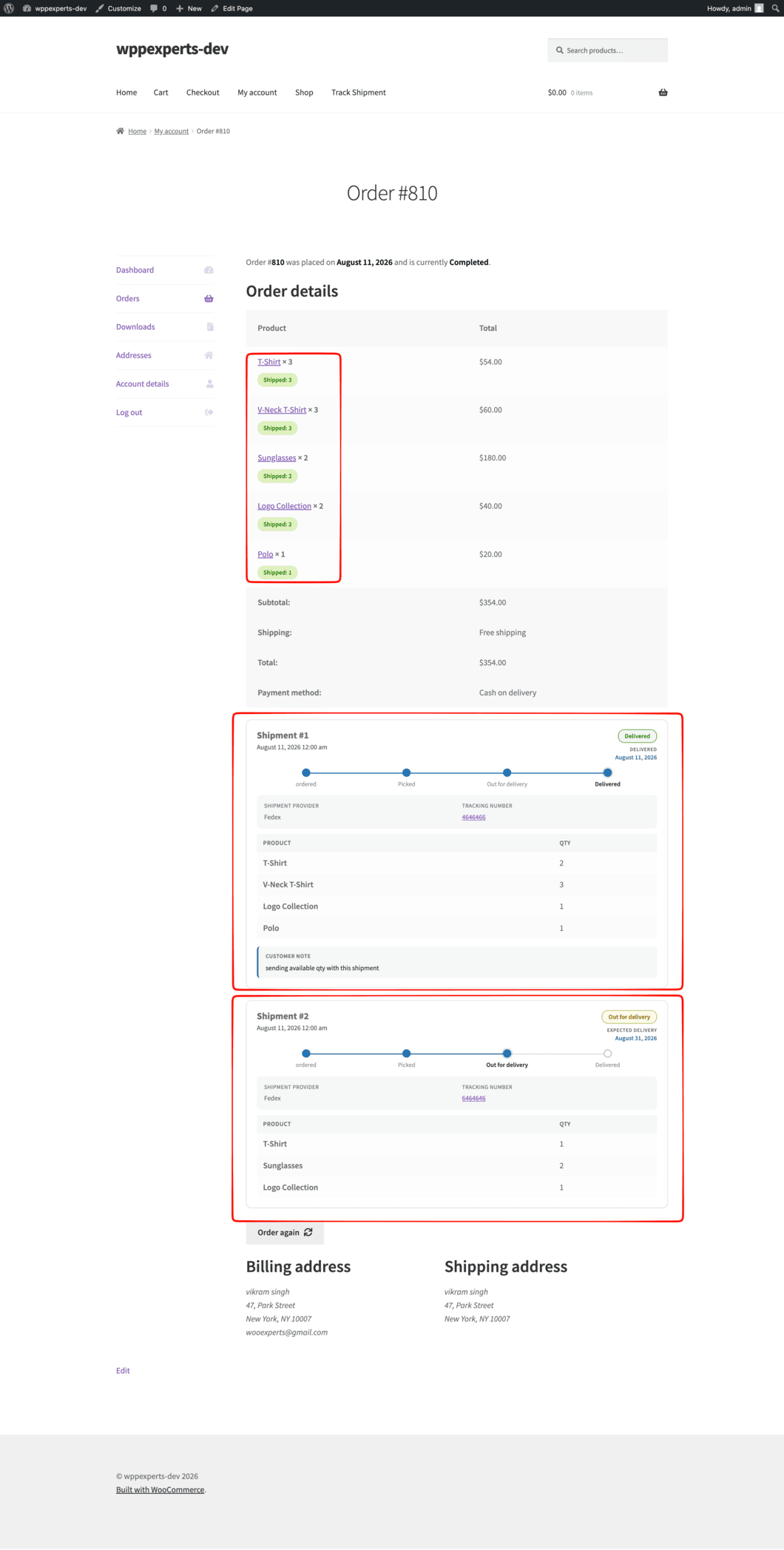
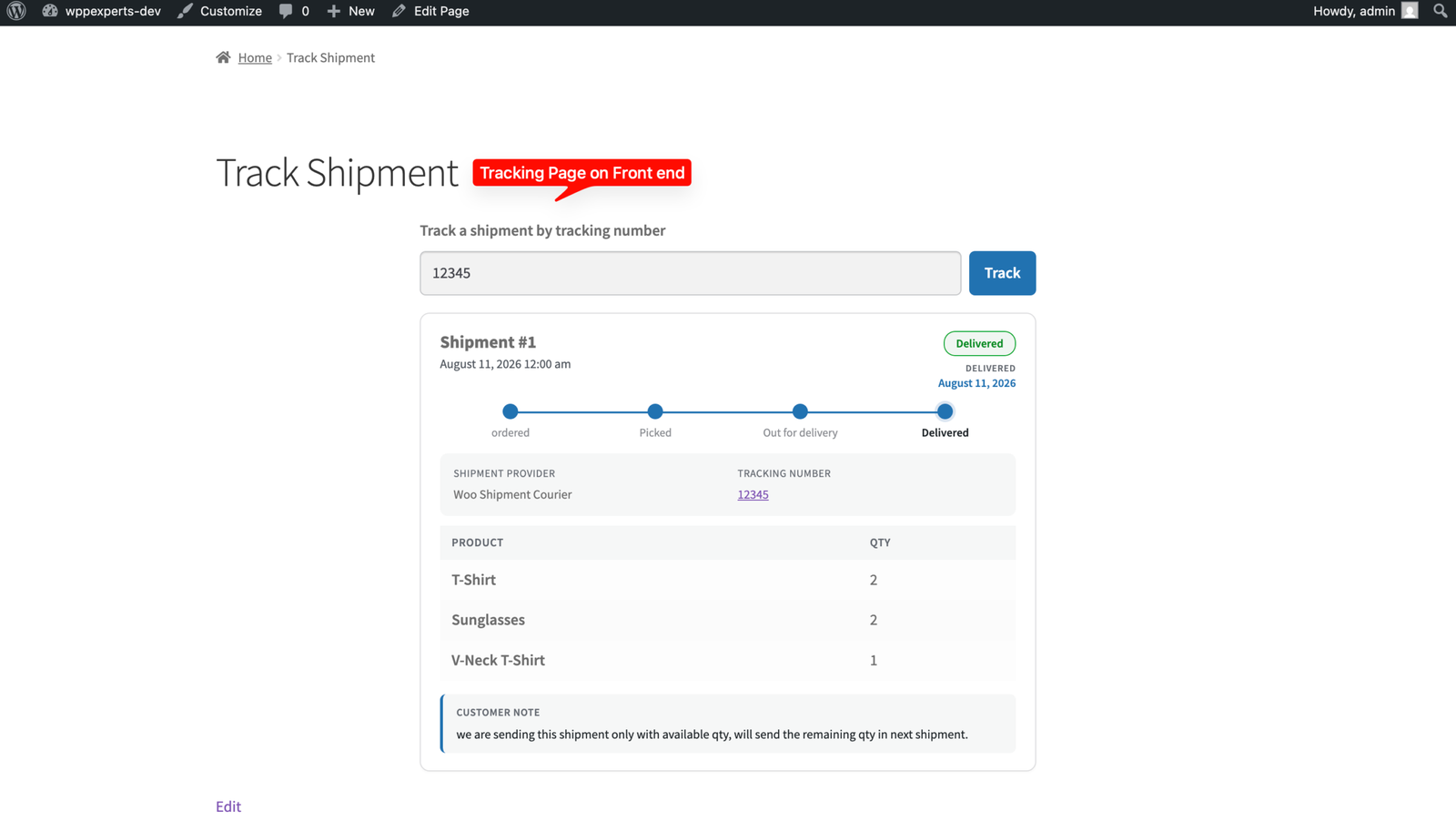
Customers see a step-by-step shipment timeline on their View Order page, and the [wphub_shipment_tracking] shortcode adds a public tracking-number lookup page.
Fulfillment Report
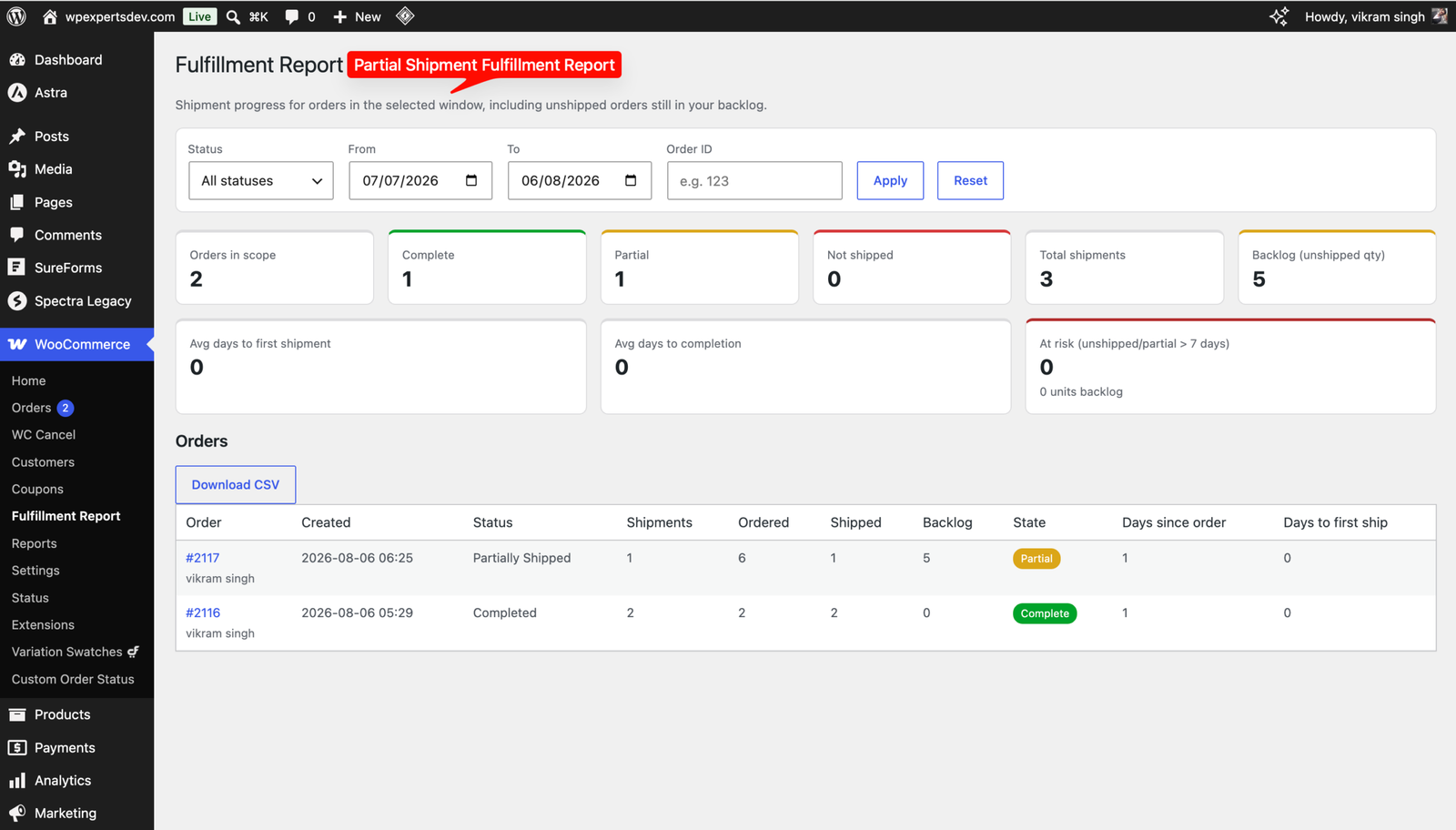
A report under WooCommerce shows complete, partial and unshipped orders, backlog quantity, average days to first shipment and to completion, with filters and CSV export.
REST API and webhooks
Read, create, edit, re-stage or delete shipments through a key-protected REST endpoint, and push created, updated and deleted events as signed JSON to your own URL.
Bulk and admin tools
Create shipments for all remaining physical items across selected orders in one bulk action, mark existing orders as shipped in the background, and print packing slips and delivery notes with PDF Invoice for WooCommerce.
04
How it works
- 1
Install and activate
Upload the plugin, activate it, and add your licence key under Plugins > WpExperts Hub Licences to receive updates. The Partial Shipment meta box appears on every order edit screen.
- 2
Configure settings
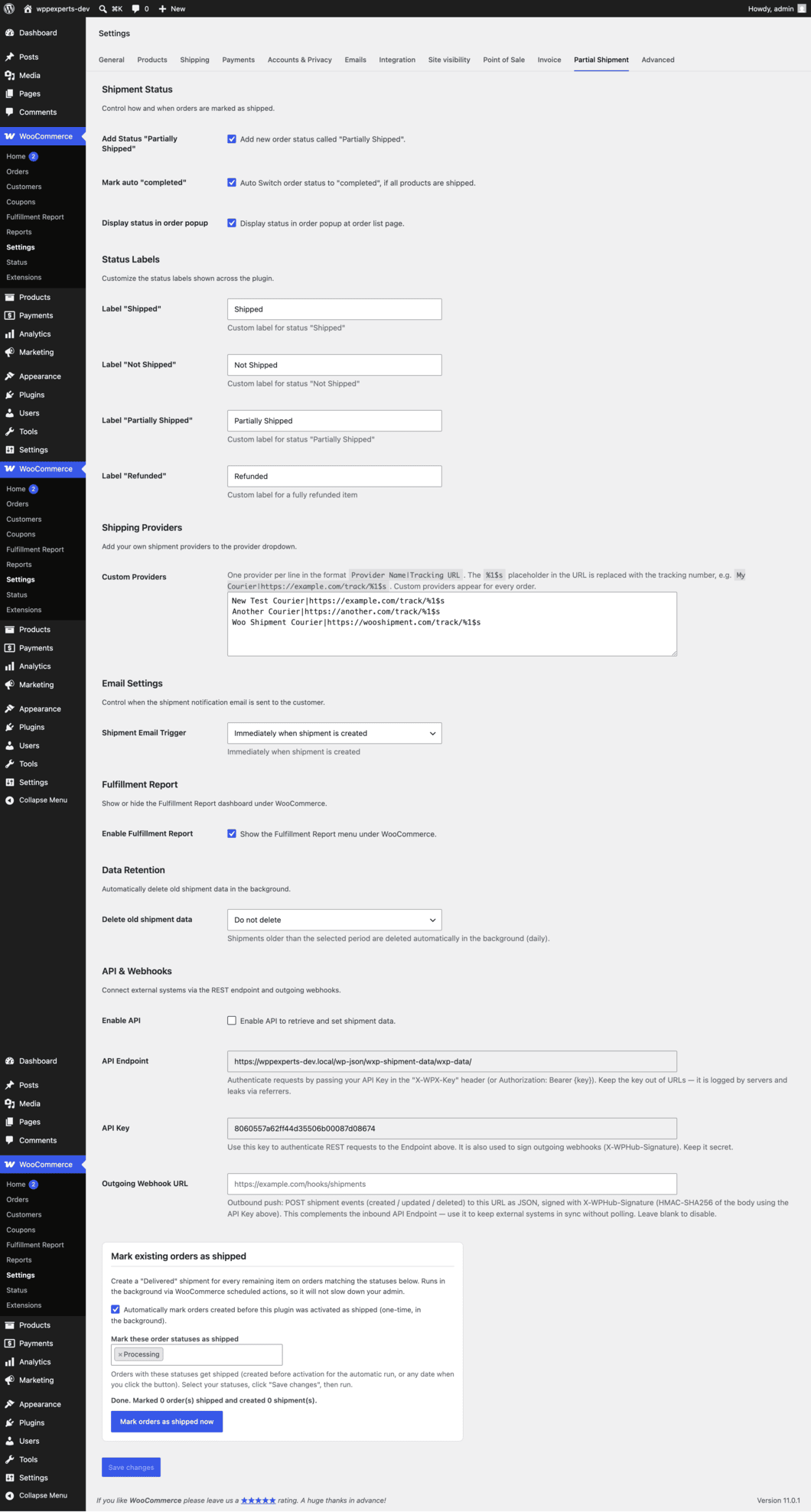
Under WooCommerce > Settings > Partial Shipment, set the status behaviour, labels, custom providers, email trigger and API options.
- 3
Create a shipment
Open an order, pick a provider, enter a tracking number and the quantity for each item, then save. No page reload is needed.
- 4
Track and update
Mark shipments Picked, Dispatched and Delivered as they move and the customer’s timeline follows. Emails follow your Shipment Email Trigger setting, and the order status updates as shipments are added, edited or deleted.
05
Screenshots & demo

06
Settings & configuration
Shipment Status
STATUSAdd the Partially Shipped order status, auto-complete orders once everything has shipped, and show shipment status in the order preview popup.
Status Labels
LABELSCustomise the Shipped, Not Shipped, Partially Shipped and Refunded labels shown to staff and customers.
Shipping Providers
PROVIDERSAdd your own carriers, one per line as Provider Name|Tracking URL, to every provider dropdown.
Email Settings
EMAILChoose whether the shipment email is sent immediately when a shipment is created or when it is first marked Picked.
Fulfillment Report
REPORTShow or hide the Fulfillment Report menu under WooCommerce. Data Retention can also delete shipment data older than 3 months to 2 years.
API & Webhooks
APIEnable the REST endpoint, copy the API key, and set an outgoing webhook URL for signed shipment events.
07
Requirements & installation
Who it is for
It suits WooCommerce stores that often ship orders in more than one parcel. For example, it fits shops with backorders, pre-orders, made-to-order items or stock in several locations. It also helps teams that want a clear record of what has shipped, what is still outstanding and where each parcel is.
Requirements
- WordPress 6.4 or later (tested up to 7.1)
- WooCommerce 8.4 or later (tested up to 11.1)
- PHP 7.4 or later
- Compatible with WooCommerce High-Performance Order Storage (HPOS) and the Cart & Checkout blocks
- Optional: PDF Invoice for WooCommerce, for packing slips and delivery notes
Installation
- Download the plugin zip from your account.
- In WordPress, go to Plugins > Add New > Upload Plugin, choose the zip file and click Install Now.
- Activate the plugin. To receive updates, enter your licence key under Plugins > WpExperts Hub Licences.
- Go to WooCommerce > Settings > Partial Shipment. Then configure statuses, labels, providers, emails and the API.
- Open any order with shippable items and use the Partial Shipment meta box to create your first shipment.
08
Documentation & support
DocumentationSetup guide and configuration reference. (opens in a new tab)
TutorialHow to Import Partial Shipments and Tracking Numbers with WP All Import
TutorialHow to Split a WooCommerce Order into Partial Shipments
Email supportsupport@wpexpertshub.com Include your order ID for faster help.
CustomisationNeed a change or an integration? Ask the developers who wrote it.
09
Frequently asked questions
Can I ship the same order in more than two parts?
Yes. You can create as many shipments per order as you need, choosing the quantity for each line item. The plugin tracks what has already shipped and only offers the remaining, non-refunded quantity.
Which carriers are supported?
The plugin includes a built-in list of tracking providers grouped by shipping country, and you can paste any tracking URL. Carriers you add under Settings > Partial Shipment > Shipping Providers (Provider Name|Tracking URL with %1$s for the number) appear on every order. The provider is optional; a tracking number is enough.
When does the customer receive the shipment email?
By default the email is sent as soon as a shipment is created. You can change the Shipment Email Trigger so it is sent only when the shipment is first marked Picked, in which case each shipment is emailed at most once.
How do I connect the REST API and webhooks?
Enable the API under WooCommerce > Settings > Partial Shipment and copy the API key. Send it in the X-WPX-Key header or as an Authorization: Bearer token to /wp-json/wxp-shipment-data/wxp-data/ with an order-id and an action (read, update, ship_all, edit, status or delete). For push updates, enter an Outgoing Webhook URL: created, updated and deleted events are posted as JSON and signed with an X-WPHub-Signature (HMAC-SHA256) header.
How do I print packing slips and delivery notes?
Install and activate our PDF Invoice for WooCommerce plugin. Packing Slip and Delivery Note buttons then appear for each shipment in the order’s Partial Shipment box. Without it the buttons are simply hidden.
What about orders placed before I installed the plugin?
The settings page includes a Mark existing orders as shipped tool. It creates Delivered shipments for orders with the statuses you choose (Completed by default), silently, and runs in the background using WooCommerce scheduled actions. After activation the plugin also runs it once for older Completed orders unless you switch Automatic run off.
How do I activate my licence and get updates?
Your licence key is emailed after purchase and is also shown in My Account → Downloads. In WordPress go to Plugins → WpExperts Hub Licences, paste the key and click Activate licence. New versions then appear on the normal Dashboard → Updates screen. A key can be active on as many live sites as you purchased; staging and local development sites do not count.
How do I get support?
Email support@wpexpertshub.com with your order details and a description of the issue, and our team will help you.
10
Customer reviews
Thanks for your review!
It’s waiting for approval and will appear here soon. We’ll email you when it’s live.
- Mick C.
Makes partial shipments much easier
We needed a way to ship orders in multiple parts, and this plugin does the job well.
Advance Partial Shipment for WooCommerce$49