FreeFree on WordPress.orgInstall it from your WordPress dashboard
01
Overview
Not every order ships in one go. Items can be out of stock or on backorder, come from different suppliers or simply need more than one parcel. Partial Shipment for WooCommerce lets you record exactly what has shipped for each order item, without splitting or editing the original order.
Click Shipment on the order screen, set the shipped quantity of each item and save. The order status follows the shipment: Partially Shipped while items are still to ship, Completed once everything has gone. Refunded quantities and virtual items are left out, so orders still complete correctly.
Each item gets a Shipped, Partially Shipped, Not Shipped or Refunded badge on the order screen, in the Orders list preview and on the customer's View Order page. You can email the customer the shipped and remaining items from the order actions, and create shipment records for older orders in one click.
02
Why store owners choose it
Always know what is left to ship: shipped and remaining quantities of every item, right on the order screen.
Fewer "where is the rest of my order?" emails: customers see a shipment badge next to each item on their order page.
The order status follows the shipment: Partially Shipped while items are still to ship, Completed when everything has gone.
Refunds are taken into account: refunded quantities no longer count as "to ship", so orders still complete correctly.
Free on WordPress.org, with no account or licence key required.
03
Features
Shipment popup
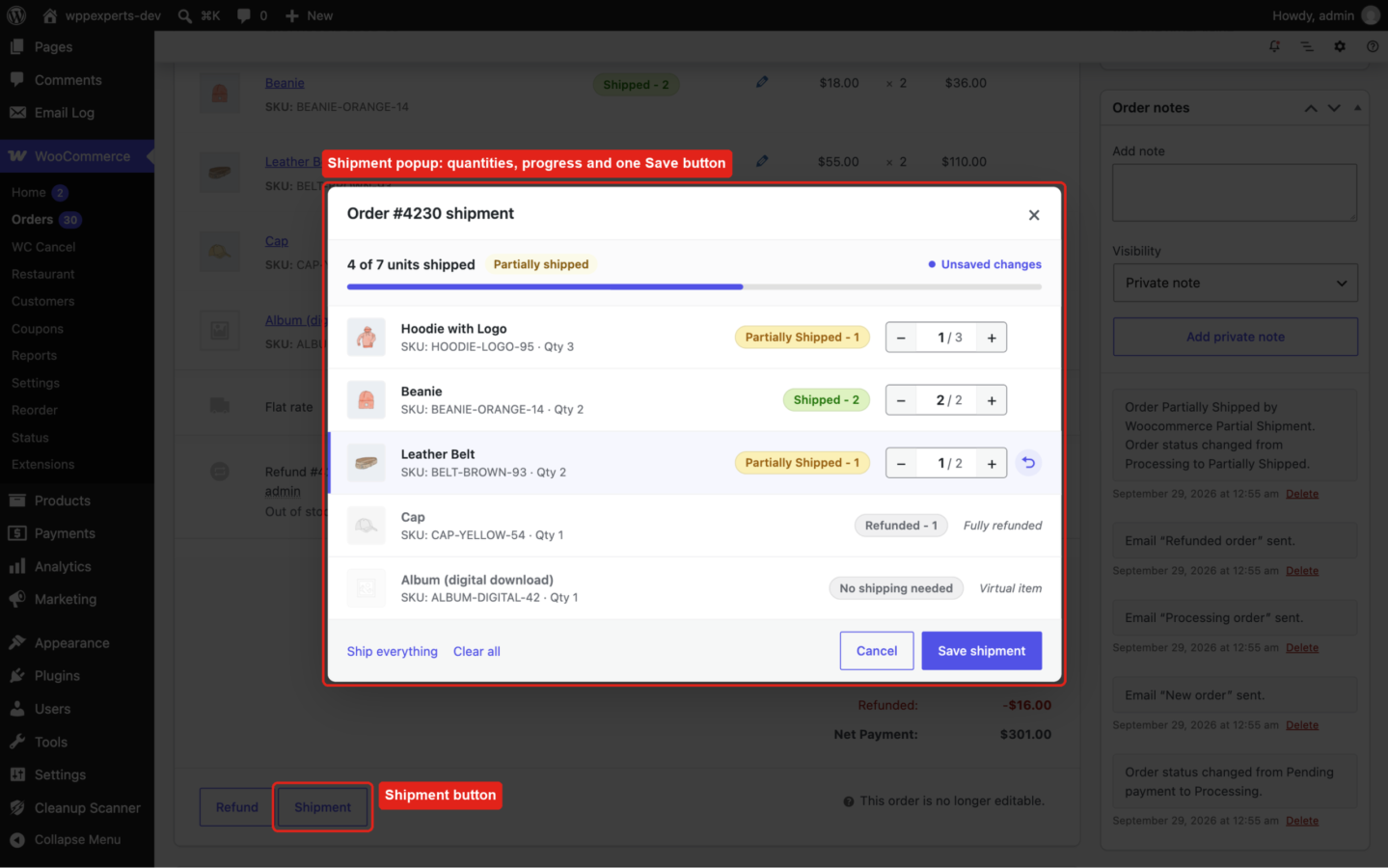
Set the shipped quantity of each item with a stepper and see the progress, product image and SKU. “Ship everything” and “Clear all” shortcuts, and one Save button.
Single item shipment
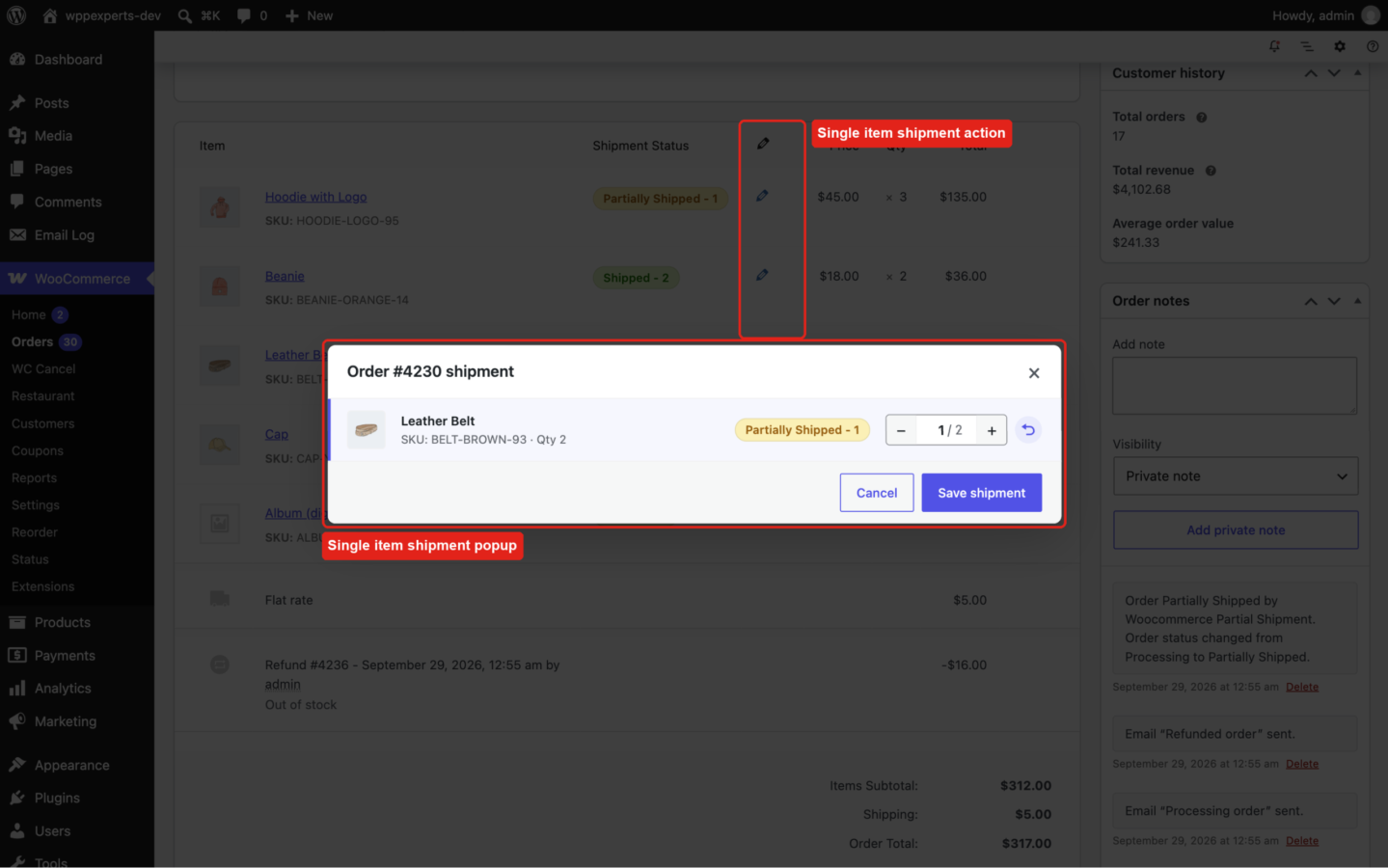
The pencil icon of an item opens the same popup for that item only. Changed rows are highlighted with a one-click undo.
Partially Shipped status
An optional order status used while only some items have shipped. It counts as paid, so downloads (on the same terms as Processing orders), total spent and verified owner reviews keep working.
Automatic completion
Optionally move the order to Completed as soon as every item has shipped. Completing an order by hand marks all of its items as shipped.
Shipment badges
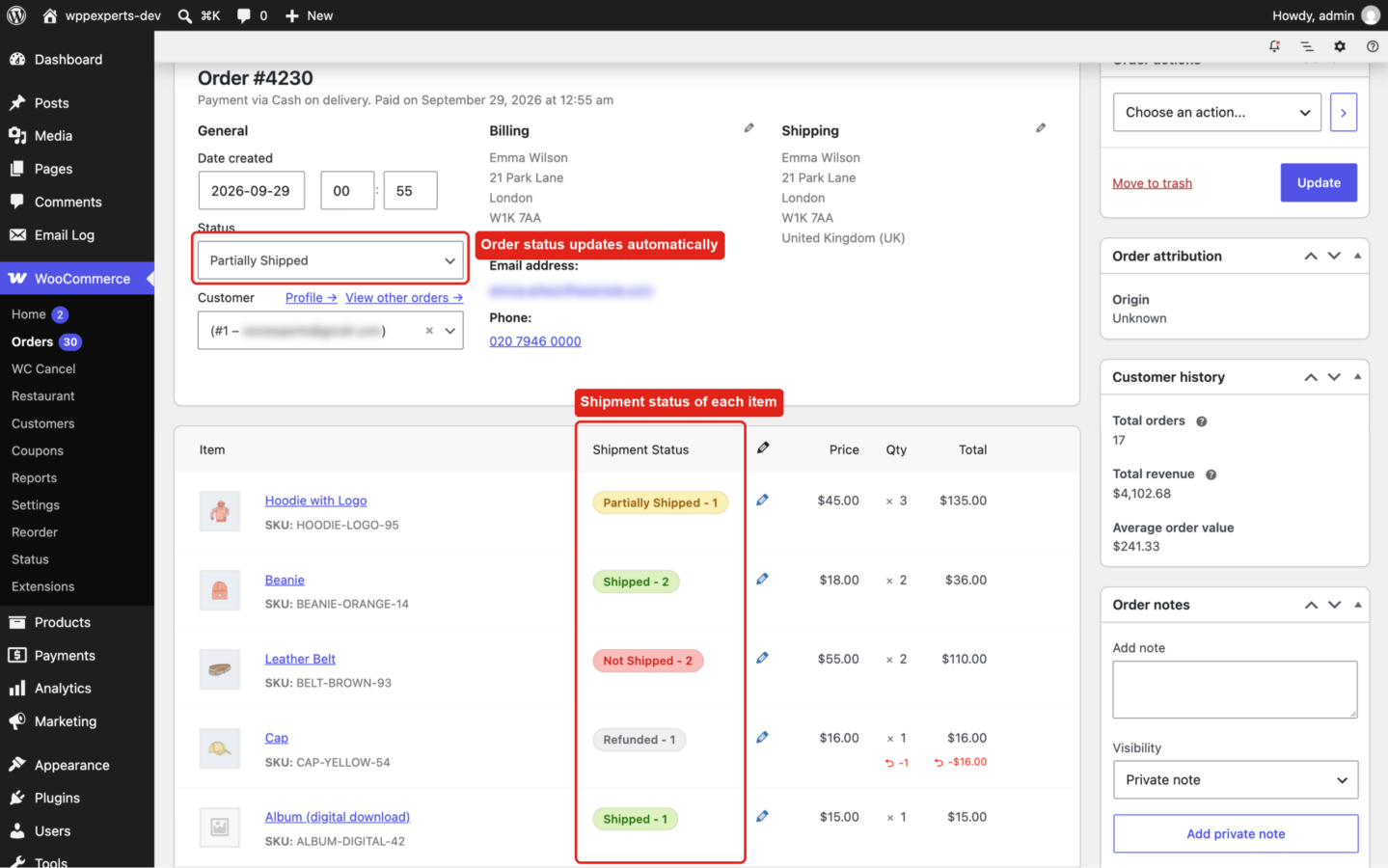
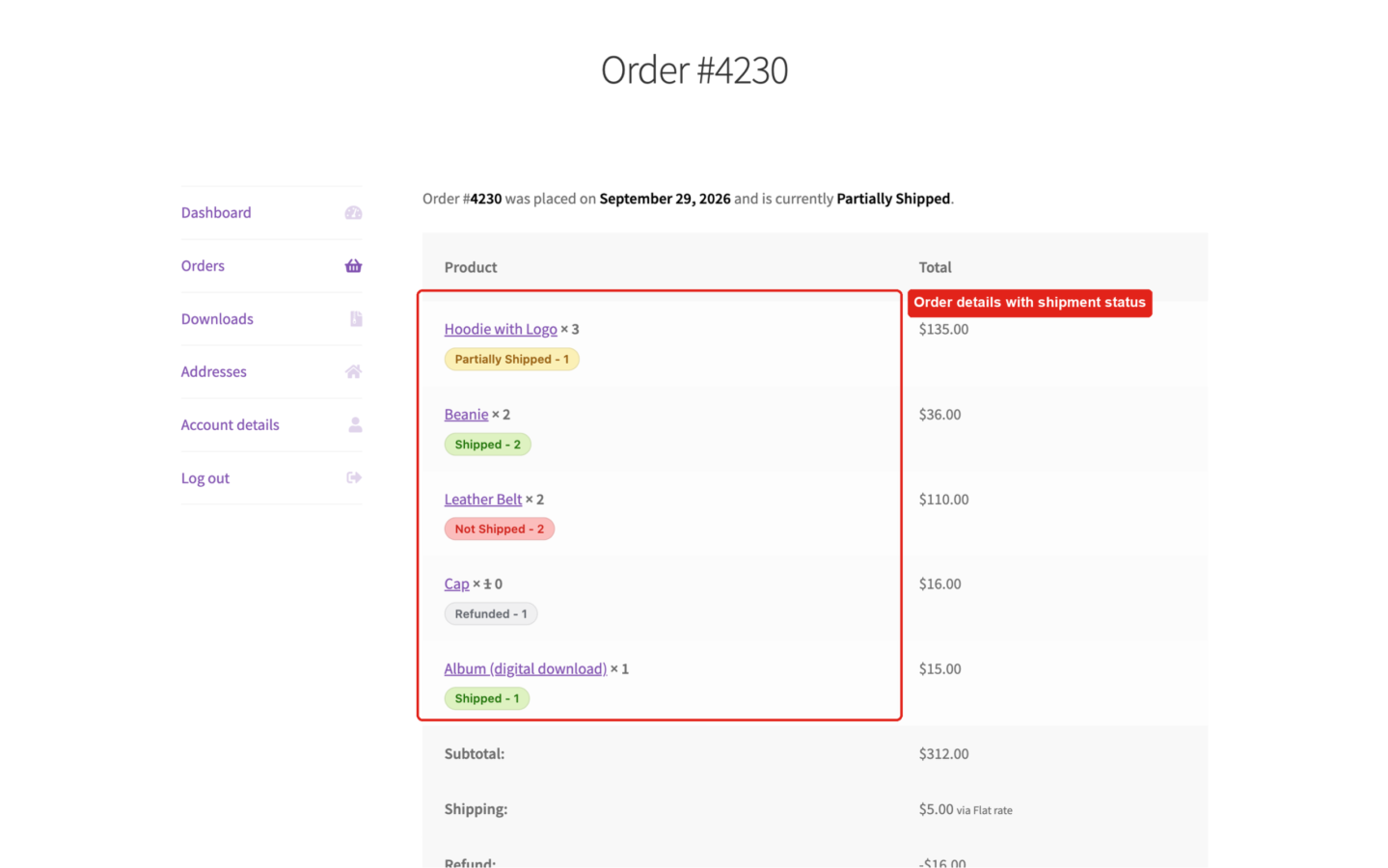
Shipped, Partially Shipped, Not Shipped and Refunded, with quantities, on the order screen, in the order preview on the Orders list and on the customer’s View Order page.
Refund-aware
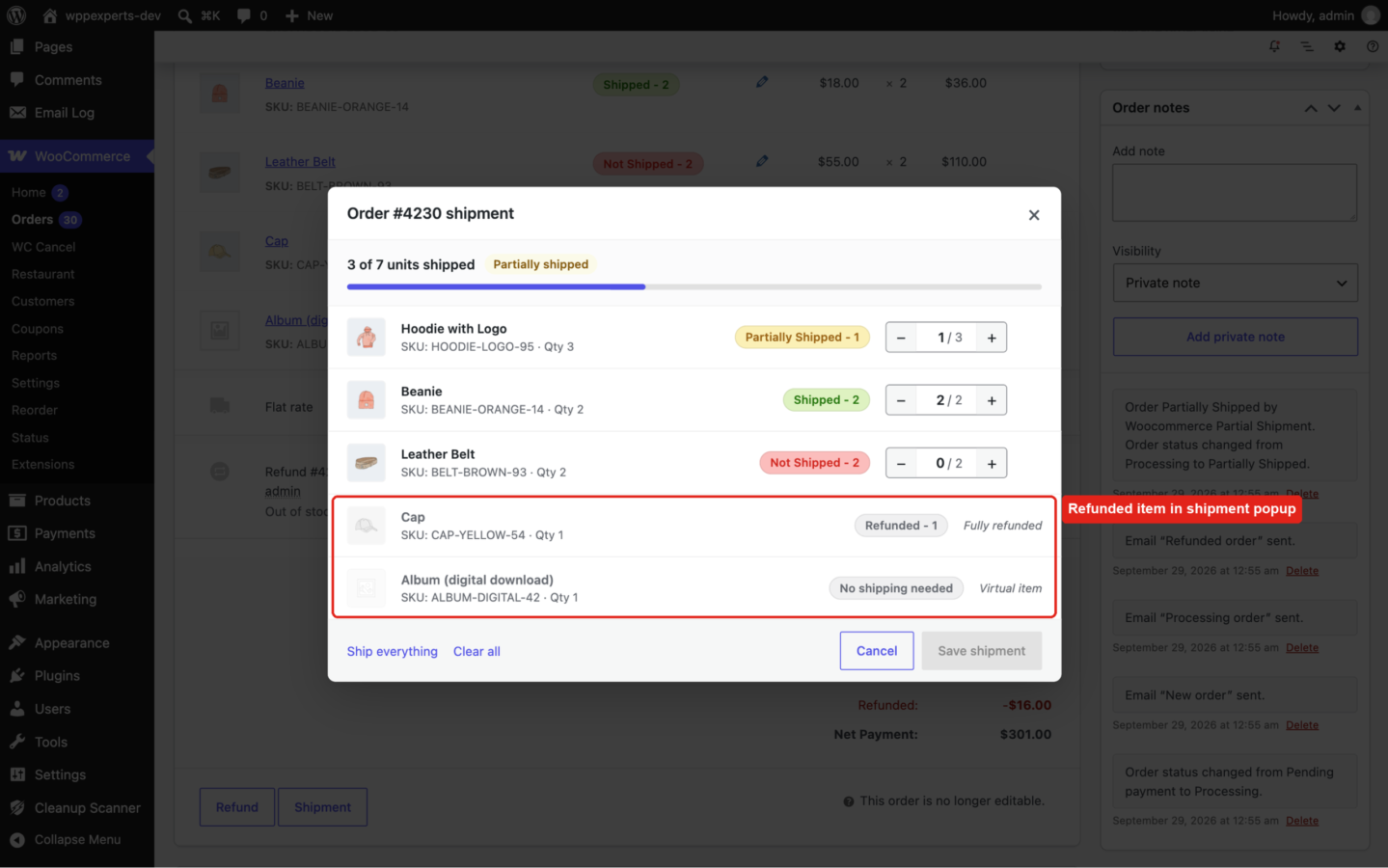
Refunded quantities no longer count as “to ship” and fully refunded items show “Refunded”. Refunding the last unshipped units of a Partially Shipped order completes it.
Virtual items need no shipping
Virtual and downloadable items are left out, so an order completes once all of its physical items have shipped.
Customer email
Send the “Partial shipment order” email, with the shipped and remaining items, from Order actions > Partial shipment notification. Edit it under WooCommerce > Settings > Emails.
Existing orders
One click creates shipment records for older orders of the statuses you choose. Large stores are processed in the background in batches.
Works with your store
Compatible with High-Performance Order Storage (HPOS), the Cart and Checkout blocks and multisite. Translation ready.
04
How it works
- 1
Open the Shipment popup
Open an order and click Shipment under the order items.
- 2
Set the shipped quantities
Set the shipped quantity of each item, or click “Ship everything”, and save.
- 3
The order status follows
Partially Shipped while items are still to ship, Completed once everything has shipped.
- 4
Customers see what has shipped
Each item gets a shipment badge on the order screen and on the customer’s order page, and you can email the customer from the order actions.
05
Screenshots & demo
-
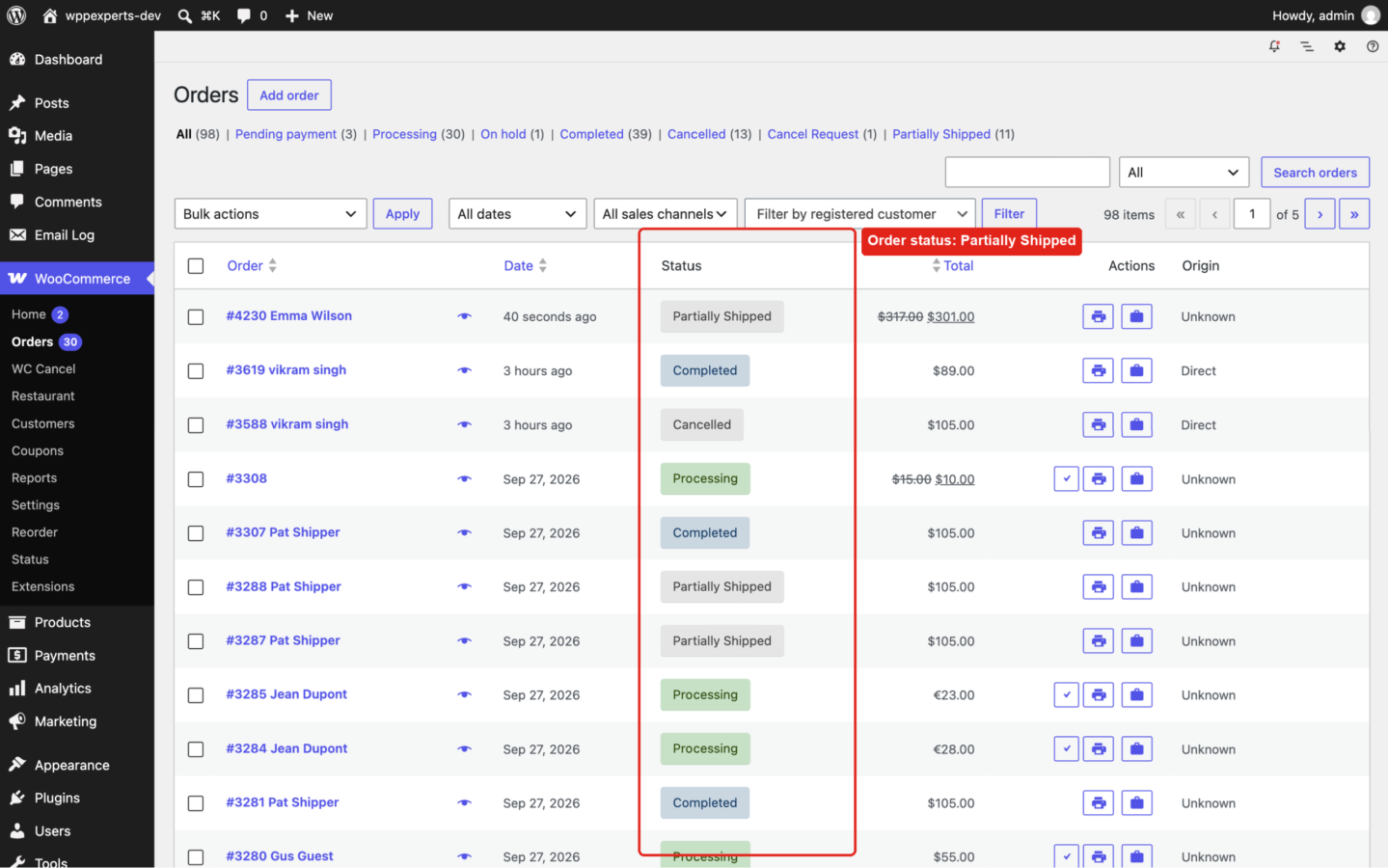
 Orders list with the "Partially Shipped" order status.
 -
Shipment popup on the order screen: shipped quantity per item, progress and one Save button.
-
Shipment status of each item on the order screen; the order status follows automatically.
-
Refunded and virtual items in the shipment popup need no shipping.
-
Single item shipment popup, opened with the pencil icon of an item.
-
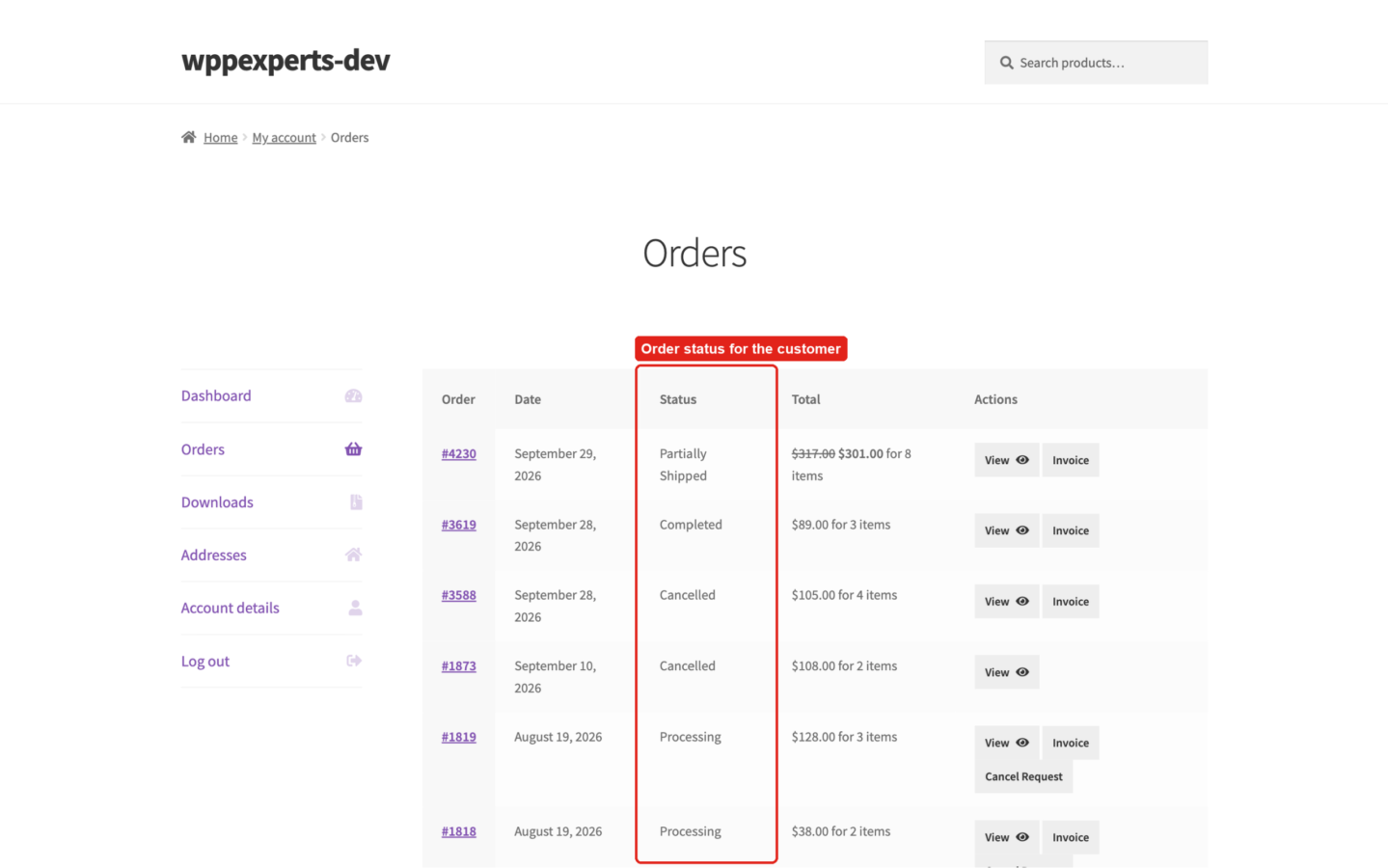
Order status in the customer's My Account orders list.
-
Shipment status of each item on the customer's order details page.
-
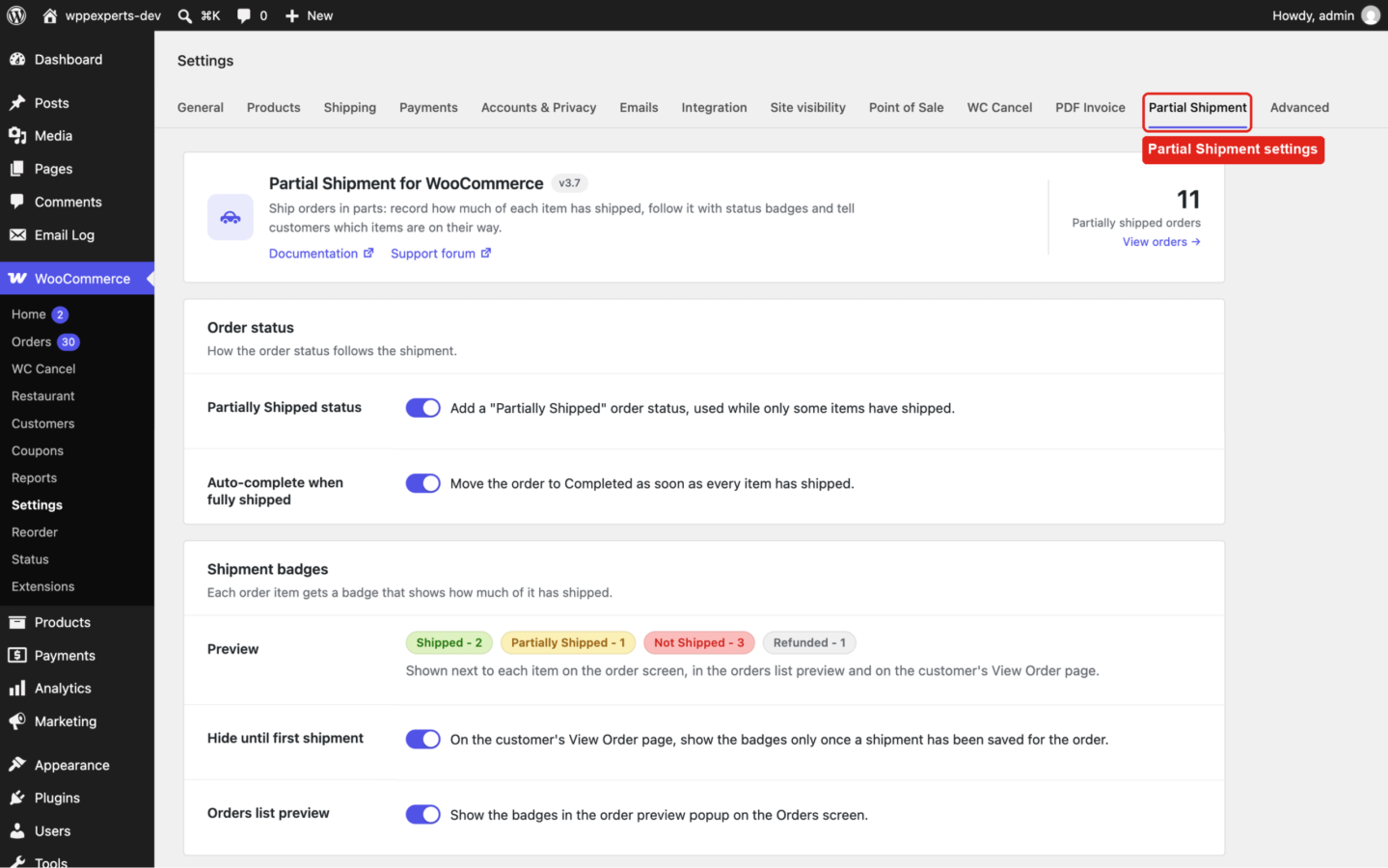
Partial Shipment settings.
06
Settings & configuration
Partially Shipped status
STATUSAdds a “Partially Shipped” order status, used while only some items have shipped. On by default.
Auto-complete when fully shipped
AUTOMATIONMoves the order to Completed as soon as every item has shipped. On by default.
Hide until first shipment
CUSTOMER VIEWOn the customer’s View Order page, shows the badges only once a shipment has been saved for the order. On by default.
Orders list preview
ADMINShows the badges in the order preview popup on the Orders screen. On by default.
Partial shipment email
EMAILShows whether the notification email is enabled, with a link to edit it under WooCommerce > Settings > Emails.
Backfill existing orders
BACKFILLChoose the order statuses (Completed by default) and run it. Orders are processed in batches of 50, in the background on larger stores, with the progress shown.
07
Requirements & installation
Who it is for
It suits WooCommerce store owners and fulfilment teams who often ship orders in parts. For example, items may be out of stock or on backorder, come from different suppliers or simply need more than one parcel. The plugin gives them a simple, free way to record what has shipped and keep customers informed.
Requirements
- WordPress 6.5 or later (tested up to 7.1)
- WooCommerce 8.0 or later (tested up to 11.1)
- PHP 7.4 or later
Installation
- Go to Plugins > Add New Plugin, search for “Partial Shipment for WooCommerce”, then install and activate it. WooCommerce must be active.
- Go to WooCommerce > Settings > Partial Shipment to choose the order status options and where the badges are shown, and to create shipment records for your existing orders.
- Open an order and click Shipment under the order items to record what has shipped.
Privacy
Shipment records (order, items and shipped quantities) are stored in two tables in your own WordPress database. The plugin adds no tracking, sets no cookies and sends no data to external services.
For developers
wxp_partial_shipment_labelsfilter: the badge labels.wxp_partial_shipping_settingsfilter: the settings fields.wxp_backfill_batch_sizefilter: orders per background batch when creating records for existing orders (default 50).wxp_order_statusaction: fires when the shipment of an order changes ($order_id); the plugin updates the order status on it.- Email template override: copy
emails/customer-partial-shipment.phptoyourtheme/woocommerce/emails/customer-partial-shipment.php.
Upgrade for full WooCommerce partial shipment tracking
Advance Partial Shipment for WooCommerce gives customers tracking for every parcel. It adds multiple shipments per order, each with its own tracking number and shipping provider, shipment statuses, automatic shipment emails, a customer tracking page, packing slips, a REST API with webhooks and a Fulfillment Report. Watch the premium demo video.
08
Documentation & support
DocumentationSetup guide and configuration reference. (opens in a new tab)
TutorialHow to Split a WooCommerce Order into Partial Shipments
WordPress.org listingDownload, changelog and installation notes.
Email supportsupport@wpexpertshub.com Include your order ID for faster help.
CustomisationNeed a change or an integration? Ask the developers who wrote it.
09
Frequently asked questions
Does the plugin split my order into separate orders?
No. The original order stays intact. The plugin records the shipped quantity of each item and shows its shipment status next to it.
How does the order status change?
With the Partially Shipped status enabled, the order moves to Partially Shipped while some items are still to ship. With auto-complete enabled, it moves to Completed once every item has shipped. If you clear all shipped quantities of a Partially Shipped or Completed order, it goes back to Processing. Pending payment, cancelled, refunded and failed orders are never changed.
Can I add tracking numbers?
Not in the free version. Tracking numbers, tracking URLs and shipping providers are part of Advance Partial Shipment for WooCommerce.
Is the customer emailed automatically?
No. Send the email when you want from the order screen: Order actions > Partial shipment notification. It lists the shipped items and the items still to come.
What happens with refunded and virtual items?
Refunded quantities are taken off the quantity to ship, and fully refunded items show a “Refunded” badge. Virtual items need no shipping, so an order is complete once all physical items have shipped.
What about orders placed before I installed the plugin?
Go to WooCommerce > Settings > Partial Shipment, choose the order statuses under “Backfill existing orders” and run it. All items of those orders are marked as shipped; orders that already have shipment records are skipped.
Can I use it together with Advance Partial Shipment for WooCommerce?
The premium plugin replaces this one and uses the same shipment data. When the premium plugin is active this plugin stays idle and is deactivated automatically; your existing shipment records are kept and shown by the premium plugin. If you switch back, the totals of all premium parcels are shown and edited here.
Where can I get support?
For the free version, please open a topic in the WordPress.org support forum. For the premium version, email support@wpexpertshub.com or use the contact form, and please do not post premium questions on the WordPress.org forum.
10
Customer reviews
Thanks for your review!
It’s waiting for approval and will appear here soon. We’ll email you when it’s live.
- itscam
Superb
One of the best plugins on our website. A really simple yet helpful plugin.
Thank you!
- oraculocreativo
Excelente plugins!!
Era lo que necesitaba!
- mohdarshad33
how to add Custom status for sub order
Hi,
i just download this plugin and it’s working fine for me but how can i create custom order status for this like “invoiced”, “hold” etc. or which is already created, currenty only 2 status showing in plugin one is shipped and another is unshipped.
please replye
- fluid2011
Works like a treat
This plugin has solved a big hole for me, I was thinking of splitting orders and marking them complete. No need now.
- DennisV
Can’t add products to manual order
After installing the creation of manual orders is admin is not working. You can select a product but it wont add it to you manual created order in admin, it keeps loading but the product is not added.
Reply from WpExperts HubHi, i checked it personally and everything seems working fine.
i added a manual order then added few items and marked them shipped and partially shipped and again I added few items in same order and again marked few item shipped.
I didn’t noticed any issue during my testing, if you are facing problem then please be in touch and provide complete details, so i can help you to solve issue.
- oberning
Great plugin!
This is going to be a great plugin.
Only missing the possibility to print the shipment, but they’re working on it!!
- biornt
works for me
plugin works as described after version 1.4.
- Janke
Support was slow but seems to be working now
Before adding this review i opened a support thread a week ago and reported a bug that was causing plugin not to save changes. For the plugin author it took nearly two weeks before answering to the thread and therefore i rated this plugin with one star.
Then plugin author was kind enough to fix the issue and was more visible. So, at the moment this plugin is working well and therefore i edit my review and give 4 stars. 5 i would have given if the plugin would have worked well or the support would have been much faster.
•
This topic was modified 8 years ago by Janke.•
This topic was modified 8 years ago by Janke.Reply from WpExperts HubHi @soldier99, plugin is working now, can you edit your review, please?
- Marc B.
A good job
Easy to use but effective plugin.
Partial Shipment for WooCommerceFree
Download