FreeFree on WordPress.orgInstall it from your WordPress dashboard
01
Overview
PDF Invoice for WooCommerce creates a clean, professional PDF invoice for every order and attaches it to the WooCommerce emails you choose. Customers can download their invoice from their account, and you can download invoices and packing slips straight from the Orders screen.
Each invoice shows your logo and company details, the customer's billing details and VAT number, every purchased item with its SKU and options, taxes, shipping, the totals and the amount due. Orders in the statuses you mark as paid get a green PAID badge, and optional sequential invoice numbers start exactly at the number you set.
The PDFs are created on your own server with the bundled Dompdf library, stored under unguessable file names in a protected folder and only delivered through permission-checked download links. The plugin works with High-Performance Order Storage (HPOS) and the Cart and Checkout blocks.
02
Why store owners choose it
Invoices are created automatically when orders reach the statuses you choose, so there is nothing to do by hand.
Customers get the PDF invoice with their order emails and can download it again from their account.
Sequential invoice numbers and a VAT Number field on the classic and block checkout help with your bookkeeping.
PDFs are created on your own server with no external services, and only delivered through permission-checked links.
Free on WordPress.org, with no account or licence key required.
03
Features
Automatic invoices
An invoice is generated when an order reaches the statuses you choose, for example Processing or Completed. It always reflects the current order.
Email attachments
Attach the invoice to any WooCommerce order email: New order, Processing order, Completed order, Order details and more.
Paid invoices
Orders in the statuses you mark as paid show a green PAID badge and an amount due of zero.
Sequential invoice numbers
Optional, with your own starting number. A number is never issued twice, even when many orders change status at the same time.
VAT number
An optional VAT Number field for the classic checkout and the Checkout block, printed on the invoice, the packing slip and the admin order screen.
Complete order details
Item SKUs, variation attributes and add-ons, taxes, shipping, payment method and totals, with “Page X of Y” on every page.
Your branding
Logo (PNG, JPG or SVG), company name, address, email, phone, a footer note and copyright text.
Non-Latin text
Non-Latin text (for example Cyrillic and Greek) and currency symbols print correctly with the bundled DejaVu Sans font.
Packing slips
Printable packing slips with the items, quantities and options, the billing and shipping address, the shipping method and the payment method, without prices.
Customer downloads
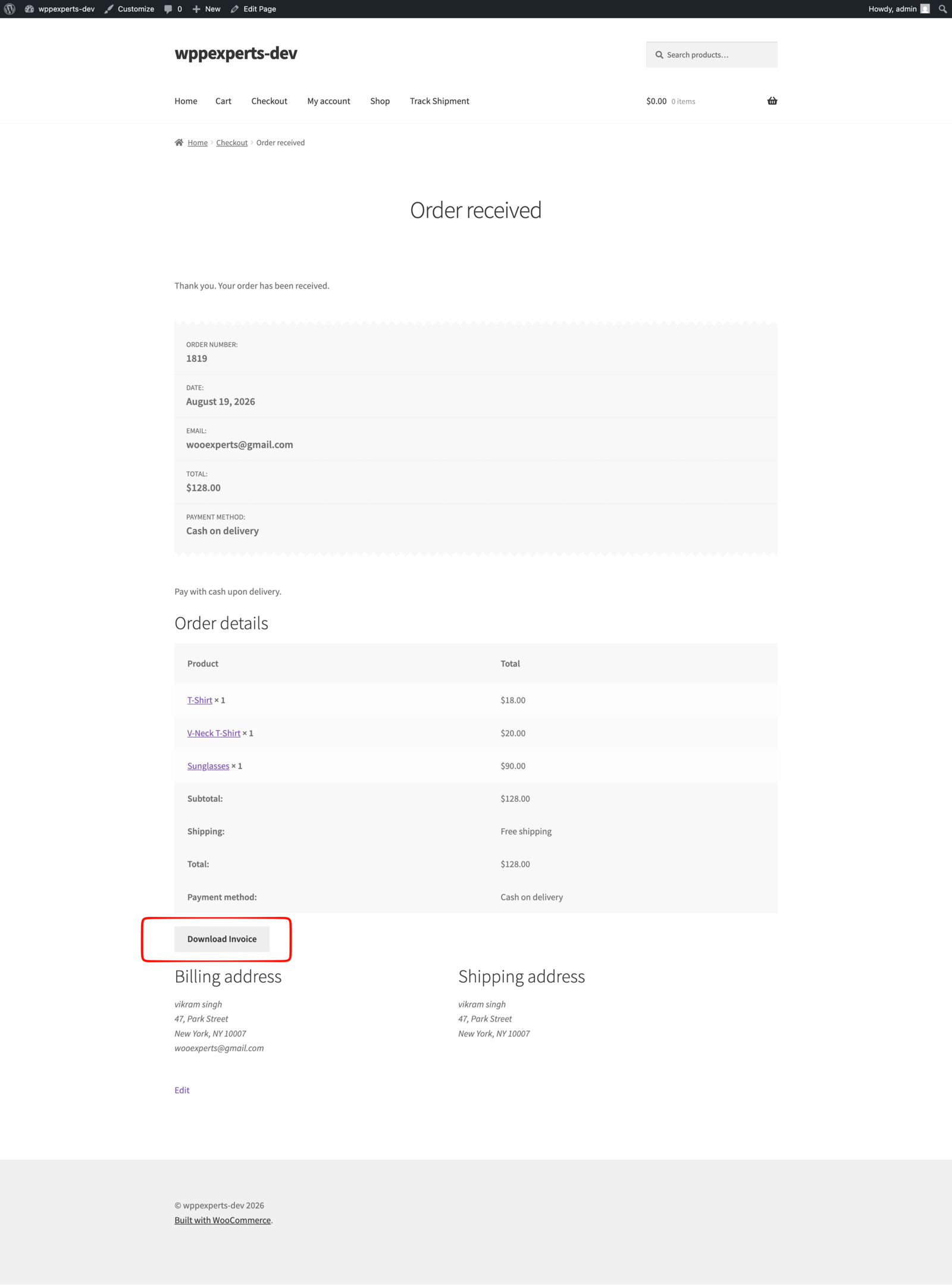
A Download Invoice button on the order received and view order pages, and an Invoice action in My Account > Orders. Guests use the secure order link.
Admin downloads and preview
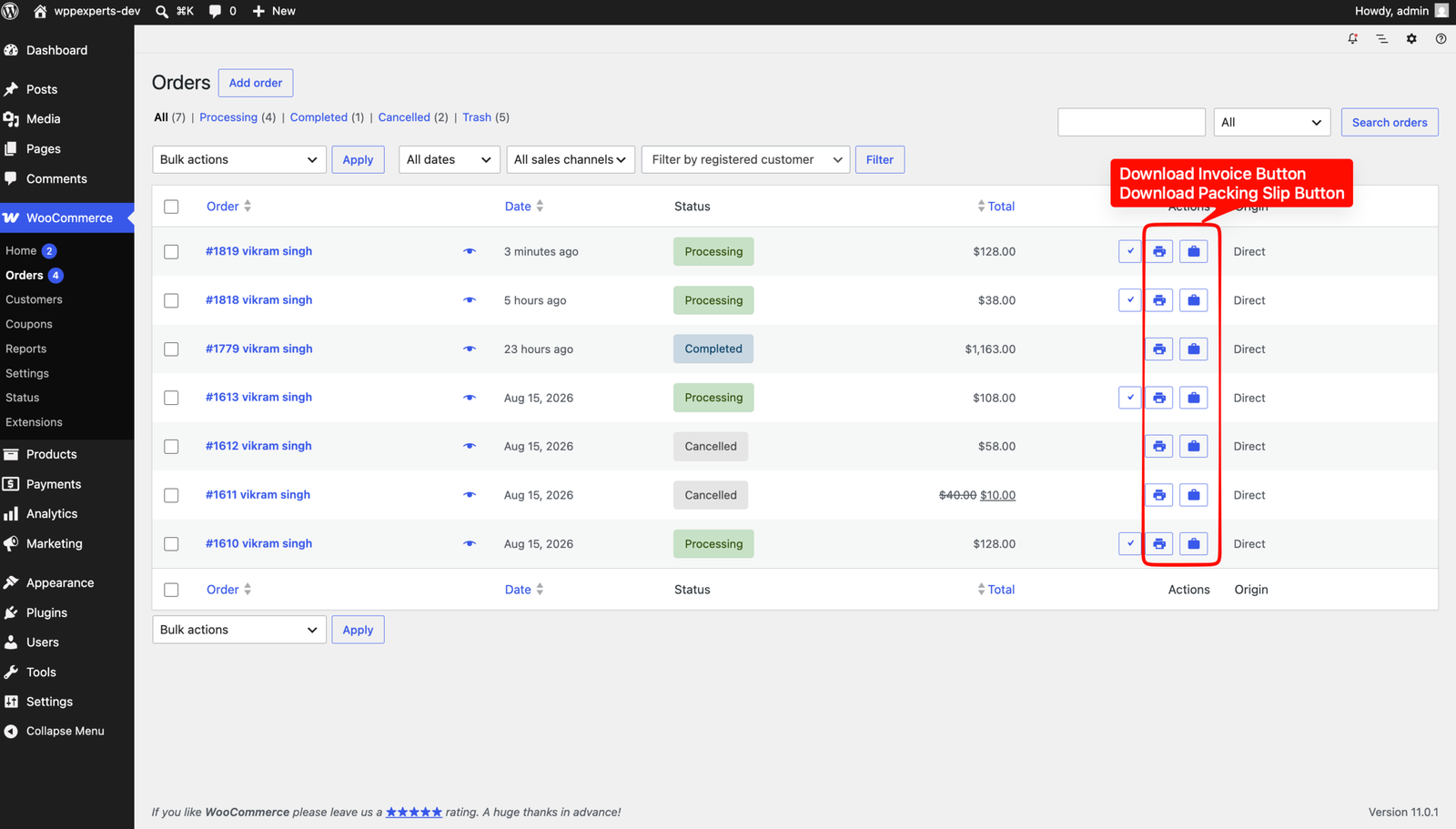
Download invoices and packing slips from the WooCommerce Orders list, and preview a sample invoice with your company details from the settings.
Private and secure
PDFs are stored with unguessable file names in a protected folder, delivered only through permission-checked links and removed after 7 days.
04
How it works
- 1
Install and activate
Install PDF Invoice for WooCommerce from WordPress.org, or upload the zip, and activate it. WooCommerce must be active.
- 2
Add your company details
Go to WooCommerce > Settings > PDF Invoice and enter your logo, company name, address, email, phone and footer text.
- 3
Choose statuses and emails
Choose when invoices are generated, which statuses mark them as paid and which emails they are attached to. Click Preview Template to check the layout.
- 4
Invoices go out automatically
Invoices are created as orders progress and attached to the emails you chose. You download invoices and packing slips from the Orders list, and customers from their account.
05
Screenshots & demo
-
 The "Download Invoice" button on the order received page.
 -
 Invoice and packing slip buttons in the WooCommerce Orders list.
 -
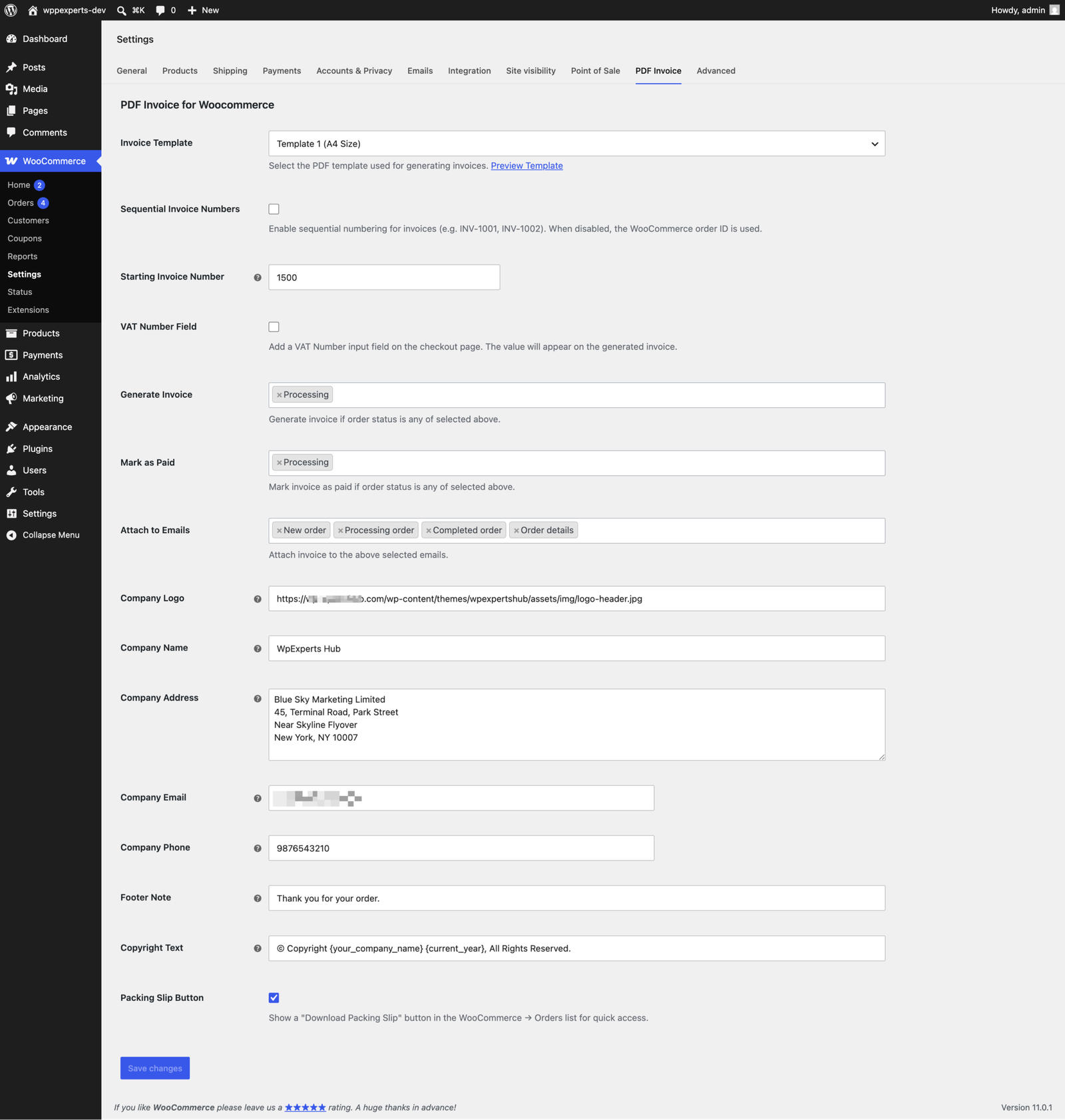
 The settings under WooCommerce > Settings > PDF Invoice.
06
Settings & configuration
Invoice Template
TEMPLATETemplate 1 (A4 size), with a Preview Template link that shows a sample invoice with your company details.
Sequential Invoice Numbers
NUMBERINGOff by default, so the WooCommerce order ID is used. Turn it on and set the Starting Invoice Number (1000 by default); the first invoice gets exactly that number.
VAT Number Field
CHECKOUTAdds an optional VAT Number field to the classic checkout and the Checkout block. Off by default.
Generate Invoice and Mark as Paid
STATUSESThe order statuses that create the invoice and the ones that mark it as PAID. Processing is selected for both by default.
Attach to Emails
EMAILSThe WooCommerce emails the invoice is attached to. New order, Processing order, Completed order and Order details are selected by default.
Company details
COMPANYCompany Logo, Name, Address, Email and Phone, printed at the top of every invoice and packing slip.
Footer Note and Copyright Text
FOOTERA thank-you message and a copyright line. {your_company_name} and {current_year} are filled in automatically.
Packing Slip Button
ADMINShows a Download Packing Slip button in the WooCommerce Orders list. On by default.
07
Requirements & installation
Who it is for
It suits WooCommerce store owners who need to send professional PDF invoices with every order. It also fits businesses that must show VAT numbers or sequential invoice numbers for their records, and stores that want invoices and packing slips one click away on the Orders screen.
Requirements
- WordPress 6.5 or later (tested up to 7.1)
- WooCommerce 10.0 or later (tested up to 11.1)
- PHP 7.4 or later
Installation
- Go to Plugins > Add New Plugin, search for “PDF Invoice for Woocommerce” (or upload the zip), then install and activate it. WooCommerce must be active.
- Go to WooCommerce > Settings > PDF Invoice, enter your company details and choose when invoices are generated, marked as paid and attached to emails.
- Click “Preview Template” to check the layout.
Privacy and security
- Generated PDFs are stored with an unguessable file name in a protected folder (
uploads/wphub-invoice) and are only delivered through permission-checked download links. - PDFs are a cache: files older than 7 days are removed automatically and re-created from the current order when needed.
- Customer data is escaped before it goes into the PDF, and scripts in documents are disabled.
- No tracking and no external services: PDFs are created on your own server with the bundled Dompdf library.
For developers
- Filters:
wphub_invoice_placeholders,wphub_invoice_number,wphub_invoice_paper_size,wphub_invoice_date_format,wphub_invoice_page_number_text,wphub_invoice_customer_can_download,wphub_invoice_dompdf_options,wphub_invoice_cleanup_daysandwphub_invoice_settings. - Actions:
wphub_before_pdf_invoiceandwphub_after_pdf_invoice. - Template overrides: copy
templates/template-1.phportemplates/packing-slip.phptoyourtheme/invoice-for-wc/.
Packing slips for each shipment
Ship orders in parts? With Advance Partial Shipment for WooCommerce active, you get a packing slip and delivery note for every shipment, created with your PDF Invoice settings.
08
Documentation & support
DocumentationSetup guide and configuration reference. (opens in a new tab)
TutorialHow to Attach a PDF Invoice to WooCommerce Order Emails
WordPress.org listingDownload, changelog and installation notes.
Email supportsupport@wpexpertshub.com Include your order ID for faster help.
CustomisationNeed a change or an integration? Ask the developers who wrote it.
09
Frequently asked questions
When is an invoice created?
When an order reaches one of the statuses selected under “Generate Invoice” (Processing by default), and whenever the invoice is attached to an email or downloaded. It always reflects the current order.
Which emails can include the invoice?
Any WooCommerce email that belongs to an order. Choose them under “Attach to Emails” (New order, Processing order, Completed order and Order details are selected by default).
How do sequential invoice numbers work?
Enable “Sequential Invoice Numbers” and set the starting number. The first invoice gets exactly that number and each new invoice the next one. Raising the starting number later continues from the new number; lowering it never re-uses a number. When the option is off, the WooCommerce order ID is used.
How do I add my logo?
Upload it under Media > Library, copy its file URL and paste it into “Company Logo”. PNG, JPG and SVG work; the image is embedded in the PDF.
Can customers download their invoices?
Yes, from the order received page, the view order page and the My Account > Orders list, once the order has reached an invoice status. Guests use the secure link of their order.
Can I change the invoice layout?
Yes. Copy templates/template-1.php or templates/packing-slip.php from the plugin to yourtheme/invoice-for-wc/ and edit the copy. Available placeholders include {invoice_number}, {invoice_date}, {invoice_status}, {amount_due}, {billing_address}, {billing_address_only}, {billing_vat_number}, {shipping_address}, {your_company_name} and {current_year}.
Can I use US Letter paper?
Yes, with the wphub_invoice_paper_size filter, for example add_filter( 'wphub_invoice_paper_size', function () { return 'letter'; } );
Does it work with the Checkout block?
Yes. The VAT Number field is added to the Checkout block’s Contact information step and to the classic checkout.
Where are the PDF files stored?
In wp-content/uploads/wphub-invoice/, with unguessable file names. They are removed automatically after 7 days and re-created when needed, so deleting them is safe.
Does it work with Advance Partial Shipment for WooCommerce?
Yes. With both plugins active, Advance Partial Shipment for WooCommerce adds a packing slip and delivery note for each shipment, created with your PDF Invoice settings.
Where can I get help?
Please open a topic in the WordPress.org support forum, or email us at support@wpexpertshub.com.
10
Customer reviews
Thanks for your review!
It’s waiting for approval and will appear here soon. We’ll email you when it’s live.
- webbbio
Finally. A nice simple pdf plugin!
Not sure why this plugin was so hard to find in WordPress directory search but it works great. Does not install any extra bloat, ads, redux plugins or other annoying stuff. Also adds a invoice tab into woocommerce settings and follows WordPress plugin developer style guidelines. I do wish it would be possible to translate all fields in pdf invoice without translation plugin. But other than that, excellent work guys.
PDF Invoice for WooCommerceFree
Download