FreeFree on WordPress.orgInstall it from your WordPress dashboard
01
Overview
Customers change their minds. When they can't cancel an order themselves, they email you, call you or ask their bank for a chargeback. WC Cancel Order adds a Cancel Request button to their WooCommerce orders, so they can ask to cancel in a few clicks and tell you why.
You stay in control: nothing is cancelled until you approve it. Each request moves the order to a Cancel Request status and appears under WooCommerce > WC Cancel with the customer's reason. Approve it and the order is cancelled the normal WooCommerce way, so the items go back into stock. Decline it and the order returns to the status it had before. The store and the customer are emailed at every step.
You choose which order statuses can be cancelled, whether customers must give a reason and what note appears in the cancellation popup. Guests can cancel too, through a secure link in their order emails.
02
Why store owners choose it
Fewer support emails: every request arrives in one list, with the customer's reason attached.
No surprise cancellations: each request waits for your decision, and only the order statuses you allow can be cancelled.
Customers stay informed: they receive an email when you approve or decline their request.
Stock stays correct: an approved request cancels the order the normal WooCommerce way, so the items go back into stock.
Free on WordPress.org, with no account or licence key required.
03
Features
Cancel Request button
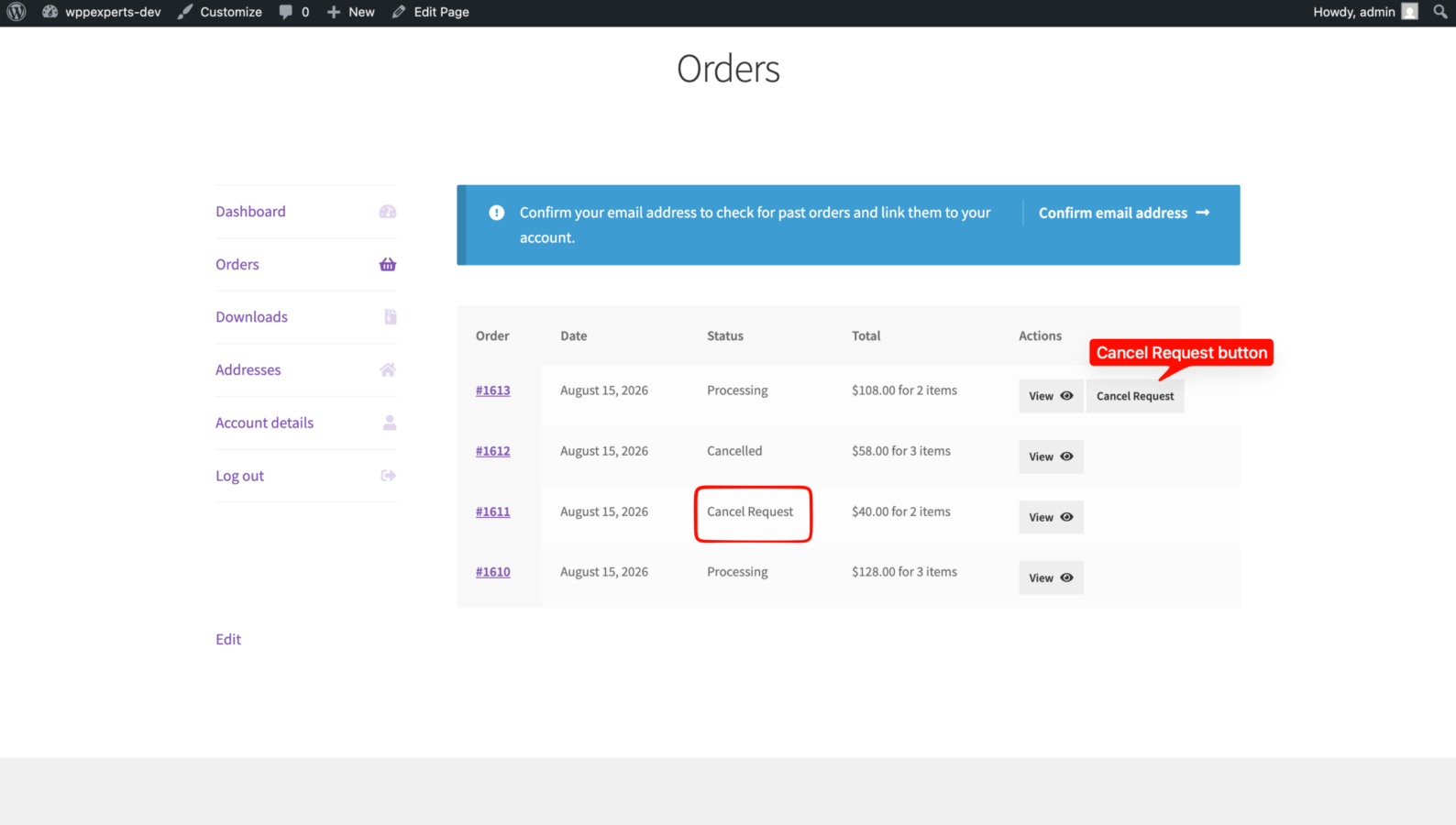
Shown in My Account > Orders and on the order details page for eligible orders. It replaces WooCommerce’s default cancel link.
Choose which orders can be cancelled
Allow requests only for the order statuses you select, for example Processing but not Completed. Pending payment, Processing and On hold are selected by default.
Cancellation details
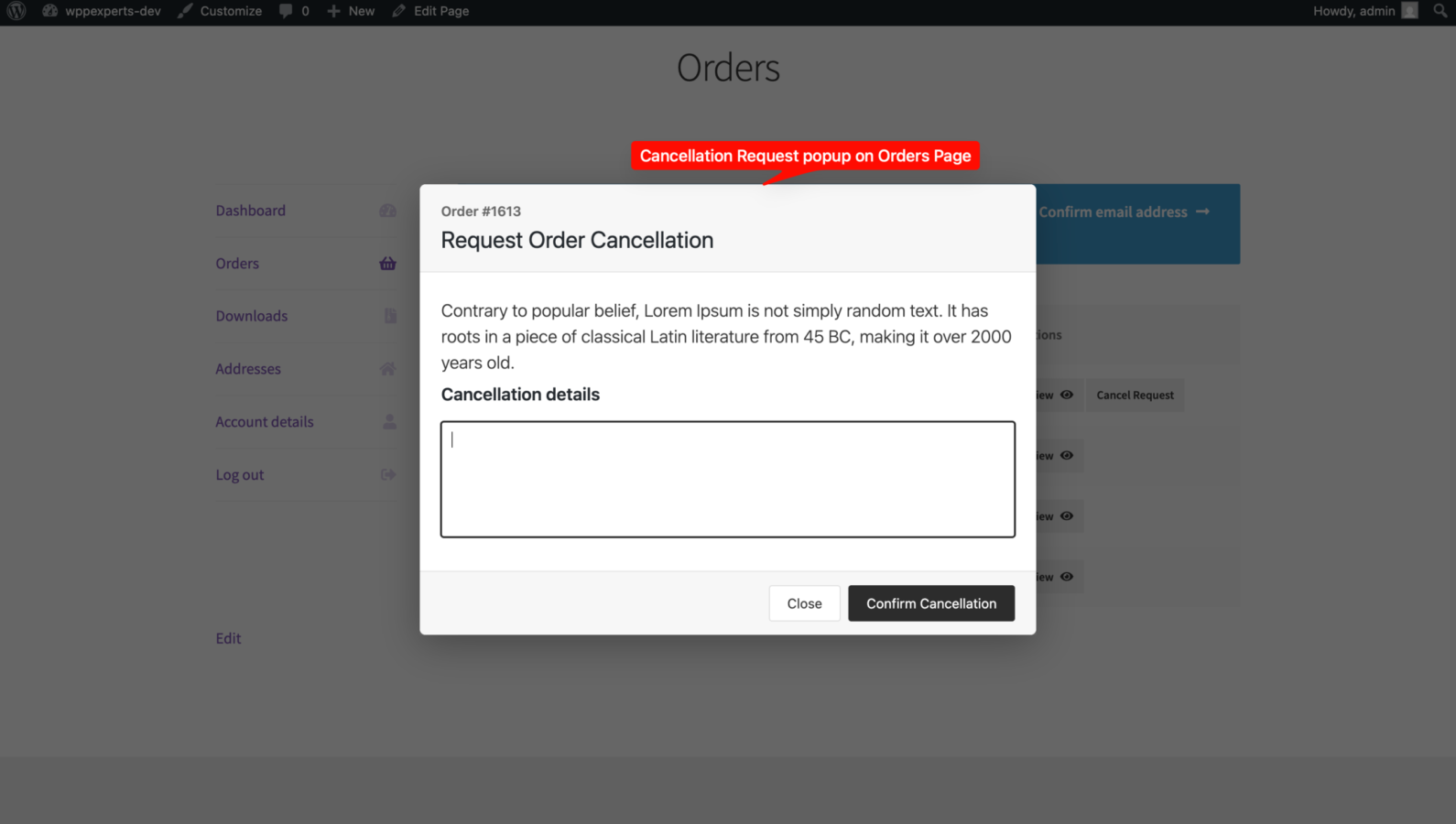
The customer explains the reason in the popup. You can make the field required, which it is by default.
Your own note in the popup
Show your cancellation policy or dispatch cut-off time above the details field. HTML is allowed.
Guest orders
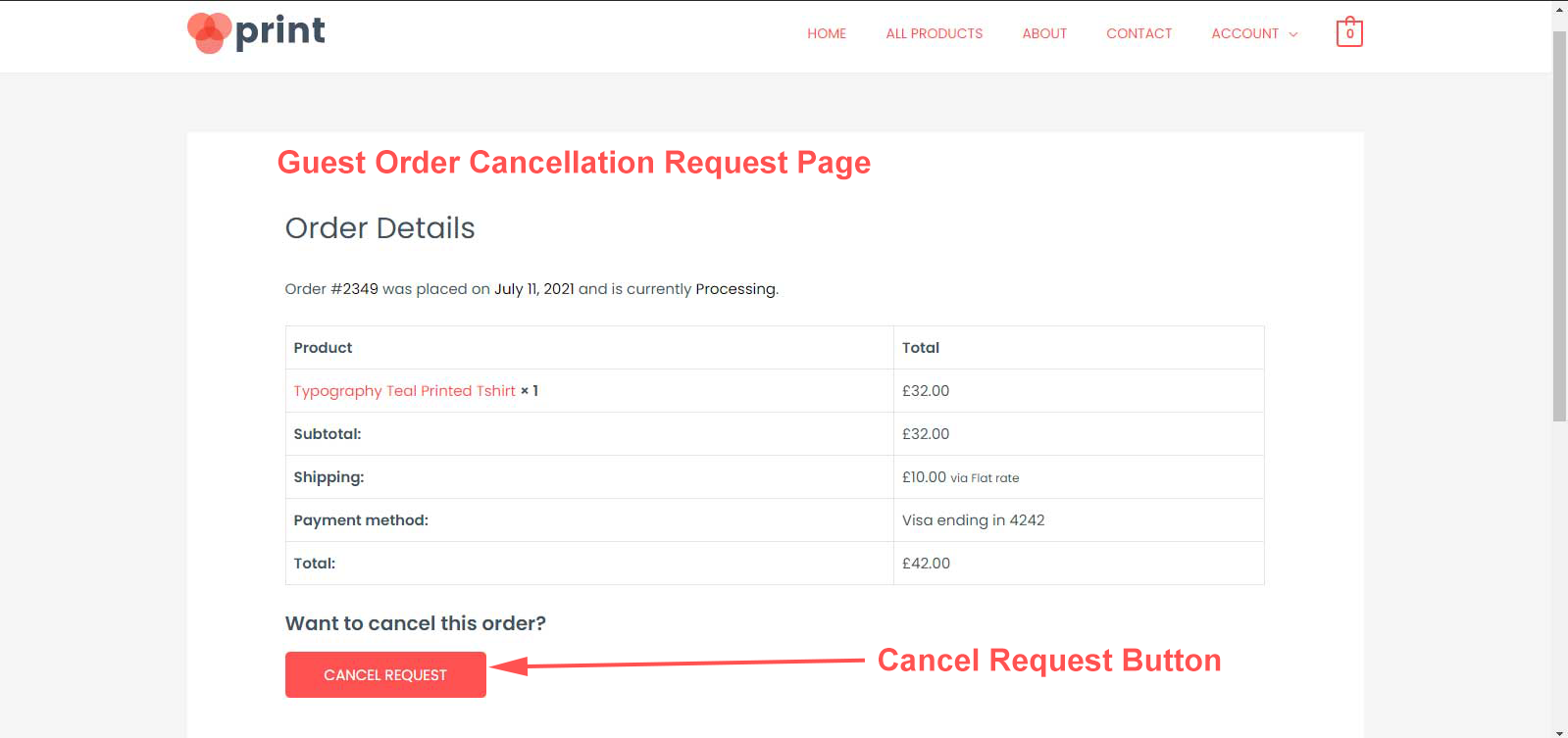
Guests get a “Want to cancel this order?” link in their order emails. It opens a secure cancellation page, no account needed.
Request list
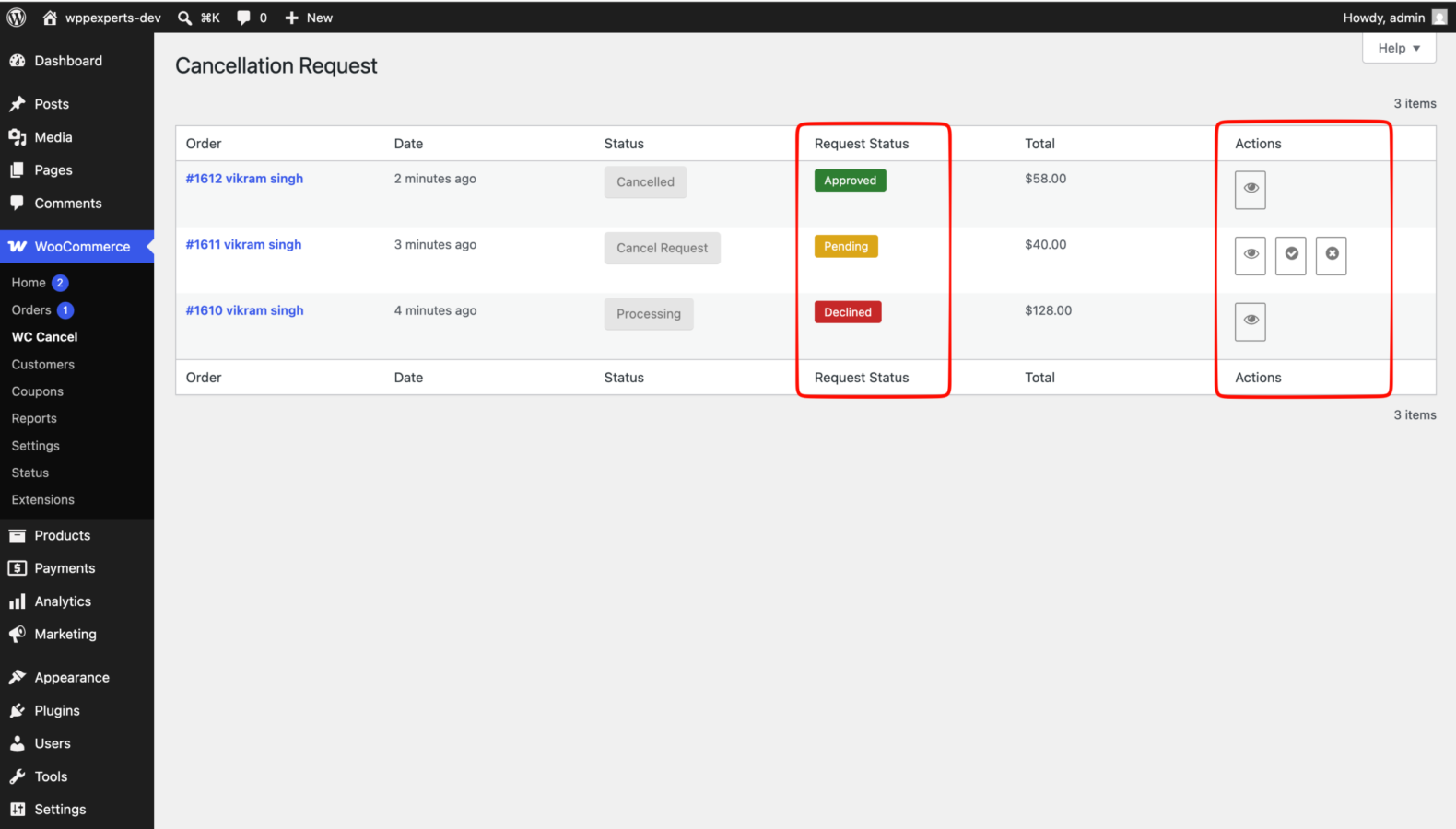
WooCommerce > WC Cancel shows the date, status and details of every request. View, approve or decline each one in a popup.
Three email notifications
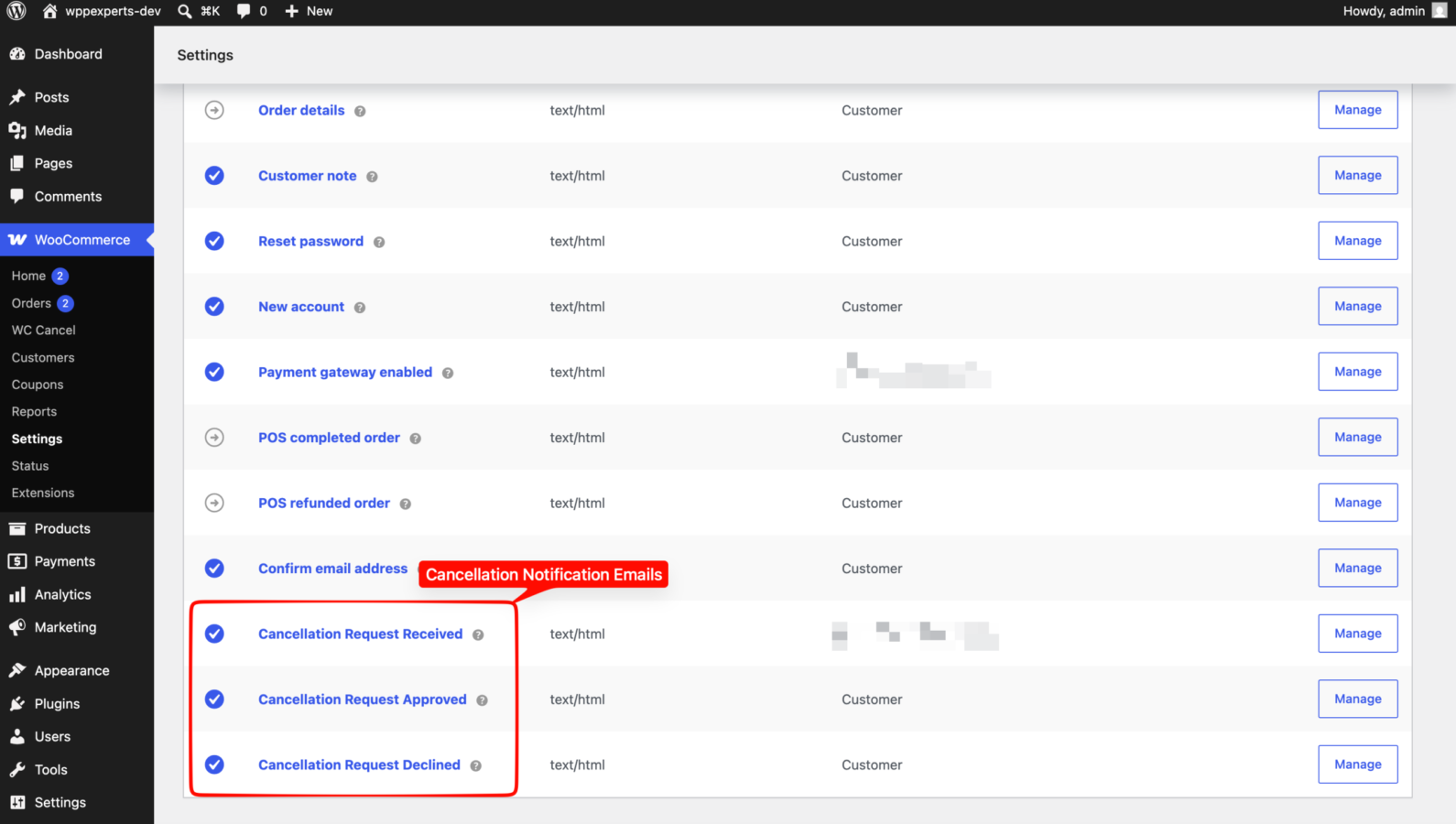
Cancellation Request Received (to the store), Approved and Declined (to the customer). Edit the recipients, subject and heading, or switch an email off, under WooCommerce > Settings > Emails.
Safe decline
A declined order returns to its previous status, for example On hold. The customer is also emailed when you move an order out of Cancel Request by hand (except to Refunded or Failed).
Cancel Request order status
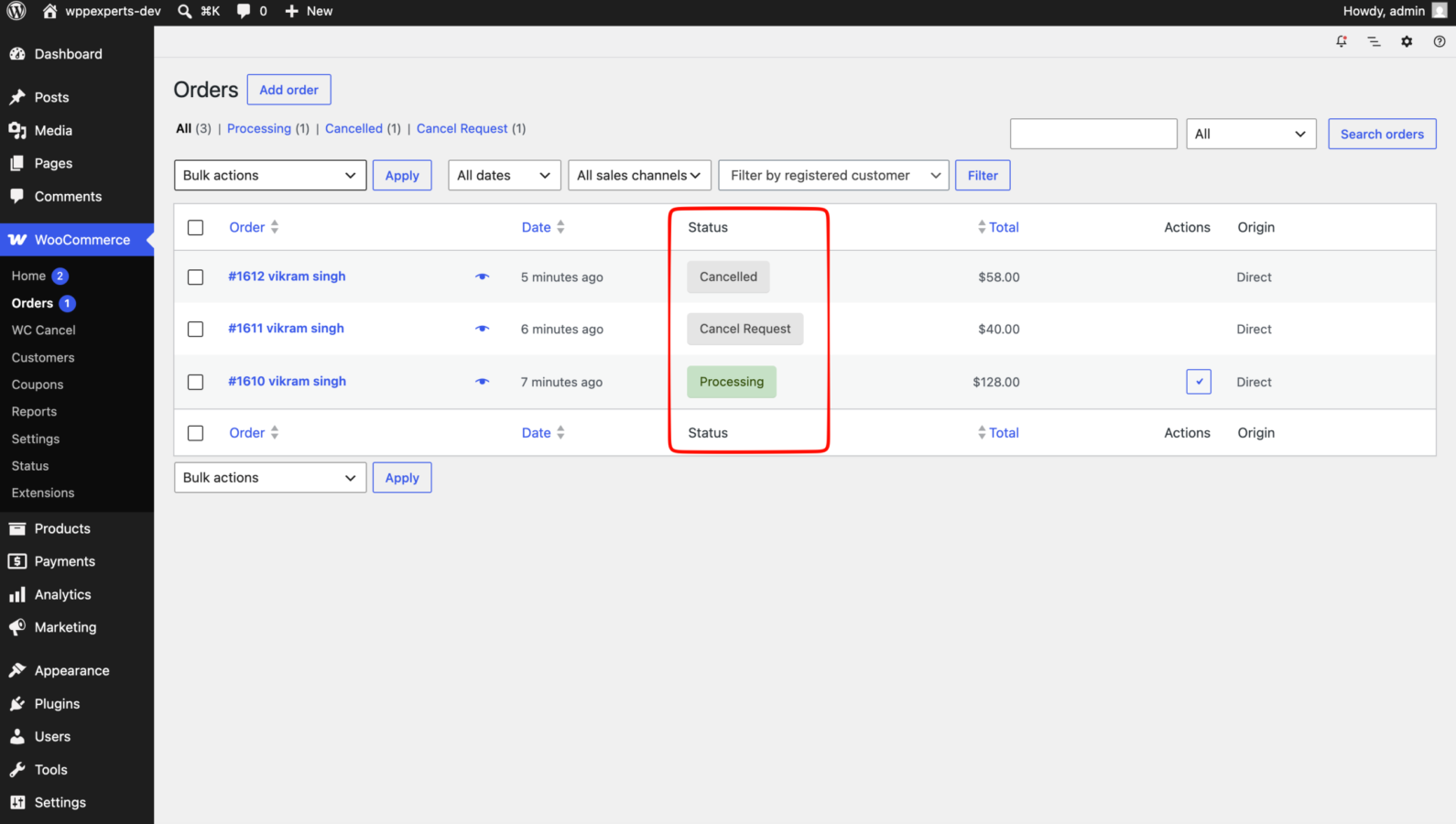
Requested orders get their own status with a filter in the WooCommerce Orders list, so open requests are easy to find.
Works with your store
Compatible with High-Performance Order Storage (HPOS), the Cart and Checkout blocks, multisite and WPML. Translation ready.
04
How it works
- 1
The customer asks to cancel
The customer clicks Cancel Request on an order in My Account > Orders and enters the reason in a popup.
- 2
The store is notified
The order moves to the Cancel Request status and the store receives the Cancellation Request Received email.
- 3
You review the request
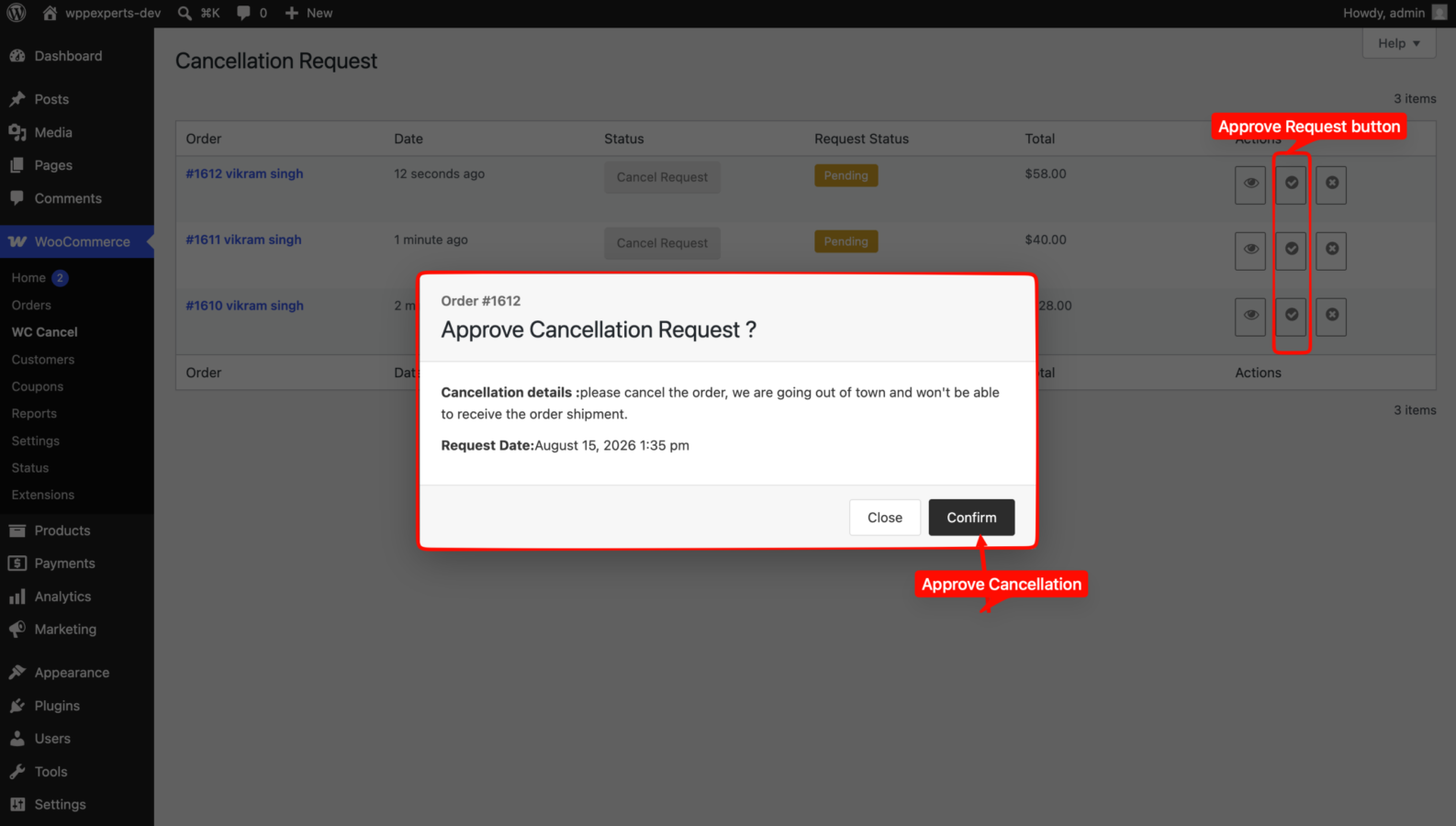
Open WooCommerce > WC Cancel, read the customer’s reason and approve or decline the request.
- 4
The order is updated
Approved: the order is cancelled and WooCommerce puts the stock back. Declined: the order returns to the status it had before. The customer is emailed either way.
05
Screenshots & demo
-
 Orders list with the "Cancel Request" order status.
 -
 Cancellation requests under WooCommerce > WC Cancel, with the request status and actions.
 -
 Approving a cancellation request.
 -
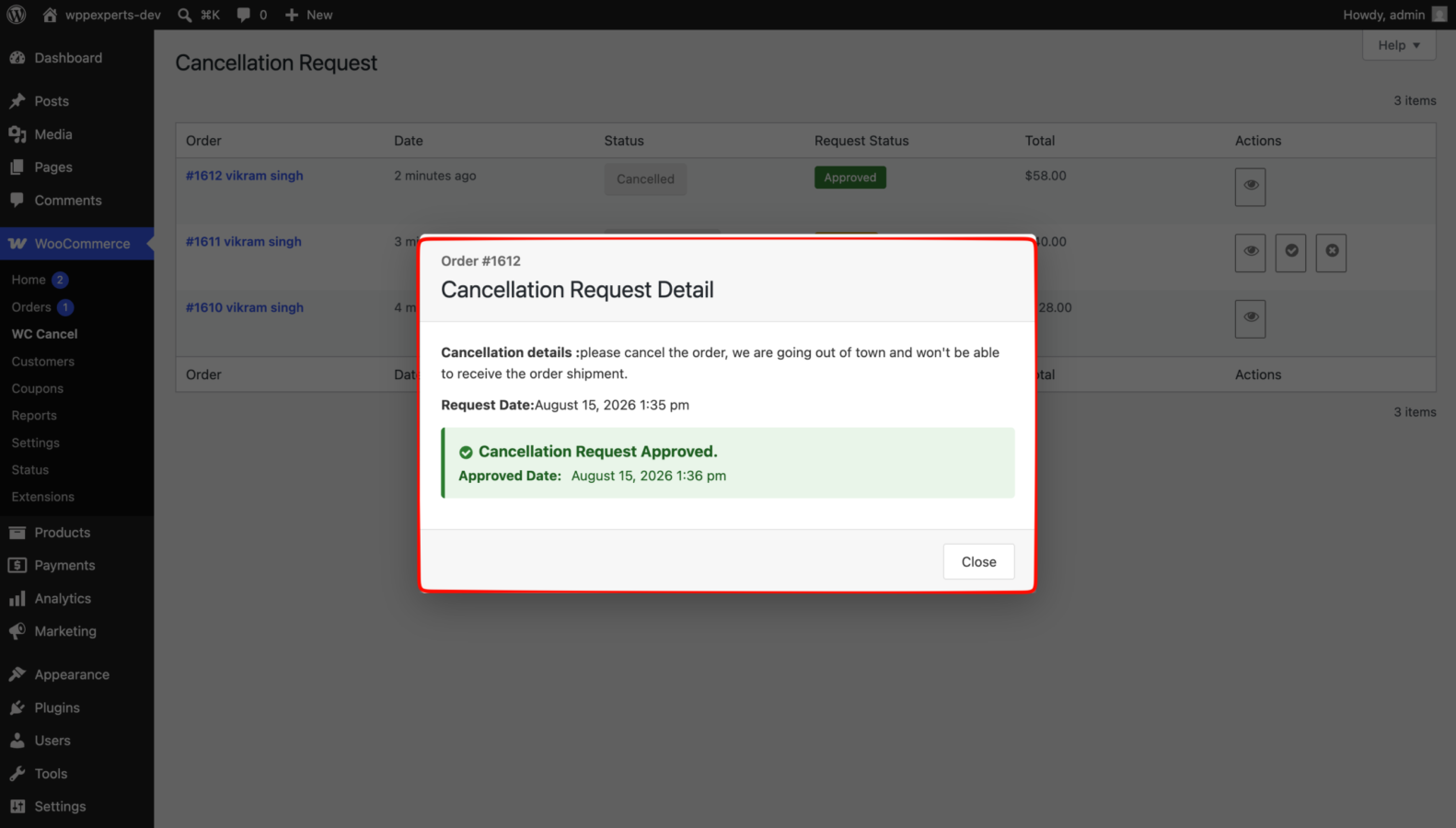
Details of an approved request.
-
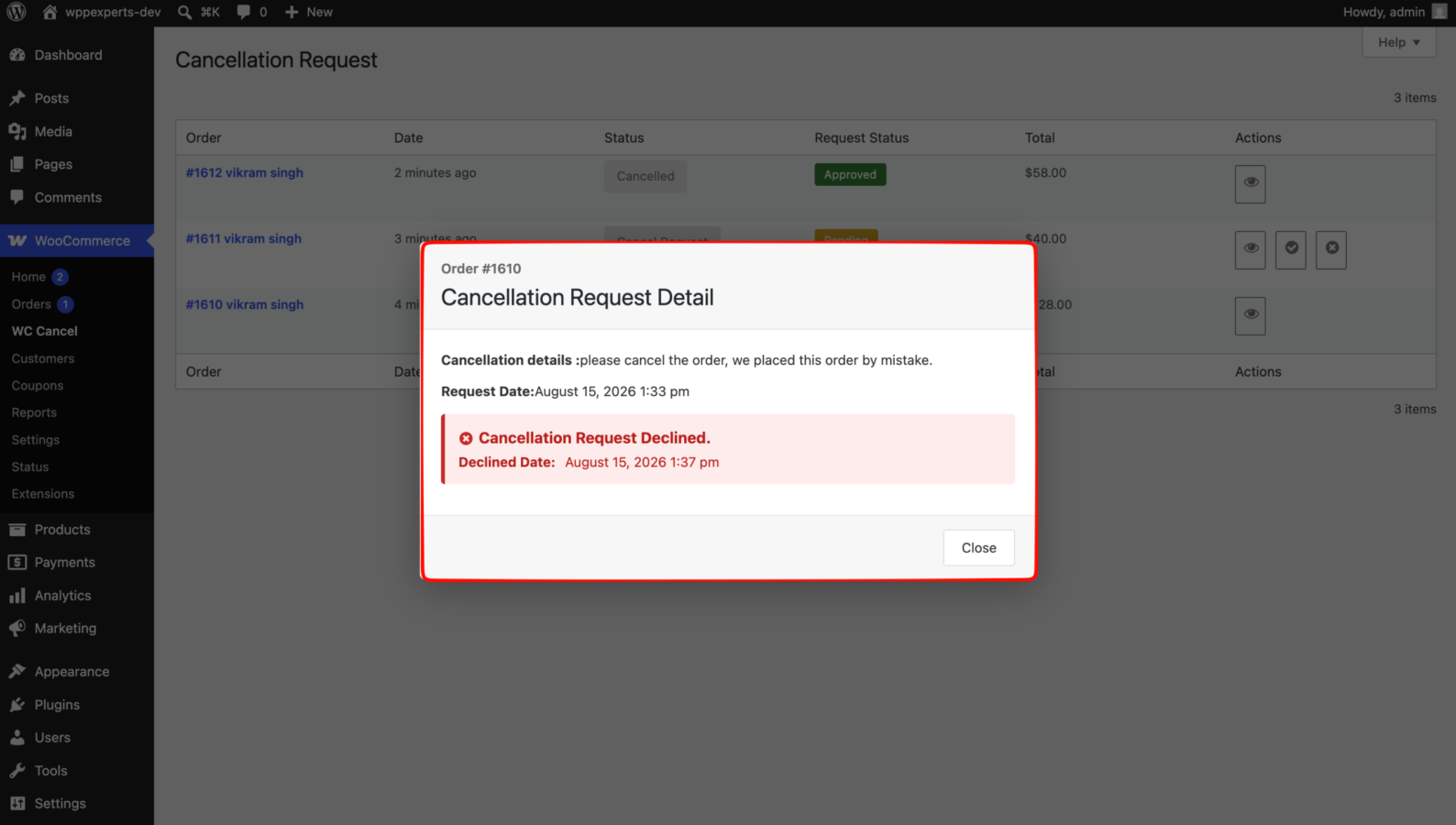
Details of a declined request.
-
"Cancel Request" button in My Account > Orders.
-
Cancellation popup with your note and the cancellation details field.
-
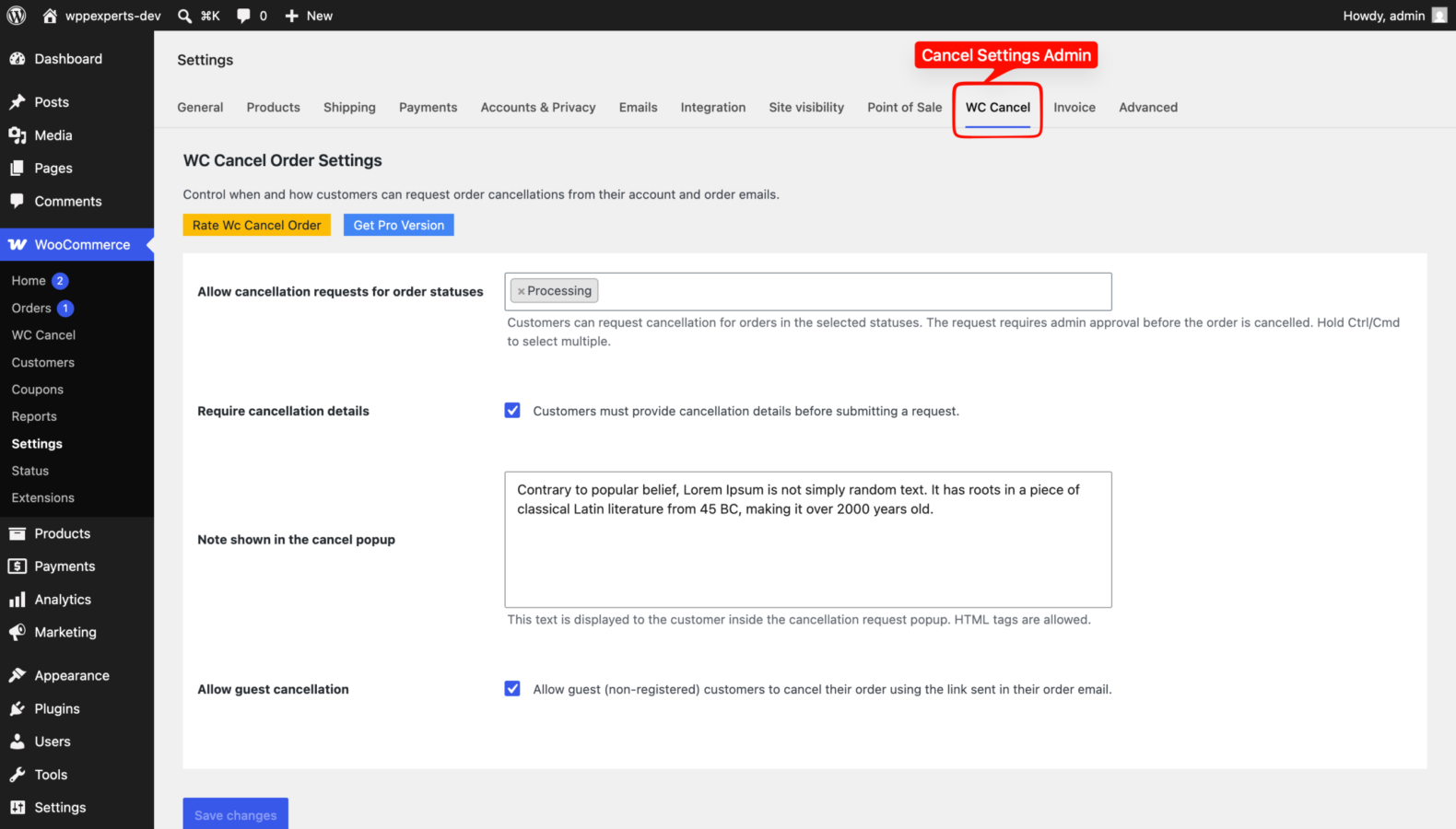
Settings under WooCommerce > Settings > WC Cancel.
-
The cancellation emails under WooCommerce > Settings > Emails.
-
 Guest cancellation page, opened from the link in the order email.
06
Settings & configuration
Allow cancellation requests for order statuses
STATUSESThe order statuses for which customers see the Cancel Request button. Pending payment, Processing and On hold are selected by default.
Require cancellation details
DETAILSWhen checked (the default), customers must explain why before they can submit a request.
Note shown in the cancel popup
POPUP NOTEYour own text, with HTML allowed, shown to customers inside the cancellation popup. For example your cancellation policy or dispatch cut-off time.
Allow guest cancellation
GUESTSAdds a “Want to cancel this order?” link to customer order emails, so guests can request a cancellation without an account. On by default.
Cancellation emails
EMAILSUnder WooCommerce > Settings > Emails, edit the recipients, subject, heading and format of the Request Received, Approved and Declined emails, or switch one off.
07
Requirements & installation
Who it is for
It suits WooCommerce store owners who want customers to ask for a cancellation without emailing or calling support. The final decision stays with the store. It also fits shops that need a simple, reviewable cancellation workflow for registered and guest customers alike.
Requirements
- WordPress 6.7 or later (tested up to 7.1)
- WooCommerce 8.0 or later (tested up to 11.1)
- PHP 8.0 or later
Installation
- Go to Plugins > Add New Plugin, search for “WC Cancel Order”, then install and activate it. WooCommerce must be active.
- Go to WooCommerce > Settings > WC Cancel and choose the order statuses that can be cancelled, whether the cancellation details are required, your popup note and guest cancellation.
- Review the requests you receive under WooCommerce > WC Cancel.
Privacy
Cancellation requests (order, date and the details the customer entered) are stored in your own WordPress database. The plugin adds no tracking, sets no cookies and sends no data to external services.
For developers
wc_cancel_order_btnfilter: change the Cancel Request action ($actions,$order).wc_cancel_settings_order_statusfilter: the order statuses offered in the settings.wc_cancel_declined_statusfilter: the status a declined order returns to ($status,$order).wc_cancel_settingsfilter: the settings fields.wc_cancel_requestaction: runs when a customer submits a request ($order_id).
Need more than the free WooCommerce cancel order plugin?
WC Cancel Order Pro turns cancellation requests into finished refunds. It uses the same settings and requests as this plugin and replaces it when activated, so you keep your data. It adds partial (item-level) cancellation, gateway, manual or store wallet refunds on approval, cancellation fees, your own cancellation reasons and instant cancellation for the statuses you choose. Watch the Pro demo video.
08
Documentation & support
DocumentationSetup guide and configuration reference. (opens in a new tab)
TutorialHow to Let Customers Cancel WooCommerce Orders
WordPress.org listingDownload, changelog and installation notes.
Email supportsupport@wpexpertshub.com Include your order ID for faster help.
CustomisationNeed a change or an integration? Ask the developers who wrote it.
09
Frequently asked questions
Does the order get cancelled as soon as the customer clicks the button?
No. The order moves to the Cancel Request status and waits for you. It is only cancelled when you approve the request under WooCommerce > WC Cancel.
Which orders can customers cancel?
Only orders in the statuses you select under WooCommerce > Settings > WC Cancel. By default these are Pending payment, Processing and On hold. Orders in other statuses show no Cancel Request button.
Is the payment refunded automatically?
No. Approving a request cancels the order and WooCommerce restores the stock, but the free version does not refund the payment. Refund it from the order screen as usual. WC Cancel Order Pro can refund through the payment gateway or as store wallet credit when you approve.
What happens when I decline a request?
The order goes back to the status it had before the request (for example Processing or On hold), and the customer receives the “Cancellation Request Declined” email. The Cancel Request button is not shown again for that order.
Can guests cancel their orders?
Yes, when “Allow guest cancellation” is enabled. Guests find a “Want to cancel this order?” link in their order emails, which opens a secure cancellation page for that order.
Can I change the emails?
Yes. Go to WooCommerce > Settings > Emails and open Cancellation Request Received, Cancellation Request Approved or Cancellation Request Declined to edit the recipients, subject, heading and format, or to switch an email off.
Can customers cancel only some items of an order?
Not in the free version. Partial (item-level) cancellation is part of WC Cancel Order Pro.
What does the Pro version add?
WC Cancel Order Pro replaces this plugin when activated and keeps your settings and requests. It adds partial cancellation, refunds on approval (gateway, manual or store wallet credit), a store wallet, cancellation fees, your own cancellation reasons, instant cancellation for chosen statuses, role and time limits, bulk approve and decline, and dedicated support.
Where can I get support?
For the free version, please open a topic in the WordPress.org support forum. For WC Cancel Order Pro, please contact us directly.
10
Customer reviews
Thanks for your review!
It’s waiting for approval and will appear here soon. We’ll email you when it’s live.
- digiako
perfect
this plugin is perfect and best
- mksamadnet
Excellent Plugin and Good Support
It works as expected! Nice addon to the woocommerce list!
- ncgyber
Great plugin and awesome technical support!
Plugin is working nicely and the author provided very kind technical support.
All the issue is resolved! Appreciate it!
- paulharris0291
Works like a charm
first i found another plugin but that didn’t worked then i installed this and it works like a charm with my theme. Quick setup and no problems encountered.
- micky07
Excellent plugin and amazing support !!
I have used the plugin in the free version, but I can’t wait to purchase the pro version. Congrats for the great and best support work and technical elaboration.
Thank you guys!
- dada84
Great Plugin with all necessary features in free version
Thank You WooExperts for such a great plugin, It really helps a lot and provides every necessary feature that you need for your customer to allow order cancellation, and Interface is also too good.
- interweb899
Wonderful, this is more than I expected.
We were looking for cancellation feature and found it exactly what I was looking for.
Thank you
- mmguder
button not working
cancel request button is not working on my account page/my orders. When i clicked on it, screen goes to half transparent and nothing happens. but when i copy the link of button to the address bar, it works. my theme is porto 6.1.4 , wordpress 5.8, woocommerce 5.5.1
Reply from WpExperts HubHi @mmguder , can you please contact us here, so we can check and fix issue for you.
it seems some JavaScript conflict issue.
Thanks
- Knut S.
Well made, working good
I have been using this for a couple of years and are quite satisfied. It’s also extensible with hooks and filters, so if you are skilled, you can add, remove or alter how it works and their conditions, like limit the time after order date the cancel button appears om My page. Or add extra information on the admin screen list table columns.
The English UI and readme strings are not good, a bit cumbersome to translate.
Reply from WpExperts HubThank you for your support and appreciation, we are always open for suggestions and trying to provide best.
Thanks again.
- nitromau
Good job
it’s a great project.
- Pradeep
Great plugin
Great and well-coded plugin. It would be great if these features/changes can be added in a future release.
1) Rename the dashboard action buttons to ‘Approve Request’ and ‘Decline Request’ instead of Cancel Order and Process Order.
2) Ability for admins to add a note when declining cancellation requests so the customer get to know why their requests got declined.
Keep up the good work!
- shreyans94
Pro version not received
I have paid money to you bank account for pro version and referenced my order id and have written to support but no one replies from contact us form not have I received plugin download files.
EITHER REFUND MY MONEY OR GIVE ME THE DOWNLOAD FILES.
UPDATE:
Received the plugin now.
•
This topic was modified 8 years ago by shreyans94.Reply from WpExperts HubHi, we have already sent you the plugin and that only got little bit delayed because your mail was caught by spam and pushed in spam folder.
Thanks
- robhorsfall
Great plugin
Very good plugin, used it on this website along with woocommerce bookings.
Have not tried the Pro version yet.
Thank you!
- vinescarlan
Works Great on my custom theme
Used this on my custom theme. It’s working fine. Hope they will keep it simple and more intuitive.
- kevinpwhite
Great Plugin
This is a great plugin! I was wonder if I wanted to customize your email templates can I use the same technique that woocommerce uses. What I mean is by naming a file in my child theme wc-cancel-order->emails->cancel-request-order.php or do you suggest using some kind of hook or filter?
Regards,
Kevin White
Reply from WpExperts HubHi, Thanks for using plugin and rating it.
yes you can directly copy the template same as woocommerce email templates or you can copy using woocommerce email settings.
please check the screenshot.
https://drive.google.com/file/d/0B1mjVYu7P_vsX2R3TjAyWmpjQVU/view?usp=drivesdk
Thanks
- teamsmart
Aweeeesome
The Plugin is simple and works perfectly.. Check it HERE
- thebbcreamgirl
SO USEFUL!
This is such a useful plugin!
It sends an email notification to the admin as well when customer requests a cancellation, and adds a custom status for orders that have the cancellation request, on the orders page.
Very straightforward and superb plugin.
Thanks!
- saytouqeer
Nice plugin
Superb plugin for cancel order request in woocommerce
- K4TAY
Bravo
Good method for handling this. Shame they wont implement something like this into the core.
- Bubuuu
great plugin
Thanks!
Are there any language files?
- neo110
Good Plugin
Very good plugin. It works perfectly. I give 10 stars. Keep it up.
- jangidharish
Very Nice Plugin
Now We can handle cancel order in woocommerce . Superb Plugin !!
Thanks.
WC Cancel OrderFree
Download