$49One-time paymentUpdates & support included
01
Overview
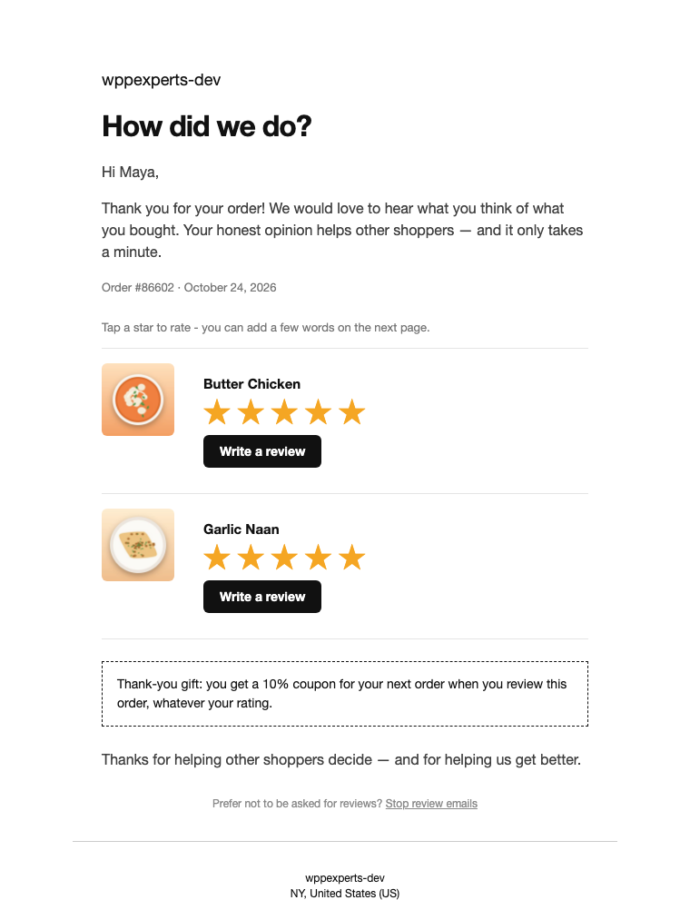
Reviews for WooCommerce by WpExperts Hub turns completed orders into product reviews. It emails the customer a friendly request with five clickable stars and a button for each product they bought, sends a reminder after 5 days and a final reminder 7 days later, and lets them write a review on a clean private page without creating an account. Customers with an account can also start from a Leave a review button on their orders in My Account.
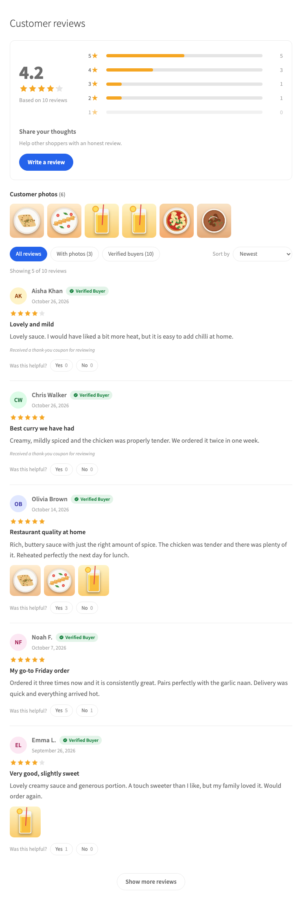
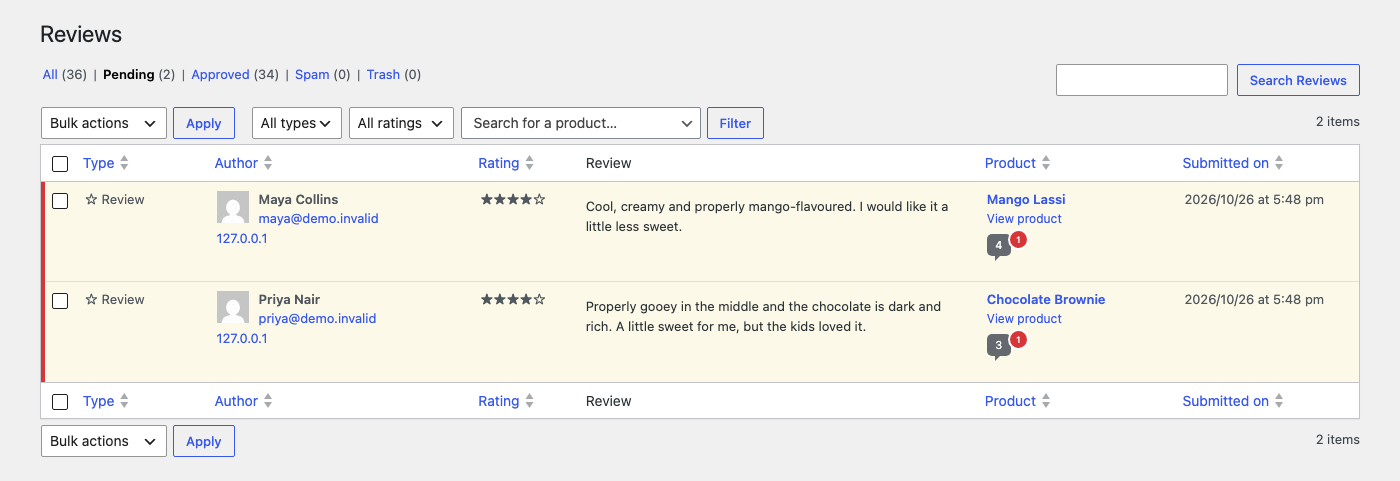
Reviews arrive as normal Pending WooCommerce reviews, so you stay in control. Approved reviews of a real purchase show a Verified Buyer label in a reviews section on the product page, with a rating summary, customer photos, filters and helpful votes. You can thank every reviewer with a coupon, whatever the rating. Every email is rechecked right before it is sent, so customers are never asked about a product they already reviewed.
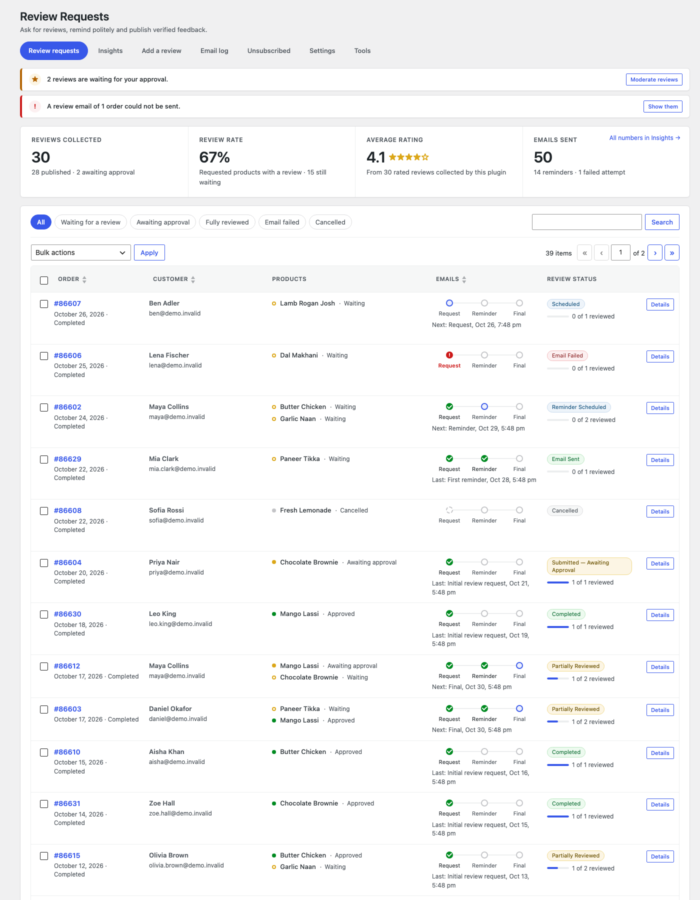
A dashboard shows every order in the sequence with a status for each product, Insights show which email brings the reviews, an email log records every attempt, and bulk actions on the WooCommerce Orders screen can ask for reviews of older orders. Everything runs on your own site: no subscription and no outside service.
02
Why store owners choose it
A review is only labelled Verified Buyer when the order is paid, contains the product and matches the billing email. Clicking an email link proves nothing, so fake labels are not possible.
Every email is sent once and rechecked just before sending. A product that was reviewed never gets a reminder, repeated status changes or queue retries can never double-send, and every request has a one-click unsubscribe.
Customers review on a private, expiring link, from the email or from the Leave a review button in My Account, without creating an account. Reviews are normal WooCommerce reviews that wait for your approval, and they keep working if you deactivate the plugin.
Shoppers see a reviews section with a rating summary, customer photos, filters and helpful votes; you see one dashboard with every order, every email attempt and Insights into which email brings the reviews.
It sends review requests by email for orders in your store. It does not import reviews from other sites, it never rewards only good reviews, and it cannot prove that an email reached an inbox: WordPress only reports whether it handed the message to your mail system.
03
Features
Automatic review requests
When an order becomes Completed the plugin schedules an email to the billing address with a review button for every product. You can add a delay before the first email, choose which order statuses count, and the sequence starts once per order, so going back and forth between statuses never restarts it.
5-day and 7-day reminders
A friendly reminder goes out 5 days after the request and a final reminder 7 days after that, with distinct wording for each. Both delays are settings. Reminders only list the products that still have no review, and they stop when every product is reviewed.
Native WooCommerce emails
Seven emails live in WooCommerce → Settings → Emails with the usual subject, heading, additional content, enable switch and HTML or plain text: the request, two reminders and three answers to a review for the customer, and a low rating alert for you. Logo, sender, preview, test email and a layout for Gmail, Apple Mail and Outlook.
Stars in the email
Five clickable stars under every product of the request and the reminders. A click opens the review page with that rating already chosen, so writing the review takes seconds.
Answers to a review
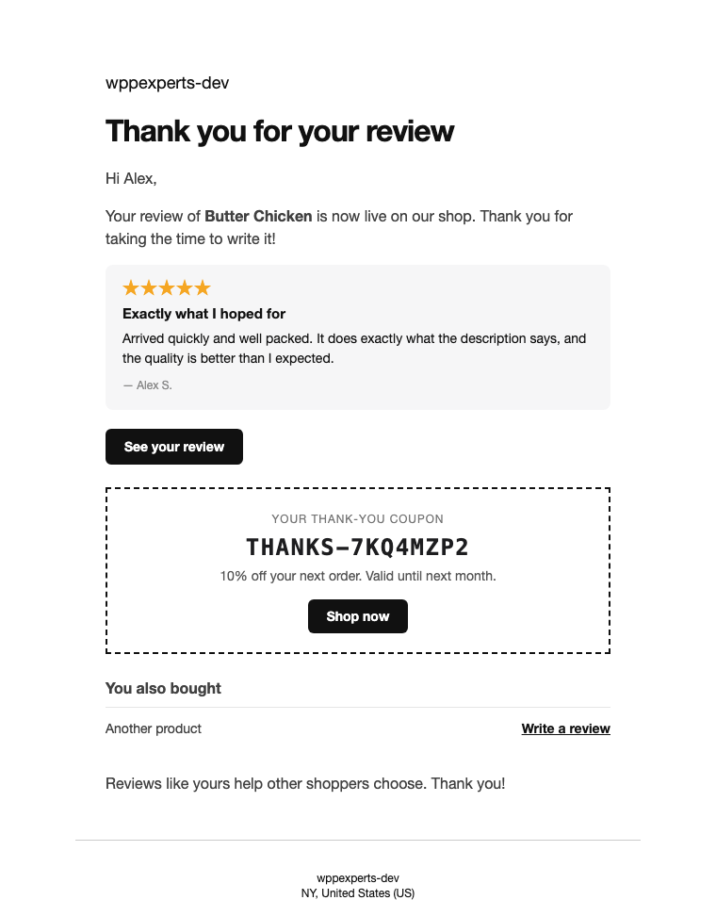
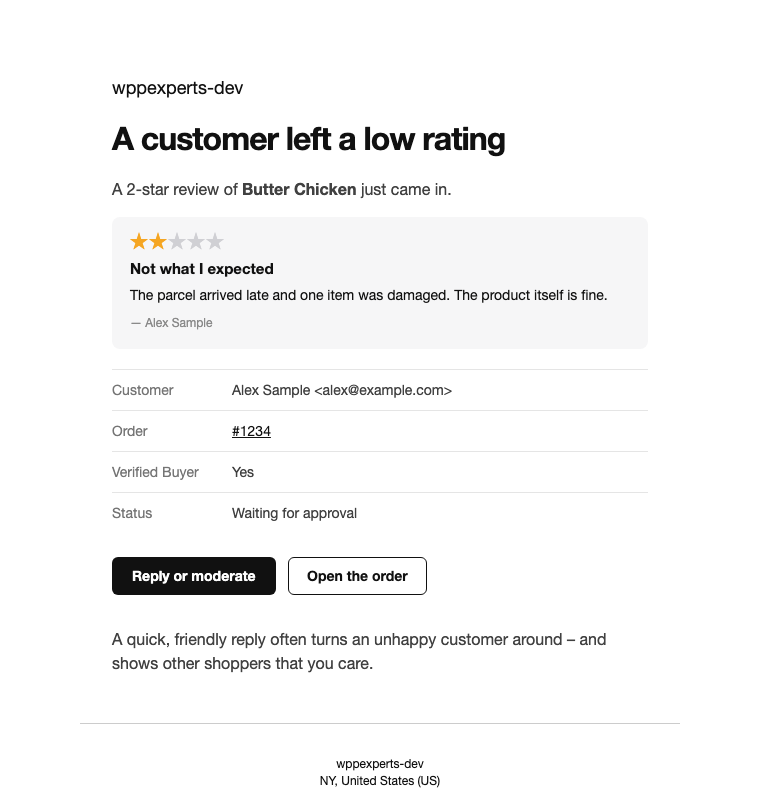
Review published tells the customer the review is live (with the coupon when one was earned), Reply to a review sends your reply, and a Low rating alert tells you about a 1 or 2-star review right away. Each is sent once.
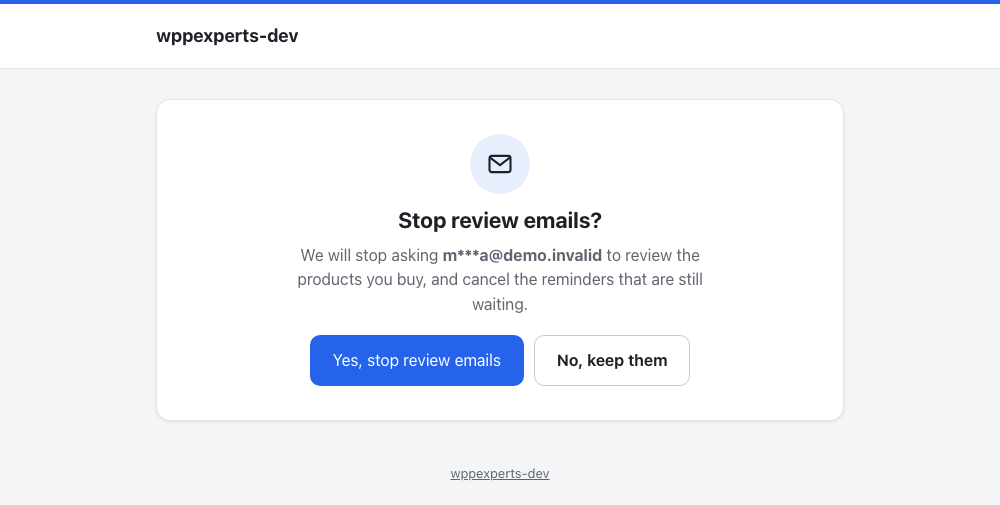
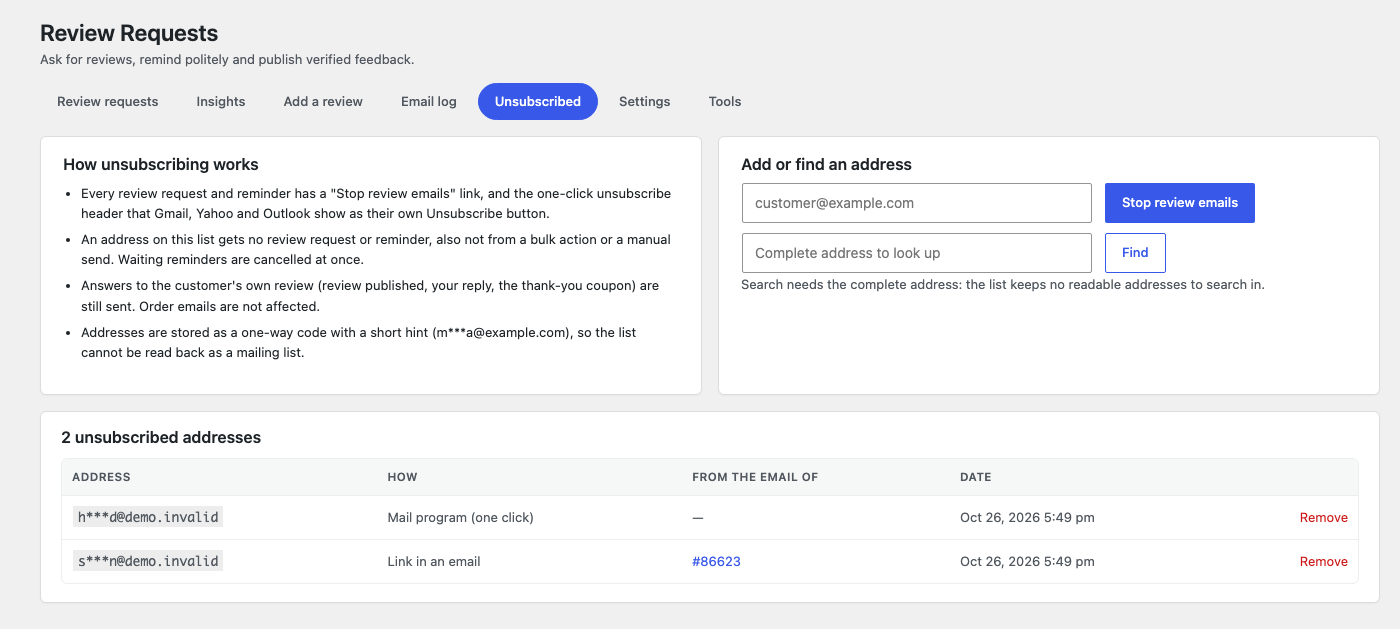
One-click unsubscribe
A Stop review emails link and the unsubscribe header Gmail, Yahoo and Outlook show as their own button. Unsubscribed addresses are listed masked, stored as one-way codes and never asked again.
Sent exactly once
Each email is claimed with an atomic step before sending, so repeated status changes, webhook retries, queue retries, parallel workers and double clicks cannot produce a duplicate. Before every email the order, refunds and existing reviews are checked again.
A private review page
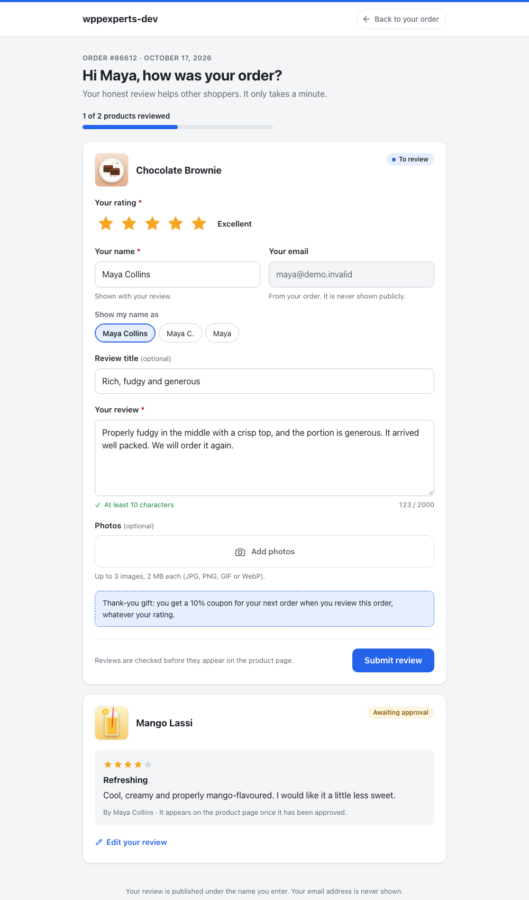
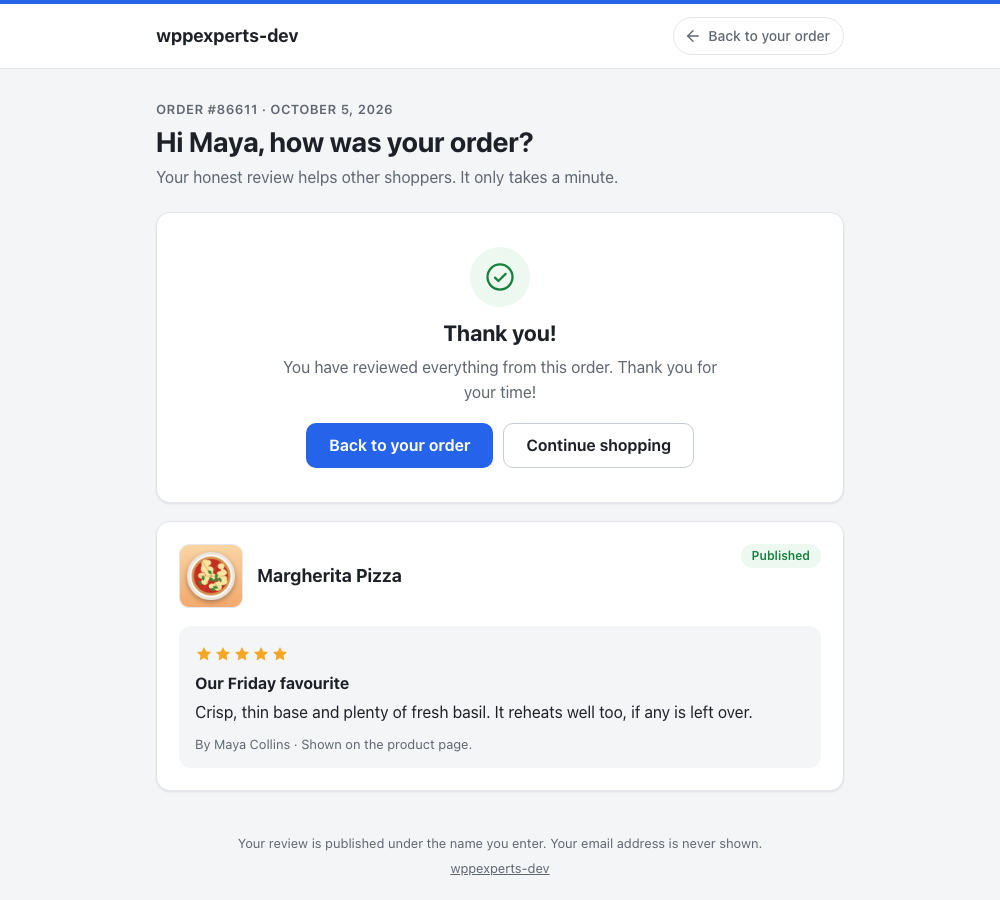
The email button opens a responsive, accessible page in your colours: the order and a progress bar, a star rating with words, optional title, review text and photos with previews. No account is needed, details are prefilled from the order and kept after an error, and a refresh cannot create a second review.
Leave a review in My Account
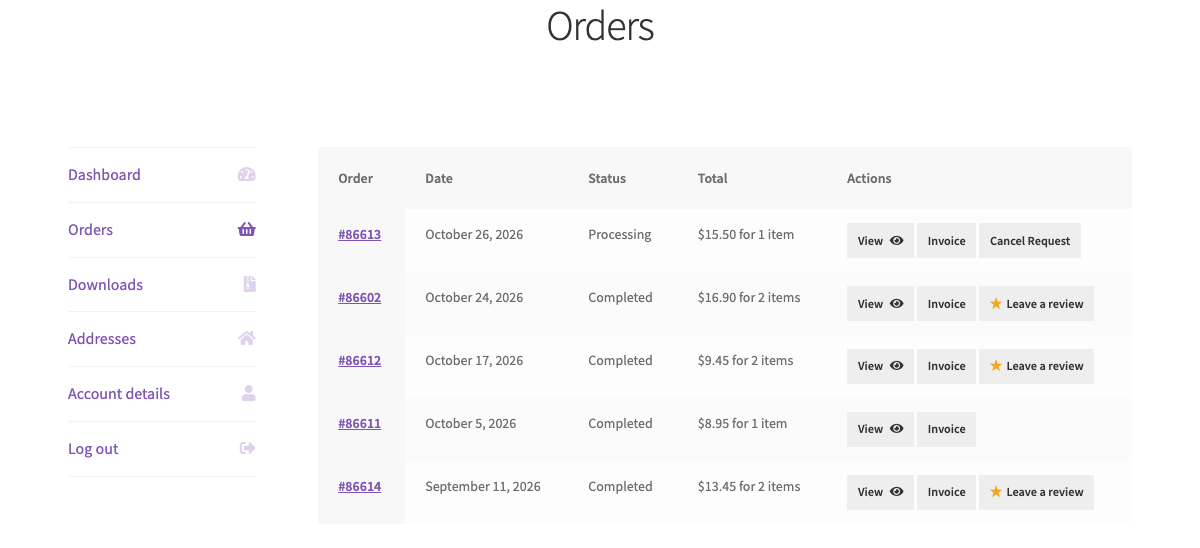
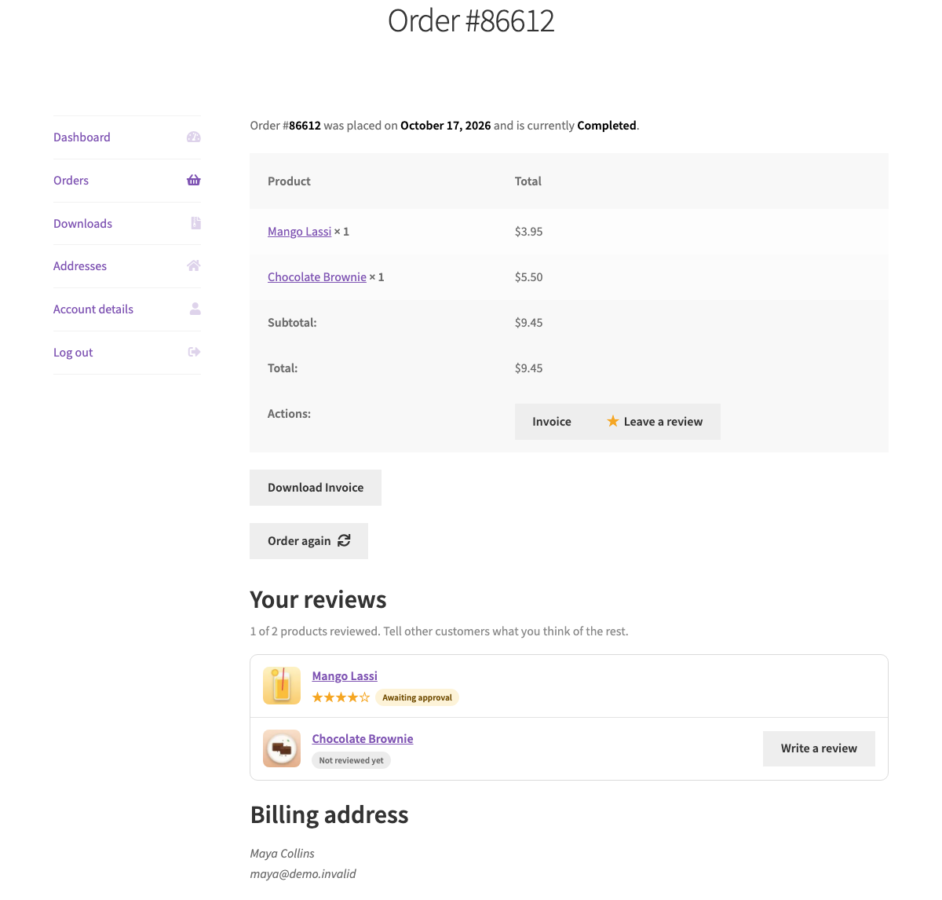
A Leave a review button on the customer’s orders in My Account and on the order page, while a product still needs a review, plus a list of every product of the order with its review status. It opens the same private page as the email, for the signed-in customer only, in any theme.
A page in your colours
The review page takes your WooCommerce email colour or a colour you choose, shows your email logo, works in dark mode and on phones, and you can preview it with sample products.
Secure, expiring links
Links carry a random token with a signature derived from your site keys, expire after the days you set and can be revoked. They never contain the order number or email, show nothing to anyone without the link, and only ever accept products that were bought in that order.
Verified Buyer reviews
WooCommerce’s own verified-owner flag is set only for a paid order that contains the product and matches the review’s billing email. Show a Verified Buyer badge, WooCommerce’s text or nothing. Reviews stay Pending until you approve them, and the request status follows your moderation.
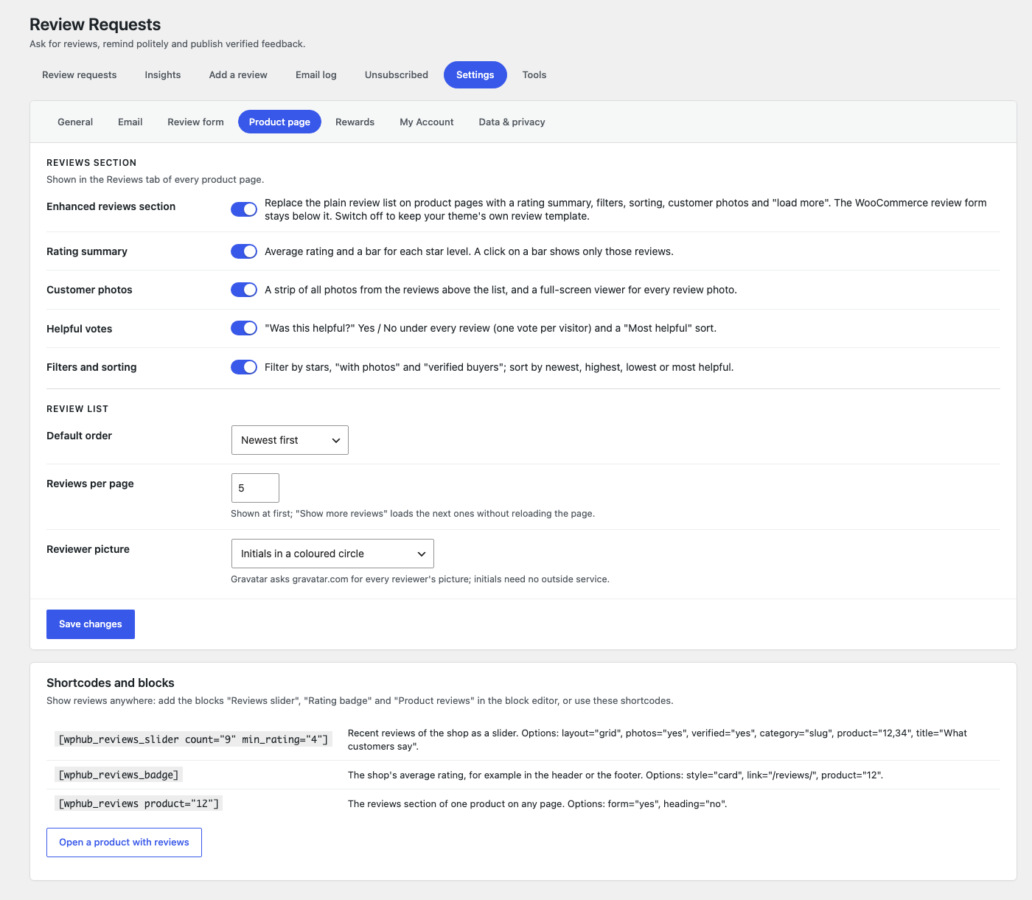
Reviews section on the product page
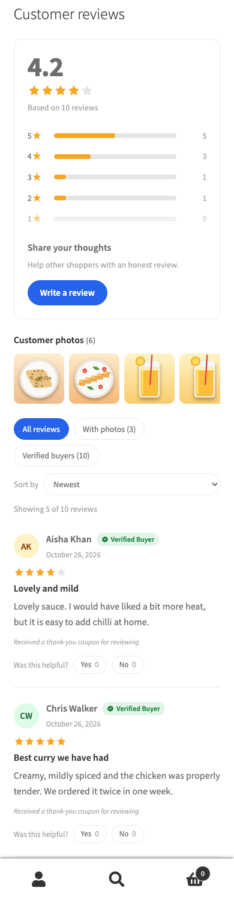
The plain review list becomes the average rating with a bar per star level, filters for stars, photos and verified buyers, sorting, replies under the review and Show more reviews without reloading, in your colours and on phones.
Customer photo gallery
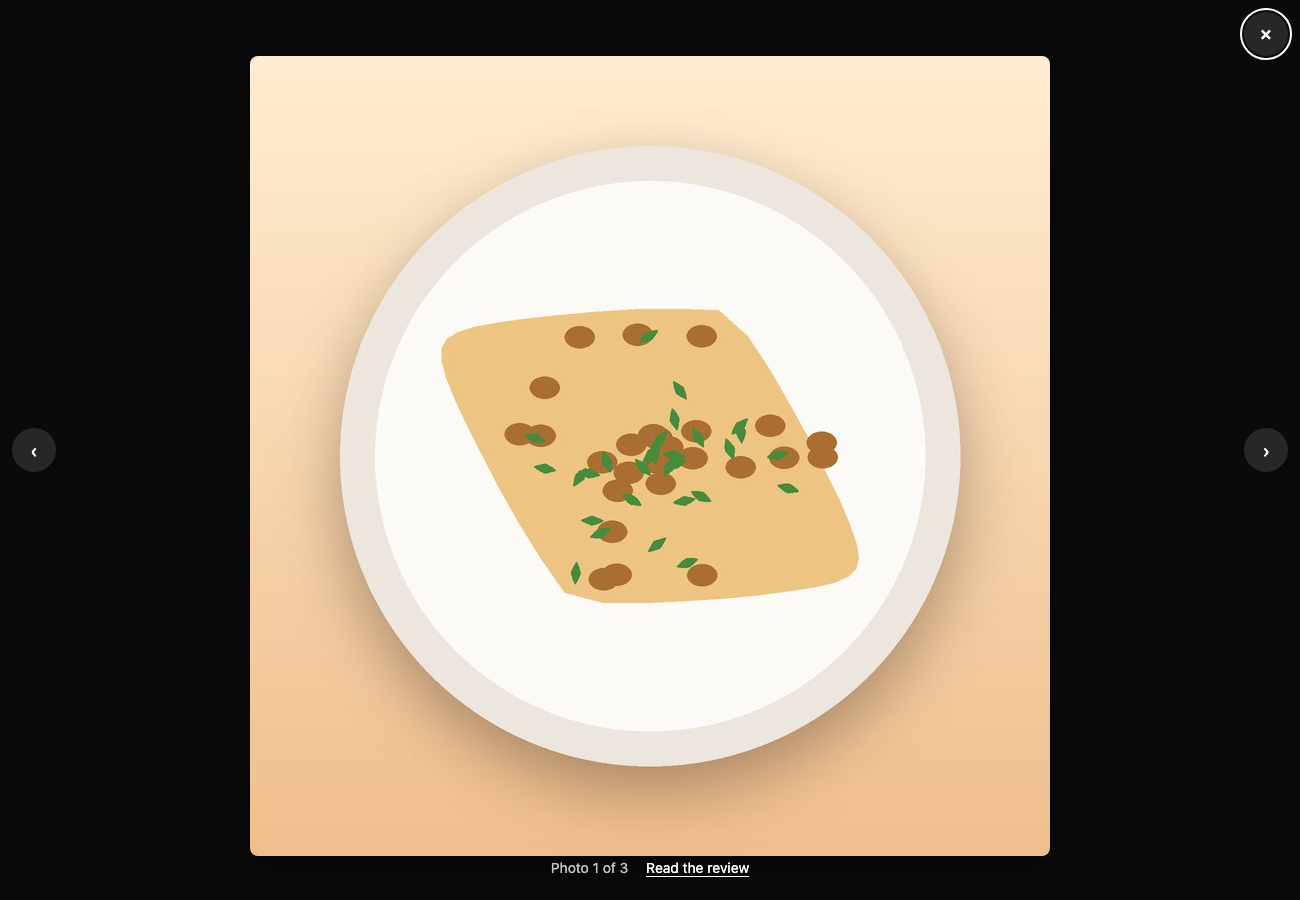
Every photo from the reviews in a strip above the list, swipeable on phones, and a full-screen viewer with previous and next and a link to the review the photo belongs to.
Helpful votes
Was this helpful? under every review with a Most helpful sort: one vote per visitor, never on one’s own review, and a limit per address against scripted voting.
Titles and photos
Let customers add a review title, up to a number of photos you choose, and how their name is shown (full name, Maya C. or first name). Photos are checked by content, limited to JPG, PNG, GIF and WebP and by size, and shown with the review and in the photo gallery.
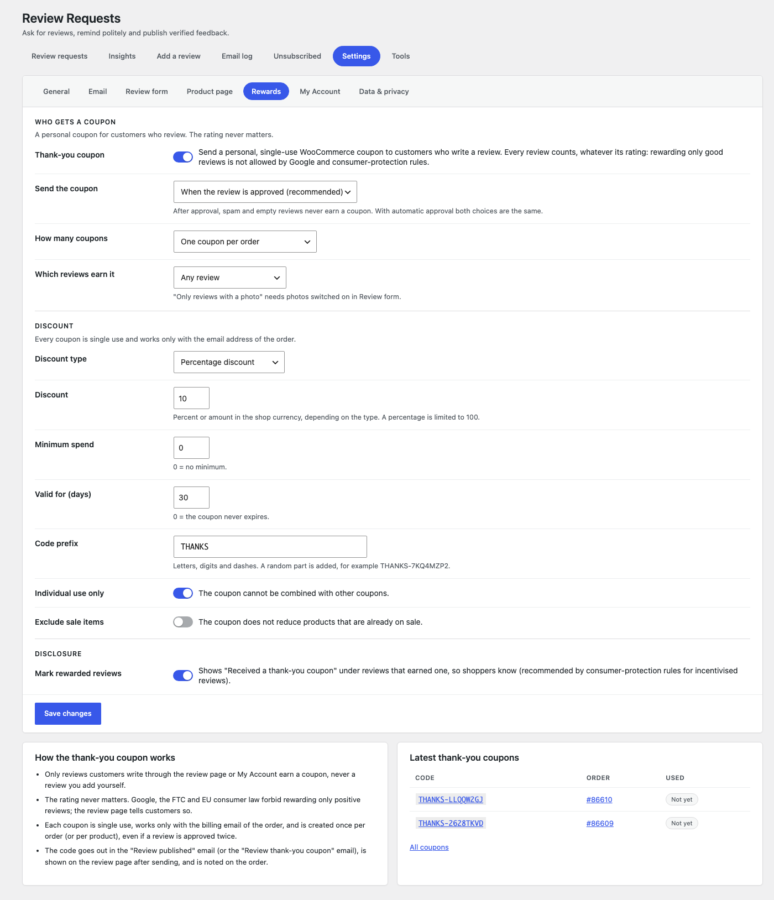
Thank-you coupons
A personal, single-use coupon for the order’s email, for every review whatever its rating, on approval or right away, per order or per product. Rewarded reviews can be marked, as consumer-protection rules recommend.
Dashboard and statistics
What needs your attention at the top, then reviews collected, review rate, average rating and emails sent with fixed counting rules. A searchable, sortable table with each order’s three emails as a track and a status for every product, filters and a CSV export.
Insights
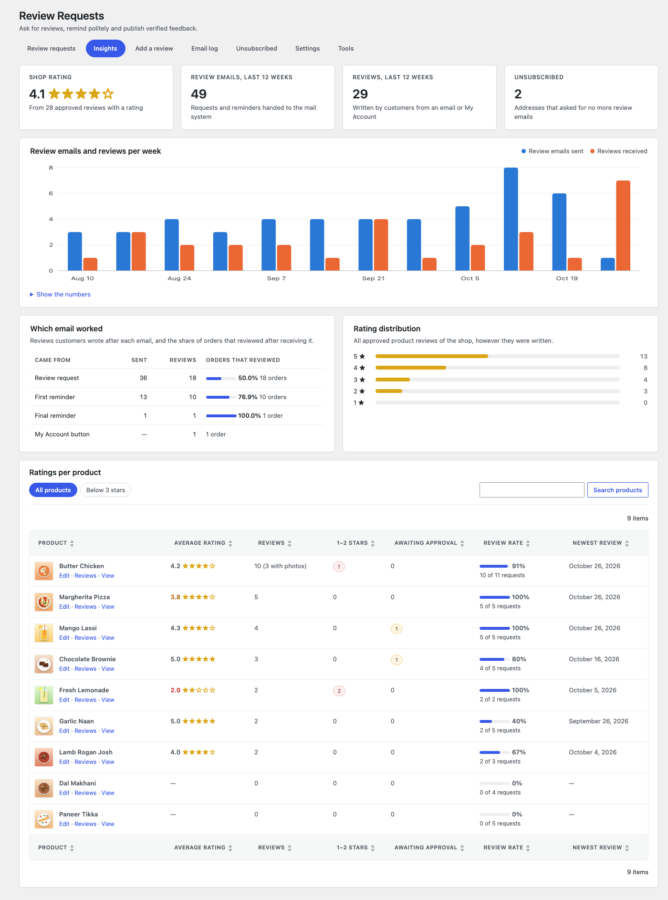
Review emails and reviews per week, which email brought the reviews, the rating distribution and a sortable table of ratings per product with low-rated products a click away.
Shortcodes and blocks
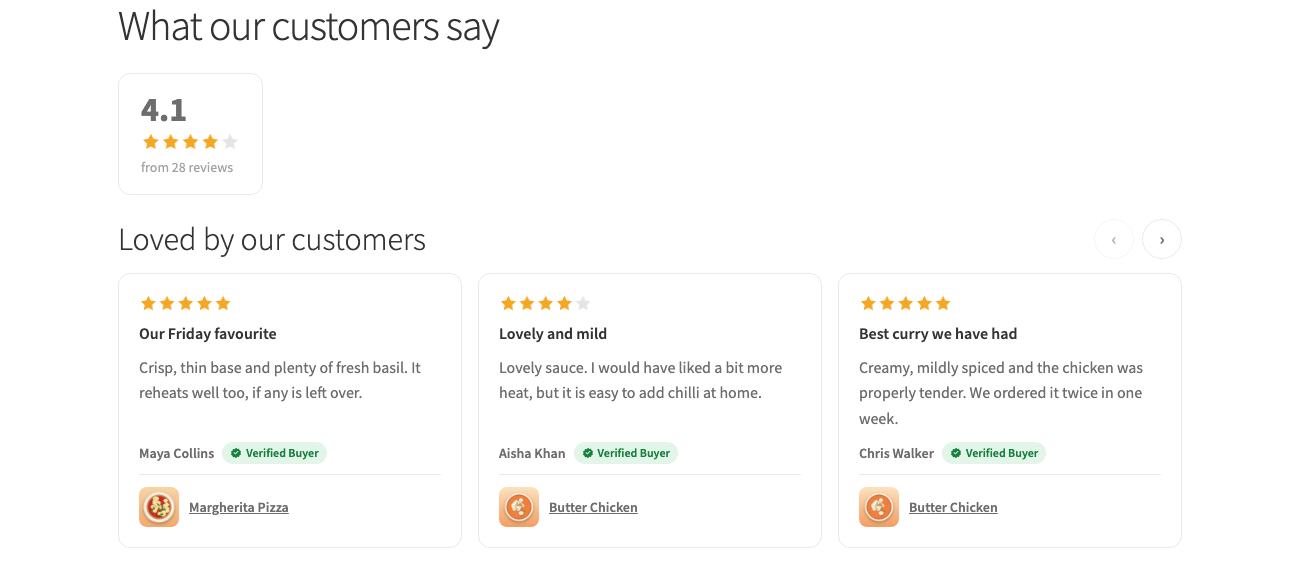
A reviews slider or wall, a rating badge for the shop or a product, and the reviews section of any product, as blocks with a live preview or as shortcodes.
Order detail and manual control
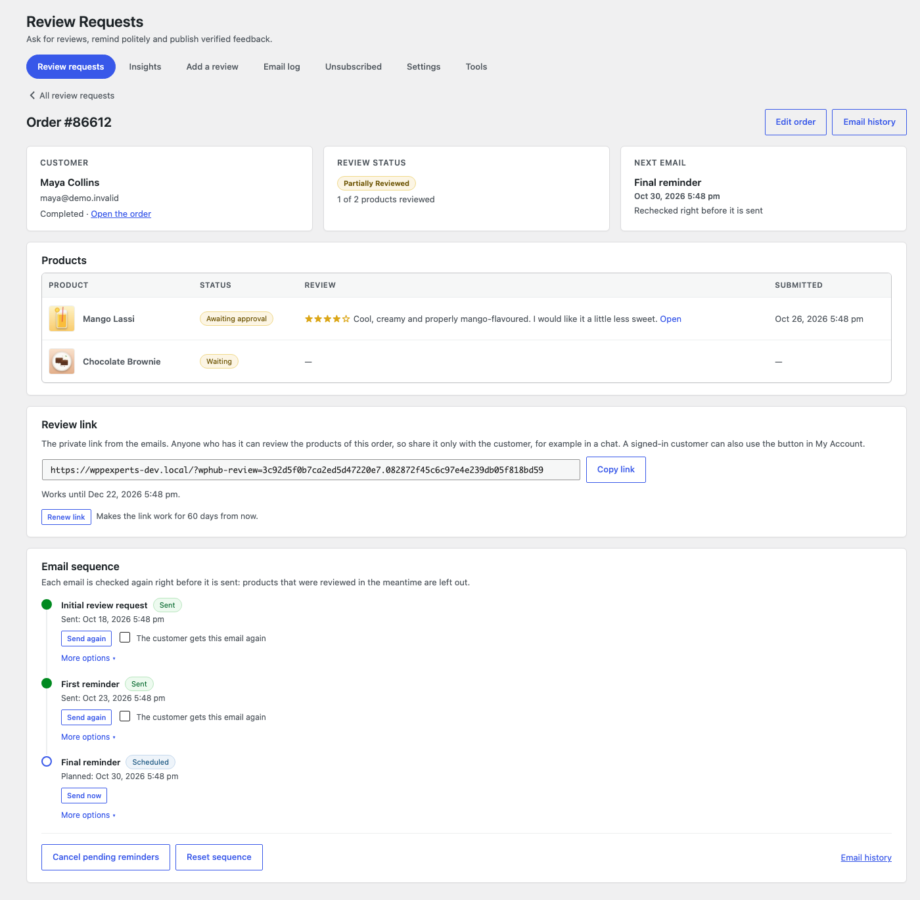
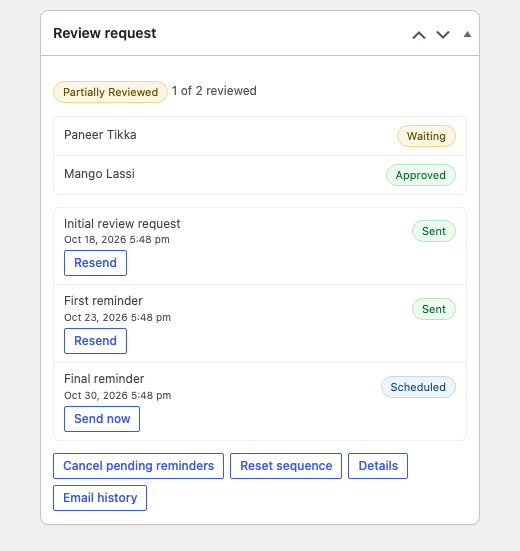
Open an order to see its products with their reviews, the customer’s review link with Copy and Renew, and the three emails as a timeline. Send now, resend (with confirmation), reschedule, cancel pending reminders, retry failed emails or reset the sequence, without ever deleting a review.
Bulk actions that are safe
On the Orders screen and the dashboard, queue the initial email, a reminder, cancel or retry for many orders at once. Each order is checked on its own, ineligible or already-sent emails are skipped, and the work runs in the background with a summary of what was done, skipped or failed.
Orders screen integration
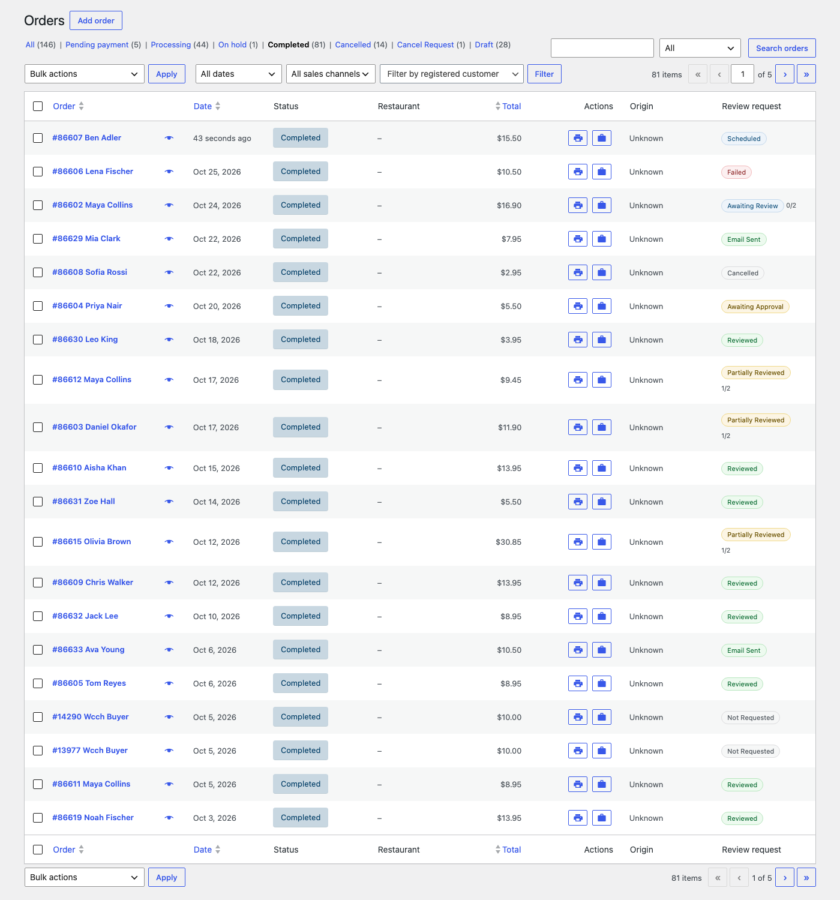
A Review request column shows each order’s status and links to its detail, and a box on the order edit screen has one-click actions. It works with HPOS and with the classic order list, and does not get in the way of WooCommerce filters or other plugins.
Add a review for a customer
Enter a review that arrived by phone or email. It is saved as a normal review (Pending by default), is verified only when the order really contains the product, and is marked as entered by an administrator with your name and the time.
Email log and retries
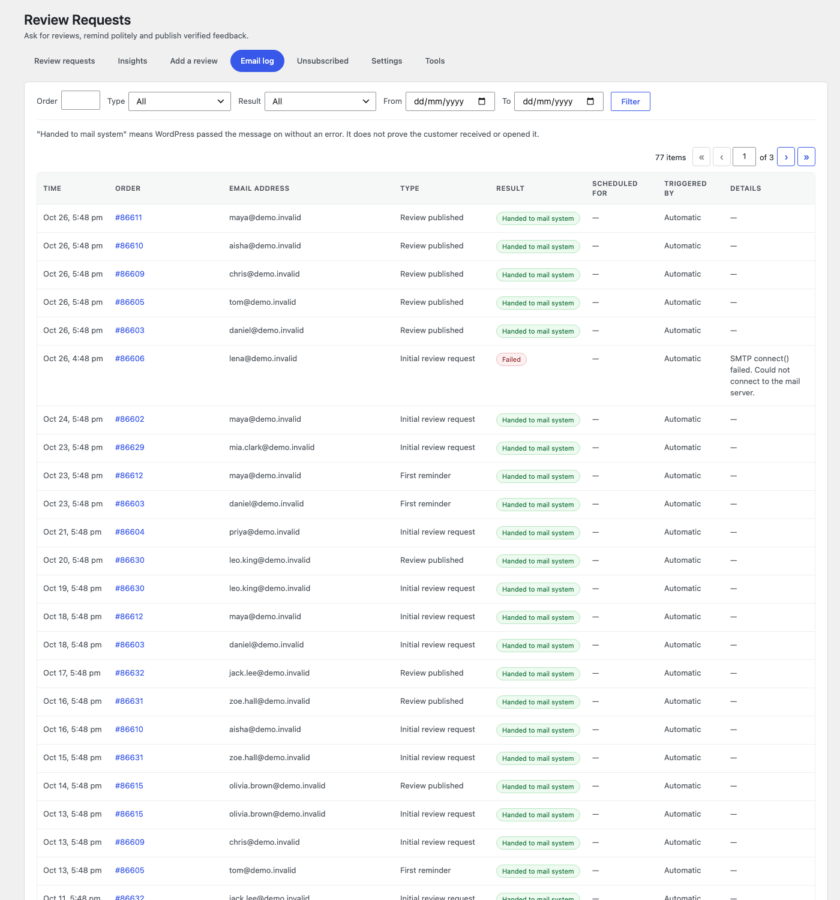
Every attempt is recorded with the order, address, type, time, result, error and who triggered it. The log never claims delivery. Temporary failures are retried automatically after growing pauses, and Retry failed emails requeues the rest.
Rules for who is asked
Choose eligible order statuses, include or skip guests and virtual products, exclude products and categories, set a minimum order value, decide how refunds and repeat purchases are handled, and whether an existing review stops further requests.
Privacy and clean uninstall
Personal data export and erase by email address, log retention, no message bodies stored, an unsubscribe list that cannot be read back as addresses, and an uninstall that deletes data only if you tick the box. Reviews and coupons are never deleted.
04
How it works
- 1
Install and activate
Upload the plugin and activate it. It adds WooCommerce → Review Requests, seven emails under WooCommerce → Settings → Emails and the reviews section on your product pages. The defaults work without changes.
- 2
An order is completed
The plugin records the order, picks the products that can be reviewed and schedules the initial email. The customer gets five clickable stars and a button for each product.
- 3
The customer reviews
They open the private link from the email, or press Leave a review on the order in My Account, rate the product and write a few lines, with photos if you allow them. If they do not, a reminder follows after 5 days and a final one 7 days later.
- 4
You approve and publish
The review waits as a normal Pending review. Approve it and it appears in the reviews section with a Verified Buyer label, the customer hears that it is live (with a thank-you coupon if you use them), and Insights count it.
05
Screenshots & demo


06
Settings & configuration
Who Is Asked
GENERALSwitch automatic requests on or off, choose the eligible order statuses, include guests and virtual products, exclude products and categories, set a minimum order value and decide how refunds and repeat purchases are handled.
Review Link Lifetime
LINKSLinks expire after the number of days you set, counted from the last email sent (60 by default). Every email sent renews it, and a daily job permanently revokes links that expired long ago.
Reminder Timing
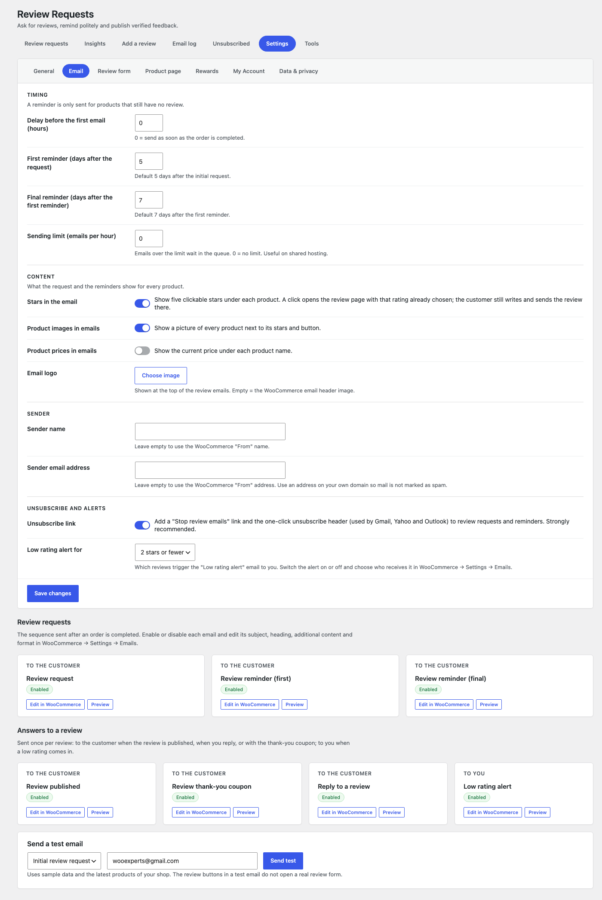
TIMINGAn optional delay before the first email, the first reminder after 5 days and the final reminder 7 days after that. All three are settings, and an optional hourly sending limit keeps a shared host happy.
Sender and Branding
EMAILChoose the sender name and address, an email logo, whether product images, prices and the clickable stars are shown, the unsubscribe link, and from which rating you get a low rating alert. Subject, heading and additional content are edited in WooCommerce → Settings → Emails.
The Review Form
FORMSwitch the title and photo fields on or off, set the minimum and maximum review length and the photo count and size, decide whether a star rating is required, pick the colour of the review page and preview it.
Reviews Section
PRODUCT PAGESwitch the reviews section, the rating summary, customer photos, helpful votes and filters on or off, choose the default order, reviews per page and the reviewer picture, and copy the shortcodes.
Thank-you Coupon
REWARDSOff by default. Choose when the coupon is sent, one per order or per product, any review or only reviews with a photo, the discount, minimum spend, expiry, code prefix, and the note under rewarded reviews.
Review Button in My Account
MY ACCOUNTShow a Leave a review button on the customer’s orders and a review status list on the order page, change the button text, or switch either off.
Sign-in and Duplicates
ACCESSOptionally require customers who have an account to sign in first, and choose one review per product and order or one per customer and product across orders.
Approval and Verified Label
MODERATIONAutomatic approval is off by default. You can let customers edit a review until it is moderated and choose how the Verified Buyer label is shown.
Email Log Retention
LOGKeep the email log for the number of days you choose (90 by default, or forever). Message bodies are never stored.
When the Plugin Is Deleted
UNINSTALLNothing is removed unless you tick Delete all plugin data on uninstall; then the plugin’s tables, settings and queued emails go. Reviews and coupons are WooCommerce data and are never deleted.
Export and Maintenance
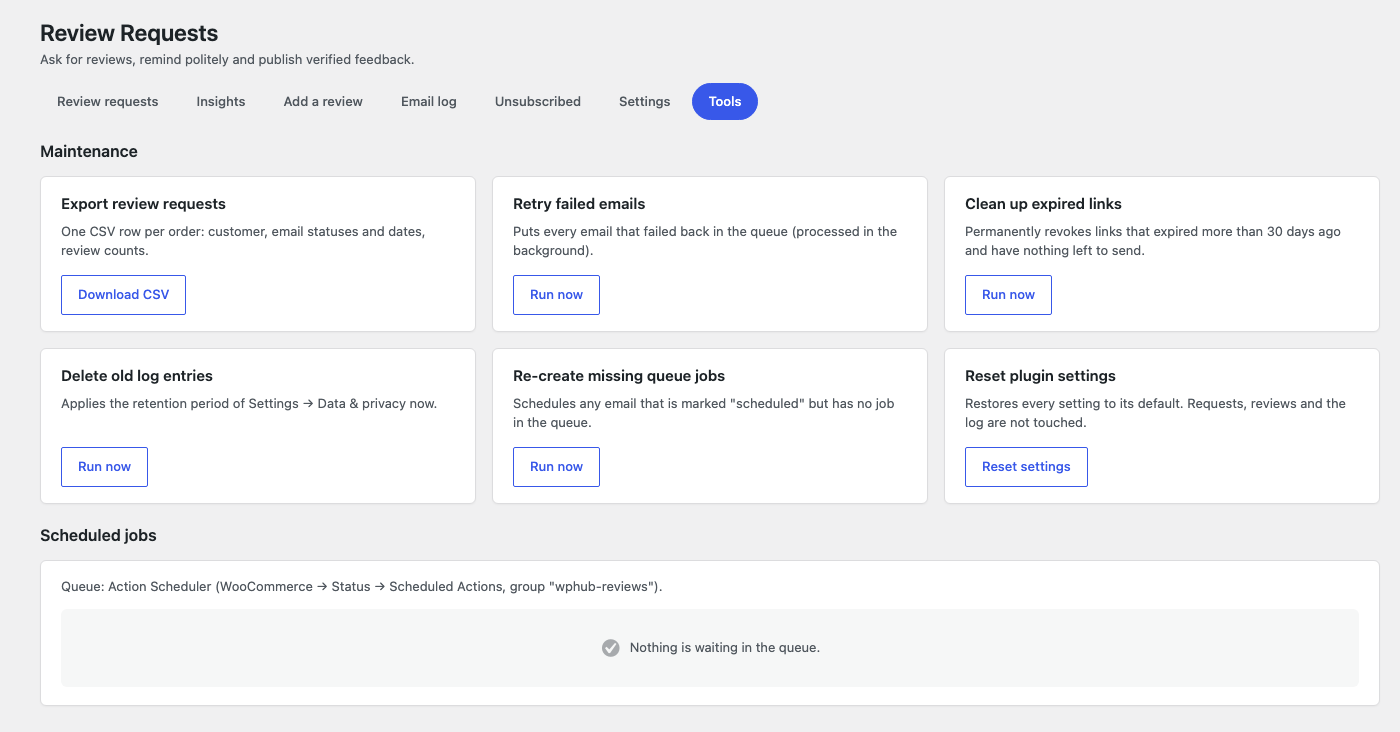
TOOLSExport every request as CSV, retry failed emails, clean up expired links, delete old log entries, re-create missing queue jobs and see what is waiting in the queue.
07
Requirements & installation
Who it is for
It suits WooCommerce stores that want more genuine product reviews without chasing customers by hand, agencies that set up stores for clients, and shops that want trustworthy Verified Buyer reviews on their own site instead of a paid review service.
Requirements
- WordPress 6.2 or later (tested up to 7.1)
- WooCommerce 8.0 or later (tested up to 11.2) with product reviews enabled
- PHP 7.4 or later
- HPOS or classic order storage
- Action Scheduler (included with WooCommerce) or WP-Cron for the background queue
- Working email delivery; an SMTP or email-service plugin is recommended
Installation
- Download the plugin zip from your account.
- In WordPress, go to Plugins > Add New > Upload Plugin, choose the zip file and click Install Now.
- Activate the plugin. It adds WooCommerce > Review Requests and seven emails under WooCommerce > Settings > Emails.
- Open Review Requests > Settings and check the eligible order statuses and the reminder timing.
- Send yourself a test email from Settings > Email, preview the review page from Settings > Review form, look at a product page with reviews, then complete a test order to see the whole flow.
- Activate your licence under Plugins > WpExperts Hub Licences to receive updates.
08
Documentation & support
DocumentationSetup guide and configuration reference. (opens in a new tab)
TutorialHow to Automatically Ask for Reviews After a WooCommerce Order
Email supportsupport@wpexpertshub.com Include your order ID for faster help.
CustomisationNeed a change or an integration? Ask the developers who wrote it.
09
Frequently asked questions
When are the emails sent?
The initial request goes out when the order reaches an eligible status (Completed by default), after the optional delay. The first reminder follows 5 days after the request and the final reminder 7 days after the first reminder. All the delays are settings.
Will a customer who already reviewed get more emails?
No. Every email is checked again right before it is sent and only lists the products without a review. When every product has a review, the remaining reminders are cancelled.
Can the same email be sent twice by accident?
No. Each email is claimed with an atomic step in the database, so repeated status changes, a retried queue job, parallel workers or a double click cannot send it twice. A bulk action also never repeats an email that was already sent.
What happens if an order goes Completed, then On hold, then Completed again?
Nothing is restarted. An order enters the sequence once. An administrator can reset it from the order detail screen.
Does the plugin approve reviews automatically?
Only if you switch it on. By default reviews are Pending, like any WooCommerce review, and you approve them in the normal review list.
How does Verified Buyer work?
The review gets WooCommerce’s own verified-owner flag only when the order exists, is paid, contains the product and has the same billing email as the review. You can show a Verified Buyer badge, WooCommerce’s text, or nothing.
Do customers need an account?
No. The link in the email is enough. You can require customers who have an account to sign in first; guests never need one. Customers who do have an account can also start from the Leave a review button in My Account.
Can customers leave a review from their account?
Yes. Customers with an account see a Leave a review button on their orders in My Account > Orders and on the order page while a product still needs a review, and the order page lists every product with its review status. It opens the same private page as the email. You can rename the button or switch the button and the list off in Settings > My Account.
Does the My Account button send any email?
No. An older order without a review request gets one when the customer presses the button so the page can open, but no email is scheduled because of it. An expired link is renewed for the signed-in customer.
Can I send a customer their review link myself?
Yes. Open the order in Review Requests and press Copy link in the Review link box, for example to send it in a chat. Renew link makes an expired link work again.
Can I change how the review page looks?
Pick a review page colour in Settings > Review form, or leave it empty to use your WooCommerce email colour; your email logo is shown at the top. Preview the review page shows the result with sample products.
Can customers add photos?
Yes, if you switch it on. Only JPG, PNG, GIF and WebP images are accepted, checked by content, within a count and size limit you set.
What does the reviews section on the product page show?
The average rating with a bar per star level, a strip of customer photos with a full-screen viewer, filters (stars, with photos, verified buyers), sorting (newest, highest, lowest, most helpful), the reviews with their Verified Buyer label and Was this helpful? votes, and Show more reviews. WooCommerce’s review form stays below it.
Can I keep my theme's review list?
Yes. Switch off Enhanced reviews section in Settings > Product page. The emails, the Verified Buyer label and everything else keep working.
Is it allowed to give a coupon for a review?
Yes, if every review earns it whatever the rating and rewarded reviews are disclosed. That is how the plugin works: there is no setting to reward only good reviews, and rewarded reviews can show “Received a thank-you coupon for reviewing”. Rewarding only positive reviews is not allowed by Google, the FTC and EU consumer law.
Can customers stop the review emails?
Yes. Every request and reminder has a Stop review emails link and the one-click unsubscribe header that Gmail, Yahoo and Outlook show as their own button. The address is never sent review requests again, also not from bulk actions, and you manage the list under Review Requests > Unsubscribed.
Can I show reviews elsewhere on my site?
Yes, with the blocks or shortcodes: a reviews slider or wall, a rating badge for the shop or a product, and the reviews section of any product on any page.
Which email brings the most reviews?
Review Requests > Insights shows, for the request and each reminder, how many were sent, how many reviews followed and the share of orders that reviewed, next to the reviews from the My Account button.
Can I ask for reviews of orders from before I installed the plugin?
Yes. On WooCommerce → Orders select the completed orders and use Bulk actions → Review request: send initial email. Each order is checked on its own and the emails go out from the background queue.
Does "sent" mean the customer received the email?
No. WordPress can only tell whether it handed the message to your mail system. The log says “Handed to mail system” and never claims delivery or opens. Use an SMTP or email service with delivery logs if you need proof.
Can I edit the emails?
Yes. All seven are in WooCommerce → Settings → Emails: the request, two reminders, Review published, the thank-you coupon, Reply to a review and the Low rating alert, each with subject, heading, additional content, HTML or plain text and the enable switch. The logo, sender, stars and what the product rows show are in Review Requests → Settings → Email, and theme overrides are supported.
Does it work with HPOS and the Cart and Checkout blocks?
Yes. The plugin only uses WooCommerce’s order API, its tables never assume an order id is a post id, and it is declared compatible with both.
Does it work with a caching plugin?
The review page sends no-cache headers and is marked as not cacheable. If your host or cache plugin still caches it, exclude URLs containing wphub-review.
Will it slow my site down?
Emails are sent from a background queue, never during a visitor’s request. Admin files load only on the plugin’s screens and the Orders screens, the review page loads one small stylesheet and script, and the reviews section loads its files only on pages that show it, with a cached rating summary.
What if I deactivate the plugin?
Your reviews stay exactly as they are, because they are ordinary WooCommerce reviews, and your product pages show them in your theme’s own review list. Pending emails pause, and when you activate the plugin again missing queue jobs are re-created.
Does it contact any outside server?
Only wpexpertshub.com for the licence and update check, if you activate a licence. It sends the licence key, your site address and the plugin version, and no customer, order or review data. If you choose Gravatar for reviewer pictures, visitors’ browsers load them from gravatar.com; the default initials need no outside service.
How is this different from a review service?
There is no service. The plugin runs on your site, uses your own mail setup and stores everything in your database, so there is no subscription and no third party holding your customers’ data.
Does it work without a licence?
Yes. The licence is only for updates.
How do I get support?
Email support@wpexpertshub.com with your order ID, the plugin version and what you see in the email log.
10
Customer reviews
Thanks for your review!
It’s waiting for approval and will appear here soon. We’ll email you when it’s live.
Be the first to review it
Used Reviews for WooCommerce on your store? A short review helps other store owners decide — and tells us what to improve.
Reviews for WooCommerce$49