$30One-time paymentUpdates & support included
01
Overview
Multi Currency for Polylang and WooCommerce links a currency to each Polylang language. A shopper browsing your French pages sees euro prices, the German pages can use Swiss francs, and the English pages keep your store currency.
Every translated product keeps its own price in its language's currency, or you can switch to converting the default-language price with your exchange rates. The rates also convert shipping costs, shipping taxes, the free shipping minimum amount and fixed coupon amounts.
The cart holds products of one currency only, and both the classic checkout and the Cart and Checkout blocks create the order in the currency of that cart. The order language is saved on the order and the customer returns to the thank-you page in their language.
02
Why store owners choose it
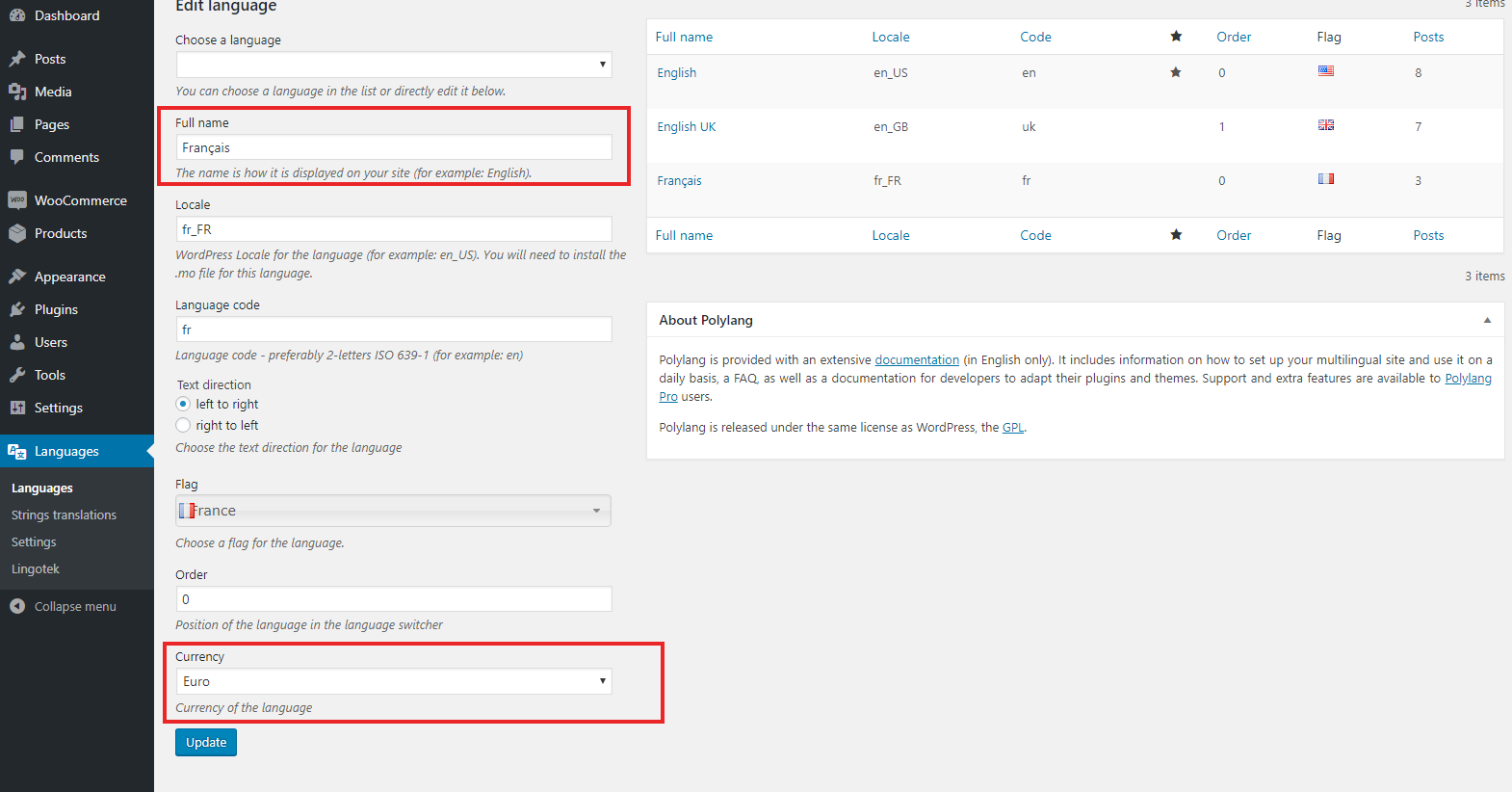
Each Polylang language gets its own currency, set right on the language screen.
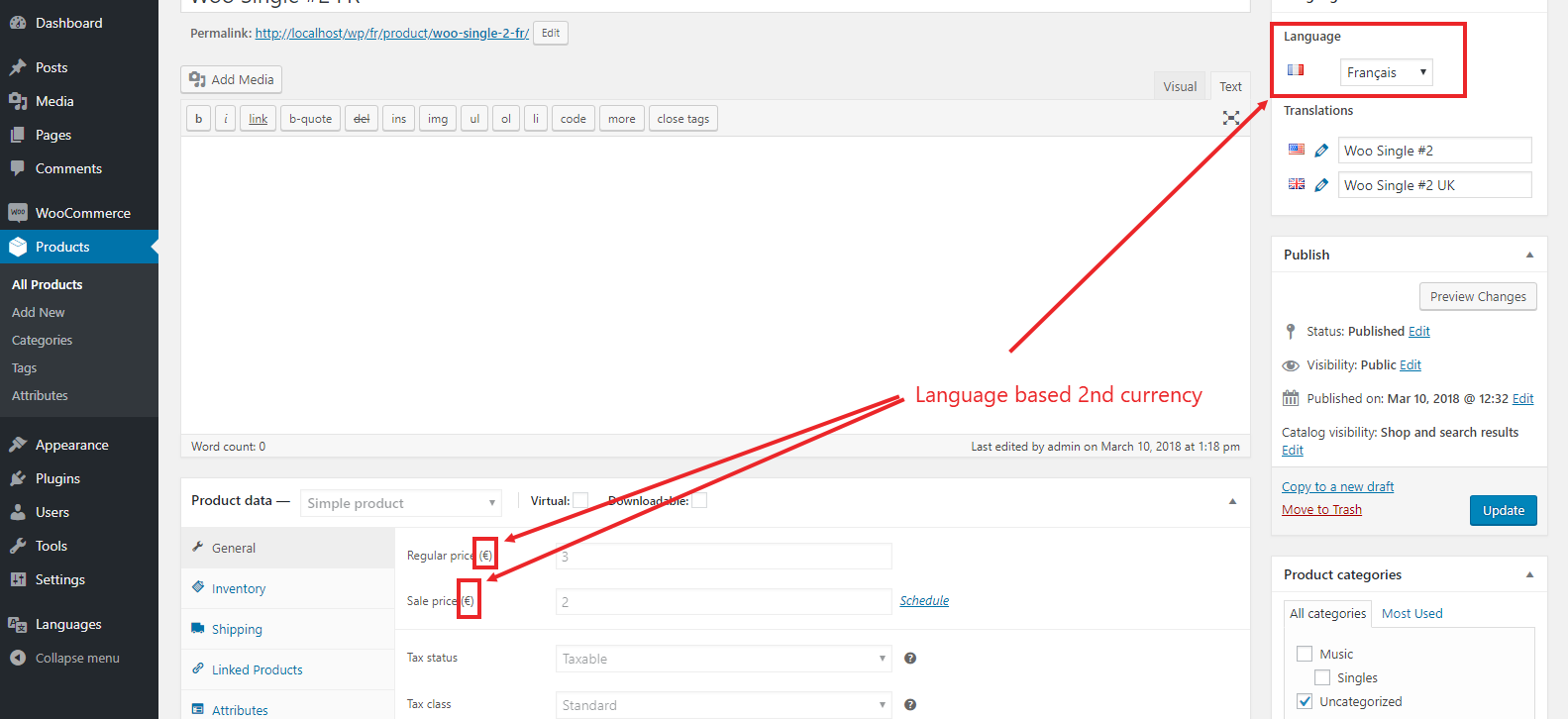
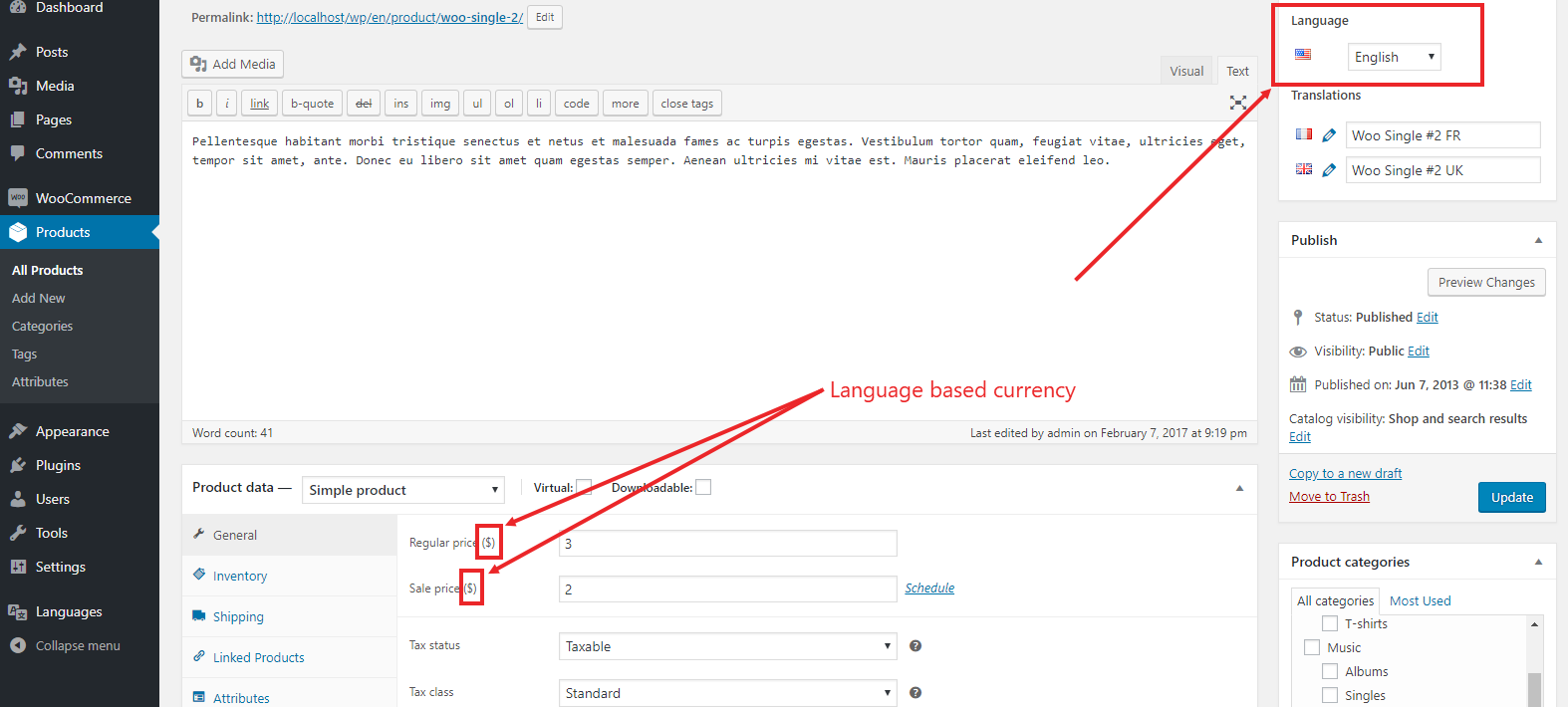
Set a local price on every translated product, or convert from your default language.
Shipping, shipping tax, free-shipping minimums and fixed coupons are converted with your rates.
Classic and block checkout both create the order in the cart's currency.
Works with Polylang or Polylang Pro; Polylang for WooCommerce is supported but not required.
03
Features
Currency per language
Choose a WooCommerce currency and exchange rate for each Polylang language, with a number format per currency.
Price per translation
Every translated product keeps its own price; Polylang sync never overwrites it.
Optional conversion
Convert default-language prices of simple products with your rates, or keep a product’s own price.
Shipping and coupon conversion
Shipping costs, their taxes, the free shipping minimum and fixed coupons use the language rate.
One-currency cart
Products priced in another currency are refused and shoppers are sent back to the cart’s language.
Block and classic checkout
Orders are created in the cart currency with the order language saved, on both checkout types.
Translated shop pages
Without Polylang for WooCommerce, cart, checkout and account links use the translated pages.
HPOS compatible
Orders are handled with WooCommerce CRUD and work with High-Performance Order Storage.
04
How it works
- 1
Set currencies
Edit each Polylang language and choose its currency and exchange rate.
- 2
Enter rates
Check or adjust the exchange rates on WooCommerce > Currency Rate.
- 3
Price products
Enter prices on each product translation, or enable conversion.
- 4
Sell
Orders are created in the currency of the language the customer shops in.
05
Screenshots & demo

06
Settings & configuration
Language currency
LANGUAGECurrency and exchange rate of each Polylang language, set on Languages > Edit language. Empty uses the store currency.
Currency rate
RATES1 store currency = X other currency, per currency, on WooCommerce > Currency Rate or the Edit language screen.
Product prices
PRICESUse the price entered on each translation, or convert the default-language price with the rates.
Use Product Price
PRODUCTPer-product checkbox that keeps the product’s own price when conversion is on.
07
Requirements & installation
Who needs Polylang WooCommerce multi currency
It suits WooCommerce stores that use Polylang for translation and sell to several countries. Each language version of the shop then charges in the local currency, with prices set per market. To limit your translators to their own language, see User Manager for Polylang.
Requirements
- WordPress 6.5 or later (tested up to 7.1)
- WooCommerce 8.0 or later (tested up to 11.1)
- PHP 7.4 or later
- Polylang or Polylang Pro, with Products translated (Polylang setting) or Polylang for WooCommerce
Installation
- First, activate WooCommerce, Polylang and Multi Currency for Polylang and WooCommerce.
- In the Polylang settings, turn on translation of Products and product categories. Or install Polylang for WooCommerce.
- Then edit each language under Languages and choose its currency.
- Next, enter an exchange rate for each currency on WooCommerce > Currency Rate (or on the language screen).
- Translate your products and enter each translation’s price in its language currency. Without Polylang for WooCommerce, also translate the Shop, Cart, Checkout and My account pages.
08
Documentation & support
09
Frequently asked questions
Do I need Polylang for WooCommerce?
No. You can make Products translatable in Polylang’s settings and translate the Shop, Cart, Checkout and My account pages; the plugin then uses those translated pages. Polylang for WooCommerce is also supported, and prices are kept separate per translation.
Does it work with the Cart and Checkout blocks?
Yes. Block and classic checkout both create the order in the currency of the cart’s language, convert shipping with your rate and save the order language.
Can a customer mix products from two languages in one cart?
No. A cart holds one currency. Adding a product priced in another currency shows a message, and opening shop or checkout pages in a language with another currency redirects to the cart’s language. Languages that share a currency can share a cart.
Are prices converted automatically?
By default each product translation uses the price you enter. On WooCommerce > Currency Rate you can switch to converting the default-language price of simple products with your rates; tick Use Product Price on a product to keep its own price.
What do the currency rates convert?
Shipping costs, shipping taxes, the free shipping minimum amount, fixed coupon amounts (with coupon minimum and maximum spend) and, in conversion mode, simple product prices. Fixed fees added by other plugins can be converted with an option on the Currency Rate screen. Percentage coupons are not changed, and variable products always use their own prices.
Is it compatible with HPOS?
Yes. The plugin declares compatibility with High-Performance Order Storage and stores the order language through the WooCommerce order API.
How do I activate my licence and get updates?
Your licence key is emailed after purchase and is also shown in My Account → Downloads. In WordPress go to Plugins → WpExperts Hub Licences, paste the key and click Activate licence. New versions then appear on the normal Dashboard → Updates screen. A key can be active on as many live sites as you purchased; staging and local development sites do not count.
How do I get support?
Email support@wpexpertshub.com with your order number and we will help you.
10
Customer reviews
Thanks for your review!
It’s waiting for approval and will appear here soon. We’ll email you when it’s live.
Be the first to review it
Used Multi Currency for Polylang and WooCommerce on your store? A short review helps other store owners decide — and tells us what to improve.
Multi Currency for Polylang and WooCommerce$30